Your Cursor dashboard usage is at grok.com/dashboard (legacy plans: cursor.com/dashboard); on Teams and Enterprise, cursor.com/dashboard/analytics adds team analytics. Both cover Cursor only; Zest shows a lead each engineer's sessions across agents, next to merged pull requests, with no demo call.
Free for 3 seats · No credit cardStarter covers 3 seats · Pro is $49 a month for 5 · The demo needs no signup
01See your team’s AI stack
Winding /Teams Last 30 days
Zest
3 Members 1 Agent
Team overview
67%
AI Adoption▲ 34 pts
240
PRs Merged▲ 101
96.1h
Median AI Time▲ 9.5h
57.2h
Build Hours▲ 20.3h
This week
Member
AI
PRs/wk
AI Task
Plan
Impl
Last Standup
AI Stack
22.8/wk
28 min ago
15.8/wk
12 min ago
4/wk
Aug 14
—
2 hours ago
Current AI models & harnesses As of Sep 8
Claude CodeFable 5.1 (max) (with fallback)70.4 · Coding Agent Index
CodexGPT-6 Astra (max)67.0 · Coding Agent Index
Muse CodeMuse Spark 1.3 (xhigh)64.2 · Coding Agent Index
Grok BuildGrok 4.5 (high)64.1 · Coding Agent Index
Kimi Code CLIKimi K362.6 · Coding Agent Index
OpencodeGemini 3.8 Flash (high)61.2 · Coding Agent Index
Cursor CLIComposer 2.5 Fast38.3 · Coding Agent Index
Demo setups use current model families. The pairings above are the combinations benchmarked by Artificial Analysis; rankings measure performance, not popularity.
Illustrative daily trends · Other totals: last 30 days. Build Hours: this week, model-estimated activity including overlap; not engineer hours.
USED BY ENGINEERING TEAMS AT
Not starting today? What's in the way?
How to check your Cursor usage
On The X Subscription, your usage is under Usage at grok.com/dashboard, and in the editor's settings: how much of your weekly pool for Cursor's own models (Grok and Composer) you've used, the next reset date and your prepaid credit. Third-party models such as Claude and GPT aren't in the pool; they bill from that credit.
On a legacy plan (Hobby, Pro, Pro+, Ultra, or a Teams Standard or Premium seat), the Spending tab at cursor.com/dashboard/spending shows two monthly pools, Cursor Models and Other Models, and any on-demand charges. Either way, Cursor publishes no number for a plan's included usage; what each plan includes is on Cursor pricing. To price a month of tokens yourself, use the token cost calculator.
Who needs more than Cursor's own dashboard?
If your team only runs Cursor, its dashboard is enough. It counts Tab, agent edits and messages per person, and Zest doesn't record Tab at all. You need more when the same engineers also run Claude Code or Codex, or when you want to see which local sessions ended in a merged pull request, because Cursor's analytics docs list pull requests for cloud agents only.
We built Zest for the lead whose team mixes Cursor with other coding agents and keeps its code on GitHub. One developer checking a quota already has the answer in the steps above, and a team that needs Tab counts, or hosts its code elsewhere, should look somewhere else.
These rows come from Zest's Cursor setup guide, which we read on November 10, 2026.
What
Zest with Cursor
Install
One click from the Open VSX Registry, per engineer (setup)
Records
Chat and agent sessions: prompts, replies, the model and the tools the agent called
Doesn't record
Tab completions
Tokens and cost
Off by default; an engineer turns on the Cursor Dashboard API switch
Code diffs
Not uploaded
Sync
Every minute
Works with
Claude Code, Codex, VS Code with Copilot Chat, Hermes, Grok Build, OpenCode and Freebuff, each through its own plugin or extension
Pull requests
GitHub only, through the Zest GitHub App
To start
Starter is free for 3 seats, no credit card
How to track Cursor usage across your engineering team
Start with Cursor's analytics dashboard, on a Teams or Enterprise plan with everyone on Cursor 1.5 or later: admins see each user's usage there. Enterprise teams can pull the same numbers from the Admin and Analytics APIs.
All of these cover Cursor only. To see Cursor and Claude Code usage in one dashboard, you either load both vendors' exports into your own reports, or use a tool that reads both agents, such as Zest.
Ways to track Cursor across a team, from Cursor's docs, read November 8, 2026.
Option
Needs
Per engineer
Other coding agents
Analytics dashboard
Teams or Enterprise
Up to 10 users and 90 days at a time, with a CSV per chart
None
Admin API
Enterprise
Daily usage, each request's tokens and cost, spend per member
None
Analytics API
Enterprise
The dashboard's numbers as JSON
None
AI Code Tracking API
Enterprise, in alpha
Each commit: lines from Tab, the agent and people
None
Zest
The Zest extension in each engineer's Cursor
Every session, next to the pull requests they merged
Claude Code, Codex, Copilot Chat and more
What does the Cursor analytics dashboard show?
It shows how much of your committed code Cursor generated, along with agent edits, Tab completions, messages, active users and a leaderboard. On Teams and Enterprise, cursor.com/dashboard/analytics gives admins every user's data and members their own. Data comes only from Cursor 1.5 or later, and you can filter by up to 10 users and 90 days or download any chart as a CSV.
AI share of committed code: the lines changed in commits, and the share Cursor generated.
Agent edits and Tab completions, suggested and accepted.
Messages sent, by mode (Agent, Ask, Cmd+K) and by model.
Active users, and daily usage over the past 365 days.
A usage leaderboard lists the top ten users with their favorite model, chats, Tab completions and agent lines of code, and every member can see it.
Repository Insights gives AI lines committed, total lines committed and the share committed by AI, per repository.
Cloud agent usage counts agents created and the pull requests they opened and merged, and ranks the top repositories and users.
Conversation Insights, on Enterprise, classifies agent sessions by category, work type, complexity and specificity.
How do I pull usage and seat data from the Cursor Admin API?
An admin creates a key with the admin:* scope on the API Keys page of the Cursor dashboard, and you call https://api.cursor.com with it as the basic-auth username. Cursor's API overview lists the Admin API for Enterprise teams. Four endpoints cover usage and seats:
POST /teams/daily-usage-data: per user and day, lines added and accepted, Tab accepts, agent, chat and Cmd+K requests, and the most used model.
POST /teams/filtered-usage-events: each request with its model, its input, output and cache tokens, and its cost.
POST /teams/spend: each member's spend in the current billing cycle. spendCents counts on-demand use only, and overallSpendCents adds included usage.
GET /teams/members: each member's name, email, role and whether they have been removed, for a seat count.
These limits come from Cursor's docs, which we read on November 10, 2026.
Endpoint
Limit
/teams/daily-usage-data
30 days per call, 20 requests a minute, hourly data
/teams/filtered-usage-events
1,000 events a page, 60 requests a minute, hourly data
/teams/spend
The current billing cycle, 20 requests a minute
Is there a Cursor analytics API?
Yes, for Enterprise teams. The Analytics API returns the dashboard's numbers as JSON, with team totals under /analytics/team/ and one row per person under /analytics/by-user/. It covers agent edits, Tab use, daily active users, models, MCP servers, Cursor skills, commands and the leaderboard, up to 30 days per call. The AI Code Tracking API, in alpha, goes down to each commit: lines from Tab, from the agent and from people.
Cursor counts AI lines per commit, GitHub Copilot counts them in the editor and Claude Code's contribution metrics in merged pull requests, so their shares don't add up. How much code is written by AI sets them side by side.
curl -X GET "https://api.cursor.com/analytics/team/dau?startDate=14d&endDate=today" \
  -u YOUR_API_KEY:

curl -X GET "https://api.cursor.com/analytics/by-user/agent-edits?page=1&pageSize=50" \
  -u YOUR_API_KEY:
How do I see Cursor and Claude Code usage in one dashboard?
Install Zest's extension in Cursor and its plugin in Claude Code, and each engineer's sessions from both tools land on one dashboard, next to the pull requests they merged. Cursor's dashboard and APIs stop at Cursor, so they can't show the Claude Code or Codex sessions the same engineer runs. Each engineer adds the Cursor extension with one click (setup). It reads Cursor's local chat history (composer conversations and agent transcripts) and syncs each session with its models and timings; optionally, it adds each session's tokens and cost from Cursor's usage dashboard.
Cursor is the agent our own team runs least: it co-authored 7 of the 3,192 commits in our two repos from July 5 to October 3, 2026. What this page says about Cursor comes from Cursor's docs and the extension's code, not from our usage.
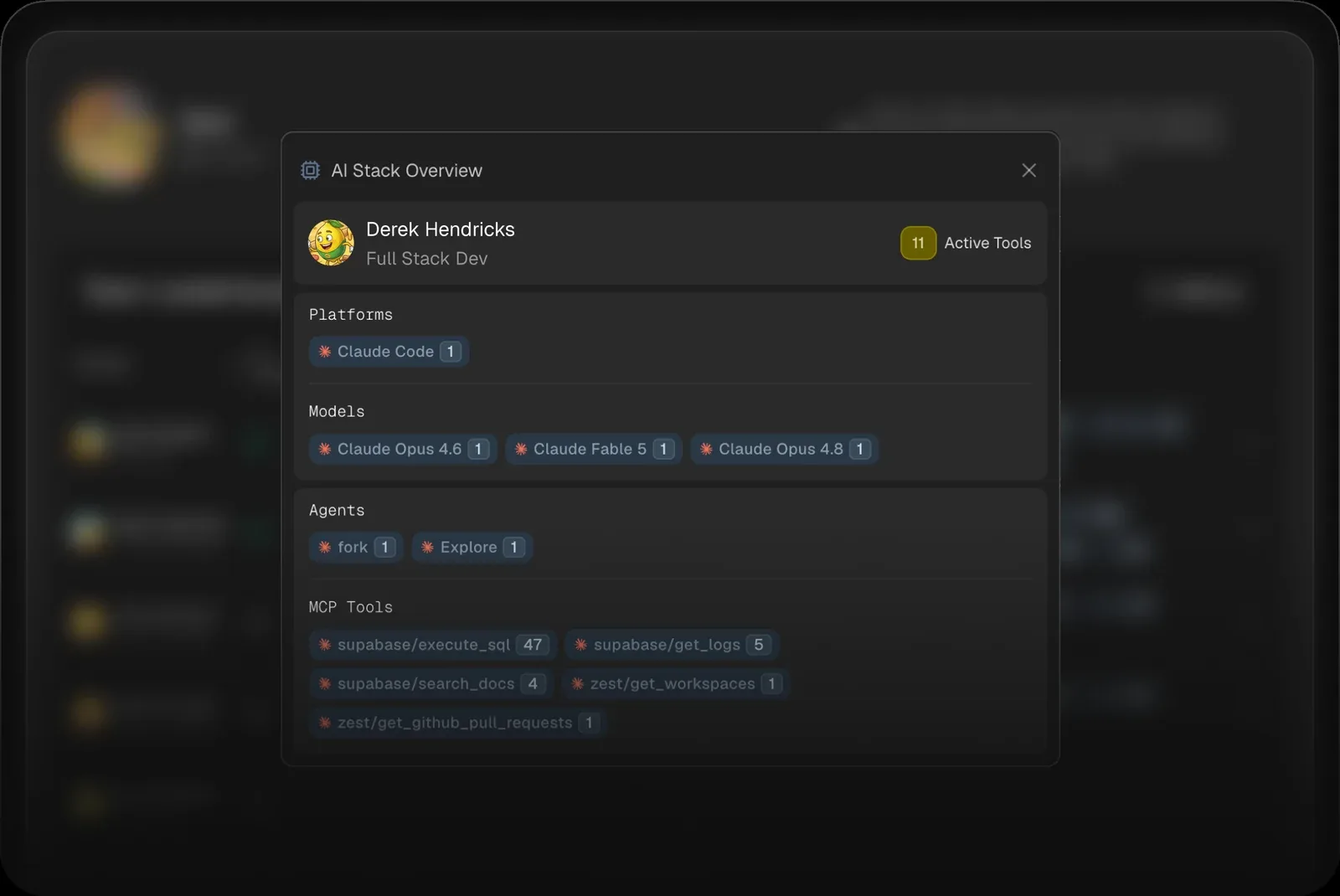
MCP tools and the skills someone asks for by name in each Cursor session, rolled up per engineer in the AI Stack view.
With the Zest GitHub App, each engineer's Cursor sessions sit next to the pull requests they opened and merged.
Redaction runs on the engineer's machine before upload; no code diffs are sent.
Zest's AI Stack overview for one engineer
TRY IT ON YOUR TEAM
See what your team ships with AI.
Starter is free (3 seats, no credit card). Pro is $49 a month with 5 seats and Max is $149 a month with 10 seats — priced per workspace, not per engineer, with extra seats at $19 a month. See pricing
Open Usage at grok.com/dashboard: it shows your weekly pool, the next reset and your prepaid credit, and the editor's settings show what's left too. On a legacy plan, the Spending tab at cursor.com/dashboard/spending shows both pools and any on-demand charges.
Does Cursor have an API for team usage?+
Yes. The Admin API's /teams/daily-usage-data, /teams/filtered-usage-events and /teams/spend return usage per user, per request and per member, and the Analytics API returns the dashboard's metrics; Cursor lists both for Enterprise teams.
How do I track Cursor usage for my team?+
Each engineer installs the Zest extension in Cursor, and an admin connects your GitHub org. Zest then shows Cursor sessions per engineer (models, skills and, optionally, tokens and cost) next to the pull requests they opened and merged.
Can I compare Cursor with Claude Code and Codex?+
Yes. Zest reports Claude Code, Codex, GitHub Copilot Chat, Grok Build and Hermes sessions on the same dashboard, so you can see which tool and model each engineer reaches for.
Is there a free plan?+
Yes. Starter is $0 per workspace per month with 3 seats included and no credit card. It includes Coding agent analytics, Models & Skills analytics, AI cheatcodes.


 Winding / Teams