
AI Code Debugging: Start With a Failing Test
Related guide: Claude Code skills: reusable prompts in a SKILL.md
The most reliable way to debug with AI is to give a coding agent a failing test. Reproduce the bug, capture it in a test, paste the stack trace and the expected behavior, and let the agent change the code and rerun the test until it passes. Then review the diff yourself.
“Fix this bug” with a pasted function gets you a guess. A failing test gets you a fix the agent has already checked, and a regression test that keeps the bug from coming back.
Why a failing test works better than “fix this”
A coding agent such as Claude Code, Codex, Cursor’s agent or GitHub Copilot can run commands, so it can check its own work. The test gives it three things a chat message can’t:
- A definition of done. The task is finished when the test passes, not when the code looks plausible.
- Feedback on every attempt. The agent runs the test after each change and reads the new failure, instead of handing you an untested patch.
- A guard against regressions. The test stays in the suite after the fix merges.
It is also how agent bug fixes look in practice on our team. Across the pull requests our coding agents wrote in our two repositories (Winding Labs, a small team), 93% of the 221 bug-fix pull requests changed a test file. That counts any change to a file whose path looks like a test, not only new tests, and it is one team’s data: see what 866 agent-written pull requests show.
The workflow, step by step
1. Reproduce the bug
Before you involve the agent, find a reliable way to trigger the bug: the input, the request or the sequence of clicks. If you can’t reproduce it, ask the agent to help you narrow it down first, by reading the logs and the code path, not by changing code.
2. Write the failing test, or ask for it
Capture the bug as the smallest test that fails for the right reason. Write it yourself when you know the expected behavior precisely:
test("total includes tax", () => {
  expect(calculateTotal(100, 0.08)).toBe(108);
});
Or ask the agent: “Write a test that reproduces this bug and confirm it fails. Don’t fix anything yet.” Read the test before you go on. A test that fails for the wrong reason sends the agent after the wrong fix.
3. Paste the stack trace and the expected behavior
Give the agent the exact error and the full stack trace, what you expected to happen and what happened instead. Name the files involved if you know them. The agent can find them itself, but naming them saves time.
4. Let the agent iterate until the test passes
“
cart.test.js> ‘total includes tax’ fails:calculateTotal(100, 0.08)returns100, expected108. Stack trace below. Find the root cause incart.js, fix it, and rerun the test until it passes. Don’t change the test. Then run the whole suite.”
The agent reads the code, forms a hypothesis, edits, reruns and repeats. Let it work; interrupt only if it starts changing unrelated files or the test itself.
5. Review the diff
A passing test doesn’t prove a good fix. Read the change the way you would a colleague’s pull request:
- Does it fix the root cause, or only the symptom the test checks?
- Did it change the test, or weaken an assertion, to get it green?
- Could it break other callers? Run the full suite, not only the one test.
Ask why it chose the fix: “Why a null check here instead of making price required?” The answer often shows whether it understood the bug.
Writing the prompt: context, error, goal
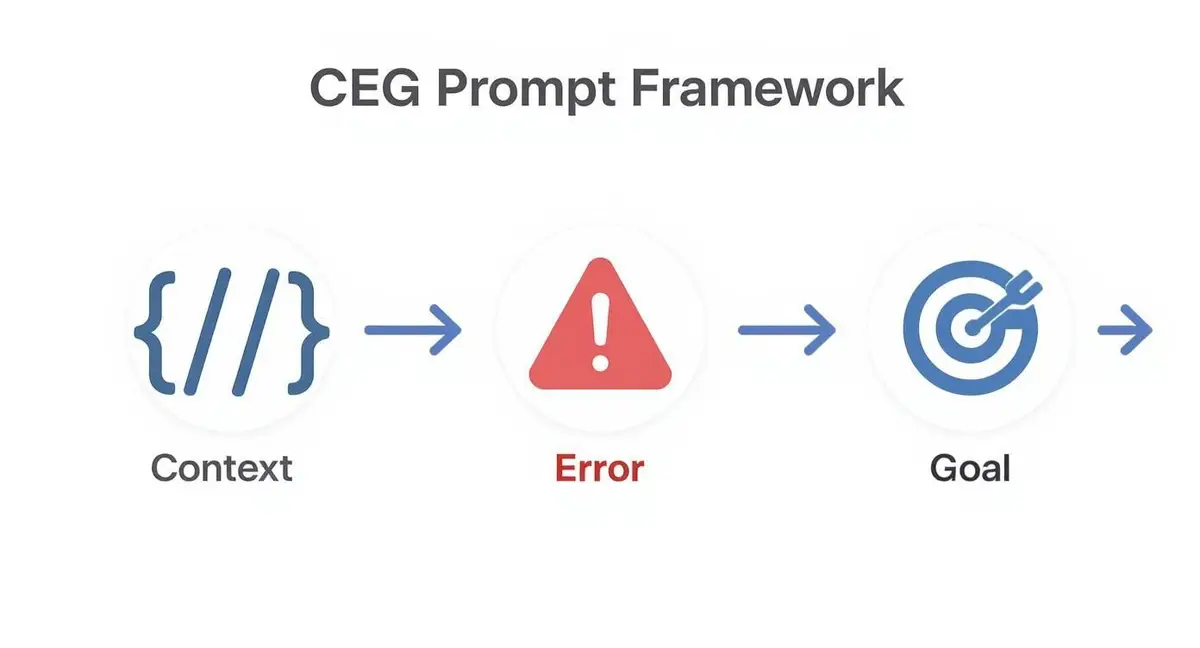
Whether or not you start from a test, a good debugging prompt has three parts.
- Context: where the bug lives. The failing function, the code that calls it, the data it gets, the framework.
- Error: the exact message and stack trace, plus actual versus expected behavior. Quantify it when you can.
- Goal: what kind of fix you want: stop a crash, correct a calculation, make a query fast enough.
Compare two prompts for the same bug.
Before: “My fetchData function isn’t working. The component doesn’t get the data. Here’s the code. Fix it.”
After:
Context: A React component calls
fetchDatainside auseEffecthook (component andfetchDataattached). Error: On mount the console throwsTypeError: Cannot read properties of undefined (reading 'map'). The network tab shows the API call returns 200, but the component’sdatastate staysnull. Goal: FixfetchDataor the component’s state handling so the response is stored in state and rendered without the error.
The first leaves the agent guessing. The second points it at how the promise resolves and how the state is set, which is where this kind of bug usually is.
| Bug | Low-context prompt | Context, error, goal |
|---|---|---|
| Data fetching | “My API call isn’t working.” | Context: React useEffect. Error: TypeError: undefined is not a function. Goal: fetch and set state without errors. |
| CSS layout | “This button is in the wrong place.” | Context: flex container with three children. Error: the third wraps below 768px. Goal: keep all three on one line. |
| Logic | “The calculation is wrong.” | Context: cart total. Error: calculateTotal(100, 0.08) returns 100, not 108. Goal: include tax. |
| Slow query | “My SQL query is slow.” | Context: PostgreSQL, three joins on tables over a million rows. Error: about 15 seconds. Goal: under 500 ms, with the right indexes. |
Where AI debugging falls short
Agents are quick with errors that the code and the stack trace explain on their own: a typo, a null that slips through, a wrong argument order, an off-by-one. They are weaker when the cause sits outside the code they can see:
- Business rules nobody wrote down. The agent sees what the code does, not why it was written that way.
- Runtime state. Race conditions, data that only exists in production, or configuration that differs between environments.
- Wide blast radius. A fix that looks right in one file can break callers the agent didn’t read.
For those, do the investigation yourself and use the agent for the parts it handles well: reading unfamiliar code, adding logging, writing the reproduction test. Keep security fixes and core business logic in human hands, with the agent as a second reader.
When the agent’s fix is wrong
Don’t keep saying “try again”. Each loop should add information.
- Give it the new failure. “That fixed the null case but now
cart.test.js> ‘empty cart’ fails with this trace.” - Ask for its hypothesis before the code. “What do you think causes this? Don’t edit anything yet.”
- Narrow the scope. Point it at the one module where you know the bug is, and tell it what it may not change.
- Start over when it is going in circles. Revert, write a sharper test, and open a fresh session with what you have learned.
Making it a team habit

A debugging approach spreads when people can see it work. Two things help:
- Make “test first” the default for bug fixes. Put it in the project instructions file your agents read (
CLAUDE.md,AGENTS.md): “For a bug, write a failing test that reproduces it before changing code.” Agents follow it in every session. - Share what works. When someone finds a prompt or a skill that cracks a class of bugs, put it where the team will find it, such as the repository or a team skill, instead of leaving it in one person’s chat history.
To see whether it pays off, watch the time from a bug report to a merged fix, and how often a fixed bug comes back. For the wider picture, see our guide to developer productivity metrics. For the test-first habit itself, read red, green, refactor: the TDD cycle, and for stepping through code by hand, debugging in VS Code.
Frequently asked questions
What makes a good AI debugging prompt?
Context, the exact error and a clear goal. Include the failing code and what calls it, the full error message and stack trace, and what you expected to happen versus what did. A failing test the agent can rerun is better than any description.
Should I let the agent change the failing test?
Usually not. Tell it not to edit the test, and check the diff for changed or weakened assertions. If the test itself is wrong, fix it yourself or approve that change explicitly, so the agent can’t make the bug disappear by changing the test.
Can I trust AI for security fixes?
Only with a careful human review. An agent can spot common vulnerabilities and propose patches, but it can also paper over the problem or add a new one. Review every security change yourself and run your security scanners before it merges.
How do I get my team debugging this way?
Start with straightforward bugs and make a failing test the first step. Add that rule to the project instructions file your agents read, so every session follows it. Share prompts and skills that work, and review agent bug fixes like any other pull request.
Zest records each engineer’s coding-agent sessions (Claude Code, Codex, Cursor, Copilot Chat) and links them to the pull requests they led to.