
A Developer's Guide to Automatic Code Review
Think of automatic code review as a set of digital guardrails for your code. It’s the practice of using tools to automatically scan your source code for common bugs, security holes, and style issues, all without a human having to lift a finger. It’s a safety net that catches the easy stuff early, freeing up your team to solve the hard problems.
The Growing Bottleneck in Modern Development
In software, speed is the name of the game. Teams are pushing code faster than ever, and a big reason for that is the rise of AI coding assistants. These tools are incredible, supercharging individual developers and turning hours of tedious work into mere minutes.
But this new firehose of code has created a massive traffic jam at a critical intersection: the human code review.
It’s like a high-tech factory where robots are assembling products at an incredible pace, only to have every single item stop and wait for a manual inspection from a handful of overworked humans. That’s what’s happening in so many engineering teams today. Code gets written in a flash, but the review process grinds everything to a halt, creating a bottleneck that slows down the entire release cycle.
The AI Productivity Paradox
It’s a strange irony. The very tools meant to make us faster have put an immense strain on the manual checks that ensure quality. As developers crank out more code, the pressure on senior engineers to perform thoughtful, detailed reviews grows. It’s not just inefficient; it’s completely unsustainable.
This isn’t just a feeling—it’s a well-documented trend. AI coding agents have boosted developer output by a massive 25-35% per engineer, but they’ve also created that review bottleneck. Analysts are now projecting a staggering 40% quality deficit by 2026. This means far more code will be flooding the system than reviewers can possibly validate, opening the door for technical debt and bugs to slip right into production. You can read more about the impact of AI on code quality in recent industry analyses.
Tools like GitHub Copilot are now standard issue for developers, offering up code suggestions and completing entire functions on the fly.
This is a perfect example of how AI can instantly generate a ton of code, all of which needs to be carefully checked before it gets merged.
Why Manual Review Is No Longer Enough
This is precisely why automatic code review has gone from a “nice-to-have” to an absolute necessity. It becomes the automated quality control for your software factory, making sure the basic checks are done before a human ever lays eyes on the code.
By catching simple mistakes, enforcing a consistent style, and flagging security red flags, these tools act as your first line of defense. This approach nails several key goals:
- Frees Up Senior Talent: It lets your most experienced engineers stop nitpicking over syntax and focus on the big picture, like architecture and tricky business logic.
- Enforces Consistency: It programmatically ensures every line of code follows the team’s established standards, making the entire codebase easier to maintain.
- Increases Velocity: Instant feedback slashes the long wait times of manual review cycles, which means features get into the hands of users much faster.
The Four Levels of Automatic Code Review
When we talk about “automatic code review,” it’s not a single thing. It’s a spectrum. On one end, you have simple tools that are like spell-check for your code. On the other, you have sophisticated AI that acts like a seasoned senior developer looking over your shoulder.
Understanding these different levels helps you pick the right tools for your team. It also gives you a roadmap. You can start small and gradually introduce more powerful automation as your team grows. Think of it as leveling up your review process, with each stage adding a new layer of protection and insight.
As more teams use AI to generate code, the review process itself is becoming the main bottleneck. You can pump out code faster than ever, but if it all gets stuck waiting for a human review, you haven’t really sped anything up.
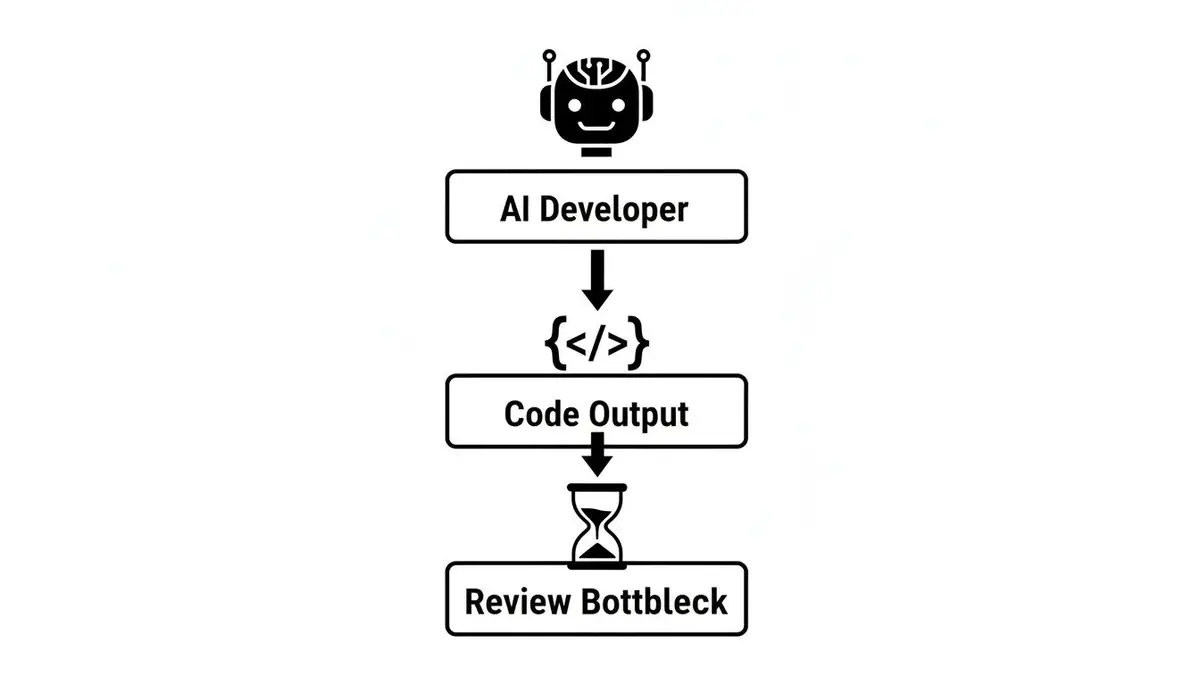
This is where automation becomes absolutely critical. It helps clear the logjam and keeps the development cycle moving smoothly, even when the volume of code is massive.
Level 1: Linters and Formatters
This is where most teams start, and for good reason. Linters and formatters are the foundational layer of automated review. They’re simple, fast, and remarkably good at catching low-hanging fruit.
Think of them as your code’s hygiene patrol.
- Linters (ESLint, Pylint) are rule-checkers. They scan your code for common mistakes like unused variables, syntax errors, or code that doesn’t follow established best practices.
- Formatters (Prettier, Black) are all about style. They automatically reformat your code to a consistent standard, ending the pointless debates about tabs vs. spaces or where to put a curly brace.
These tools give developers instant feedback right in their editor, often catching a mistake just seconds after it’s made. It’s the easiest win you can get.
Level 2: Static Analysis (SAST)
Moving up the ladder, we get to tools that act as your code’s security detail. Static Application Security Testing (SAST) tools dig deeper than linters, specifically hunting for security vulnerabilities before your code ever sees the light of day.
While a linter might complain about an unused variable, a SAST tool is looking for much bigger game. It’s programmed to spot patterns associated with major security risks, such as:
- SQL injection weak spots
- Cross-site scripting (XSS) vulnerabilities
- Hardcoded secrets like API keys
- Insecure data handling
These tools are a cornerstone of a “shift-left” security approach, where you build security in from the very beginning instead of trying to bolt it on at the end. To go deeper, check out our guide on what is static code analysis and how it hardens your codebase.
Level 3: CI/CD Pipeline Checks
This is where automation gets woven directly into your team’s workflow. Here, the checks aren’t just running on a developer’s machine; they’re an official gatekeeper in your Continuous Integration/Continuous Deployment (CI/CD) pipeline.
When a developer opens a pull request, a series of automated jobs kicks off. This isn’t just about style or security anymore—it’s about making sure the new code actually works.
A solid CI pipeline is your ultimate quality checkpoint. It ensures that every single change is well-formed, secure, and plays nicely with the rest of the application before it gets merged.
Common checks you’ll find here include:
- Running the test suite: Does the new code break any existing features?
- Building the application: Can the code actually be compiled and packaged?
- Code coverage analysis: How much of the new code is actually covered by tests?
This level of automation protects the stability of your main branch and, by extension, your product. Nothing gets in unless it passes the tests.
Level 4: AI-Powered Reviewers
This is the top tier. AI-powered reviewers are the closest thing we have to a virtual senior developer. While all the other levels rely on predefined rules and patterns, AI tools bring context, nuance, and genuine understanding to the table.
Using large language models (LLMs) trained on billions of lines of code, these tools provide feedback that feels like it’s coming from an experienced human.
They can:
- Suggest better ways to write code: Instead of just pointing out a syntax error, an AI might suggest a more efficient or idiomatic way to achieve the same goal.
- Find tricky logical flaws: They can spot bugs that a simple rule-based tool would never catch because they understand the intent behind the code.
- Learn your team’s style: The best AI tools adapt to your existing codebase, making suggestions that feel right at home with your team’s unique conventions.
This is where the future of code review is heading. Automation that doesn’t just catch mistakes, but actively helps developers write better code and learn in the process.
To help you see how these levels compare, here’s a quick overview.
Four Levels of Automatic Code Review at a Glance
| Level | Tool Type | Primary Function | Example Tools |
|---|---|---|---|
| Level 1 | Linters & Formatters | Enforce code style and catch basic syntax errors. | ESLint, Prettier, Pylint |
| Level 2 | Static Analysis (SAST) | Scan for common security vulnerabilities. | Snyk, SonarQube, Veracode |
| Level 3 | CI/CD Pipeline Checks | Run tests and builds to ensure functional correctness. | GitHub Actions, Jenkins, CircleCI |
| Level 4 | AI-Powered Reviewers | Provide contextual, human-like feedback on logic & quality. | CodeRabbit, GitHub Copilot |
Each level builds on the last, creating a comprehensive safety net that frees up your human reviewers to focus on what they do best: tackling the complex, architectural, and business-logic challenges that machines can’t.
Why Your Engineering Team Needs Automation Now
Knowing what the different kinds of automation are is one thing, but seeing how they directly boost your team’s performance is what really matters. Bringing automatic code review into your workflow isn’t just a tech upgrade—it’s a smart business move that pays off in speed, quality, and focus. The market is already screaming this from the rooftops.
The global code review market has rocketed from $784.5 million in 2021 to an expected $1,028 million by 2025. That growth is mostly coming from AI-powered tools, which are on track to push the market to a massive $1,765.2 million by 2033. This is part of a much bigger trend; the AI code review segment alone is projected to leap from $907 million in 2023 to nearly $4.94 billion by 2030. You can find more details in this comprehensive market report.
All this investment points to one simple truth: automation is no longer a “nice-to-have” for teams that want to win.
Increase Developer Velocity
The first thing you’ll notice with automation is a serious speed boost. Manual code reviews are a classic bottleneck. Pull requests can sit for hours—or even days—just waiting for a set of eyes. That dead time kills momentum and is a primary reason release cycles get dragged out.
Automated tools give feedback in minutes, not days. This rapid feedback loop lets developers fix problems while the code is still fresh in their minds, cutting out the painful mental gear-shifting required to revisit old work. By slashing that review wait time, you directly improve key delivery metrics. For a deeper look at this, our guide on what are DORA metrics breaks down how to measure these gains.
Improve Code Quality and Consistency
Human reviewers are irreplaceable for untangling complex logic, but let’s be honest, they’re also inconsistent. One senior dev might flag a minor style preference, while another lets it slide. Over time, these little inconsistencies create a messy, hard-to-maintain codebase.
Automatic code review tools are the perfect, unbiased referees for your team’s coding standards. They are objective, they never get tired, and they apply the exact same rules to every single line of code, every single time.
This consistent enforcement ensures your entire codebase follows a single style and quality standard, making life easier for new developers getting up to speed and for the whole team navigating the code.
Enhance Your Security Posture
In today’s world, you can’t afford to treat security as an afterthought. “Shifting left” is all about finding and squashing vulnerabilities as early as possible in the development process. That’s when they are cheapest and easiest to fix.
Automated security scanners (SAST tools) are your first line of defense. They plug right into your workflow and act as digital security guards, spotting common weaknesses like SQL injection or hardcoded secrets before they ever get close to production. This proactive approach strengthens your application and significantly reduces your overall risk. You can learn more about how AI software development solutions can accelerate projects while improving code quality.
Reduce Cognitive Load on Senior Engineers
Your senior engineers are your most valuable players. Their time is best spent on the big stuff: designing system architecture, mentoring junior devs, and solving tough business problems—not getting bogged down in debates over variable names or comma placement.
When you automate the routine checks, you free up your best minds. You lift the cognitive load of tedious review tasks, letting them save their brainpower for the strategic work that actually moves the needle. It makes the whole review process more meaningful and leads to a more engaged and powerful team.
How to Implement an Automated Review Strategy
Trying to jump straight to a fully AI-powered review system is a recipe for overwhelming your team. Trust me, I’ve seen it happen. The key to getting everyone on board is to take it slow and steady, introducing automation in phases. We call this the “Crawl, Walk, Run” strategy—a simple way to build confidence and prove the value at each step without causing chaos.
The whole idea is to progress from basic local checks to sophisticated, AI-driven feedback that lives right in your CI/CD pipeline.

Each stage builds on the last, so the whole process feels like a natural evolution of your workflow, not some top-down mandate.
The Crawl Stage: Get the Basics Right
This is where it all begins. The focus here is on putting simple, high-impact tools directly into your developers’ hands, right in their local environment. The goal? Catch the low-hanging fruit—the simple mistakes and style inconsistencies—long before a pull request is even created.
Your best friends in this stage are linters and formatters.
- Implement a Code Formatter: Pick a tool like Prettier or Black and get it set up to run automatically on save in everyone’s IDE. Just like that, you’ve ended every future debate about tabs versus spaces.
- Set Up a Linter: Integrate a linter like ESLint or Pylint and commit a shared configuration file to your repository. This gets everyone playing by the same rules, catching syntax errors and style issues as they type.
The “Crawl” stage is all about giving individual developers a fast, frictionless feedback loop. The best automation starts by helping engineers fix their own mistakes before anyone else even has to see them.
The Walk Stage: Automate in the Pipeline
Once your team is used to the local tools, it’s time to make these checks an official part of your process. The “Walk” stage is all about moving that automation from individual machines into your Continuous Integration (CI) pipeline. Think of it as a quality gatekeeper for every single PR.
Here’s what you’ll do in this phase:
- Add Linting and Formatting Checks to CI: Configure your CI server (like GitHub Actions or Jenkins) to run your linter and formatter on every new pull request. If the code doesn’t pass, the build fails. No exceptions.
- Integrate Static Analysis (SAST): Now you can introduce a SAST tool to scan for common security vulnerabilities. Start with a relaxed configuration that just reports warnings instead of failing the build. This gives your team a chance to see the feedback without bringing their work to a grinding halt.
- Establish a Fast Feedback Loop: This is critical. Make sure these CI checks finish fast—ideally in under five minutes. If developers are waiting around forever, they’ll just find ways to work around the system.
The Run Stage: Embrace AI-Powered Insights
With a solid foundation of automated checks in place, you’re ready for the big leagues. The “Run” phase is where you bring in advanced tools that offer deep, contextual feedback. We’re moving beyond simple rule-checking into the realm of intelligent analysis. This is where AI-powered reviewers shine.
This stage involves:
- Adopting an AI Review Tool: Integrate an AI tool that can analyze pull requests for tricky logic flaws, performance bottlenecks, and refactoring opportunities. These tools understand the intent behind the code, providing suggestions that feel like they came from a seasoned senior engineer.
- Refining Rules Over Time: As your team gets more comfortable, you can start tightening the rules in your static analysis tools. You can move from just warning about high-severity security issues to actually blocking merges until they’re fixed.
- Integrating Smart Notifications: Connect your review tools to where your developers live, like posting notifications in Slack. But be careful here—nobody likes a noisy bot. Only set up notifications for things that truly require a developer’s attention.
Finding the right tools for your specific tech stack is crucial for making this strategy work. For a good overview of what’s out there, check out this guide on the best code review tools. By taking this phased approach, your automatic code review strategy will actually help your team move faster and build better software, without all the usual growing pains.
Balancing Automation with Human Expertise
Let’s clear up a common misconception: bringing in automatic code review isn’t about making developers obsolete. It’s about making them more powerful. The real magic happens when you create a partnership where machines handle the repetitive, objective stuff, freeing up your team to focus on the strategic, subjective work that really matters.
Think of it this way: automation is great at answering the “what.” It can tell you what line of code breaks the style guide, what pattern looks like a known vulnerability, or what function is missing test coverage. This is the grunt work of code review—essential, but a total time-sink.
This simple shift frees up your human reviewers to tackle the far more critical question: the “why.”
From Rule-Follower to Strategic Thinker
When your engineers aren’t bogged down nitpicking syntax or spacing, they can finally put their deep expertise to work on the high-level problems that automated tools just can’t see. These are the uniquely human insights that separate good software from great software.
- Business Logic and Intent: Does this code actually do what the business needs? Does it truly solve the user’s problem in the way we intended?
- User Experience: How is this change going to feel for the person using it? Is the solution clever and intuitive, or just functional?
- Architectural Cohesion: Does this new piece of code fit cleanly into our existing system, or does it feel like it’s been awkwardly bolted on?
By offloading the mundane checks, you empower your team to move from being rule enforcers to being strategic architects of the product. This makes code reviews more engaging, more valuable, and a lot less tedious for everyone involved.
Building Trust Through a Hybrid Model
One of the biggest hurdles with any new tool, especially AI, is getting the team to trust it. Recent data shows that while a massive 84% of developers now use AI in their workflows, with AI tools writing 41% of all code, only about a third of them actually trust the output completely. This is where a solid automatic code review process becomes your safety net, allowing you to scale up without sacrificing quality.
The most effective teams don’t just blindly accept what an automated tool suggests. They build a hybrid model where automation acts as a smart first-pass filter.
Automation should be a powerful assistant, not an unquestionable authority. It catches the obvious 80% of issues, so your team’s valuable brainpower can focus on the complex 20% that truly makes a difference.
This approach builds confidence. Developers quickly learn the tool is there to help, not to replace them. It catches common slip-ups and preps their code for a much more meaningful human review. The goal is augmentation, not abdication. And for that extra layer of defense, you should always weave in principles from secure code reviews.
This human-machine partnership is where the real breakthroughs happen. By letting automation handle the rote work, you unlock the full creative and analytical horsepower of your engineering team, making their contributions more impactful than ever.
Frequently Asked Questions About Automatic Code Review
When teams start bringing automation into their code review process, a few key questions always come up. Let’s tackle them head-on so you can make the transition smooth and successful from the get-go.
Will Automatic Code Review Replace Human Reviewers?
Not a chance. The goal is to empower human reviewers, not replace them.
Think of it this way: automated tools are experts at catching the black-and-white stuff—style mistakes, common security risks, and overly complex code. They handle the tedious, repetitive checks, freeing up your human reviewers to focus on what they do best: thinking about the big picture. They can now pour their energy into the subjective, high-impact areas like business logic, architectural choices, and the overall user experience. It’s about letting machines do the robotic work so humans can focus on creative problem-solving.
How Do We Get Started Without Overwhelming the Team?
The last thing you want is for a new tool to feel like a burden. The secret is to introduce automation gradually using a “Crawl, Walk, Run” approach.
- Crawl: Start small and local. Introduce a linter and an auto-formatter right inside everyone’s IDE. It’s a low-friction way to show immediate value.
- Walk: Next, add a static analysis tool to your CI pipeline, but set it to warn instead of failing the build. This lets the team get used to the feedback without blocking their work.
- Run: Once everyone is comfortable, you can start enabling blocking rules for critical issues and begin exploring more advanced AI-powered review tools.
This phased rollout helps prevent tool fatigue and actually gets people on board instead of making them feel forced.
What Is the Difference Between a Linter and a Static Analysis Tool?
This is a really common point of confusion, but the distinction is pretty simple.
A linter is like a grammar and spell-checker for your code. It primarily cares about style, formatting, and simple programming mistakes, like pointing out an unused variable.
A static analysis (SAST) tool, on the other hand, digs much deeper. It analyzes your code without even running it to hunt for more complex problems. It’s looking for things like major security vulnerabilities (think SQL injection), performance bottlenecks, and subtle bugs that arise from how data flows through your application.
How Does AI Fit Into This Process?
AI-powered reviewers are the next evolution of automation. While traditional tools are great, they’re stuck following a rigid set of pre-programmed rules.
AI is different. It can understand the context and intent behind the code. This means it can suggest more idiomatic ways to write something, spot tricky logical flaws that a linter would miss, and even learn your team’s unique coding style to give feedback that feels surprisingly human and relevant.
Zest records each engineer’s coding-agent sessions (Claude Code, Codex, Cursor, Copilot) and links them to the pull requests they led to.