
How to Write User Stories in Jira (With Examples)
To write a user story in Jira, create a work item of the Story type, give it a title that states the user’s goal, and write the description as “As a [type of user], I want [an action], so that [a benefit].” Then add acceptance criteria in Given-When-Then form, attach the design, and set the epic it belongs to as its parent.
A note on names: in 2025 Jira Cloud renamed issues to work items and projects to spaces (Atlassian, Atlassian Community). Issue types are now work types, and the Summary field is now Title. This guide uses the new names.
What a user story is
A user story describes a feature from the point of view of the person who will use it. It captures what they want and why, before anyone decides how to build it. In Jira, a story is one work type among others such as Task, Bug and Epic (Jira).

The classic template has three parts:
As a [type of user], I want to [perform some action], so that [I can achieve some goal].
- Who: the user or persona, such as “new customer”, “administrator” or “logged-in member”.
- What: the action or feature they need, such as “reset my password” or “view my order history”.
- Why: the value they get. This is the most important part: it gives the team the context to make good decisions about how to build it.
A good story also meets the INVEST criteria:
| Criterion | Meaning | Example (two-factor login) |
|---|---|---|
| Independent | Can be built without waiting on another story | “Enable 2FA” doesn’t depend on “change password” |
| Negotiable | A starting point for discussion, not a contract | The team discusses SMS, an authenticator app, or both |
| Valuable | Delivers value to a user or customer | Users’ accounts are harder to take over |
| Estimable | Clear enough to estimate | The team can size SMS codes with a known API |
| Small | Fits within one sprint | Only enabling 2FA, not the whole security overhaul |
| Testable | You can check that it’s done | “The user receives a code by SMS” |
From a vague idea to a story
A stakeholder says, “We need to make the banking app more secure.” That’s a goal, not something a developer can build. The product owner turns it into stories, such as:
As a security-conscious user, I want to turn on two-factor authentication by SMS, so that nobody else can get into my account with just my password.
One sentence now says who the work is for, what to build and why it matters.
How to write a user story in Jira, step by step
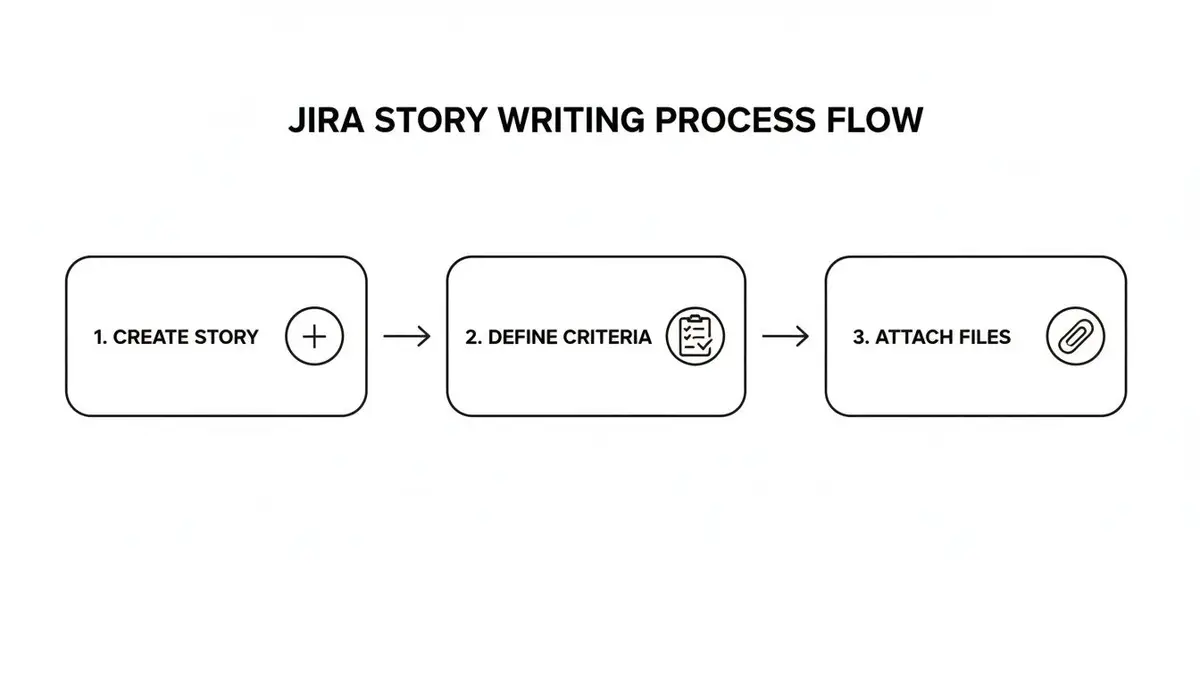
- Create the work item. Select Create (+) in the top navigation. In the dialog, check the space and set the work type to Story (Atlassian).
- Write the title. State the user’s goal in a few words. “Login feature” says little; “User can log in with email and password” says what done looks like.
- Write the description. Start with the “As a…, I want…, so that…” sentence, then add business rules, edge cases and links.
- Add acceptance criteria. Use Given-When-Then (next section), in the description or in a dedicated field if your admin has added one.
- Attach the context. Attach the Figma link. Link the Confluence page, research or API docs the story depends on (Confluence).
- Set the parent epic. Pick the epic in the Parent field so the story rolls up into the larger goal.
A common mistake is a technical task written as a story. “Create a users table in the database” isn’t a user story. “As a new user, I want to create an account so that I can see member-only content” is, and the table becomes one of its subtasks.
Write acceptance criteria with Given-When-Then
Acceptance criteria are the conditions a story must meet to be done. They prevent the “this isn’t what I asked for” conversation at the sprint review. The Given-When-Then format comes from behavior-driven development (BDD):
- Given the starting situation
- When the user does something
- Then the expected result
Example 1: login form
- Given I am on the login page, when I enter a valid email and password, then I am taken to my dashboard.
- Given I am on the login page, when I enter a wrong password, then I see the message “Invalid credentials”.
Example 2: product search filter
- Given I am on the product list, when I filter by the color “Blue”, then only blue products are shown.
Example 3: saved address
- Given I have a saved shipping address, when I reach checkout, then the address is filled in and I can change it.
Each statement is something a developer can build to and a tester can check.
Group stories under epics
An epic is a large goal that’s too big for one sprint, such as “Improve user onboarding”. Create the epic first, then create its stories with the epic as their parent:
- “As a new user, I want to sign up with my Google account, so that I can start faster.”
- “As a new user, I want a short product tour, so that I know where the main features are.”
- “As a new user, I want a welcome email with useful links, so that I can find help later.”
A story can belong to only one epic at a time. You can also add an existing story to an epic from the board or backlog with More actions (•••) › Add parent (Atlassian).
Refine stories before the sprint
Backlog refinement is a regular meeting where the product owner and the team get the top of the backlog ready for the next sprint. In it, the team:
- Talks through the requirements of the next stories.
- Adds or tightens acceptance criteria.
- Estimates each story.
- Drags the most important, best-defined stories to the top of the backlog.
The point is to clear up questions before anyone writes code.
Estimate with story points
Story points measure effort relative to other stories, taking in complexity, risk and the amount of work, instead of hours. A 1-point story might be a copy change; an 8-point story touches several parts of the codebase.
Many teams estimate with Planning Poker: after discussing a story, each person picks a card privately (often from 1, 2, 3, 5, 8, 13), and everyone reveals at once. Estimates that are far apart start a conversation that usually uncovers a hidden assumption.
Enter the estimate in the story points field. Over a few sprints, the total points completed per sprint becomes your velocity. Velocity tells you how many sprints an epic needs: an epic estimated at 60 points takes about three sprints for a team that completes 20 a sprint.
Put stories into a sprint
In a Scrum space, open the Backlog, drag the refined stories onto the next sprint, and select Start sprint when the team agrees on the scope. The sprint footer shows the total estimate; compare it with your velocity from past sprints before you commit (Atlassian). Avoid adding stories once the sprint has started.
Workflow and automation
Jira’s default workflow (To Do, In Progress, Done) hides where work actually waits. Many software teams add statuses like these:
- Backlog: new ideas, not yet refined.
- Ready for Dev: refined and estimated.
- In Development: someone is coding it.
- In Review: waiting for code review.
- In QA: being tested on staging.
- Done: released.
If ten stories pile up in In Review, the team knows to prioritize reviews.
Jira Automation then handles the busywork with “when this happens, do that” rules. Two to start with:
- Assign QA automatically. When a story moves to In QA, assign it to the QA lead.
- Flag blocked high-priority stories. When a high-priority work item moves to Blocked, post to the team’s Slack channel.
Start with one rule that fixes an obvious annoyance, then add more. Atlassian’s introduction to Jira Automation:
Use reports to improve your stories
Jira’s sprint reports show whether your stories are written well.

The burndown chart shows the work left in the sprint against the time left. A flat line that drops off a cliff at the end usually means the stories are too big. Split them so each one takes a few days at most.
The velocity chart compares, for each sprint, what the team committed to at the start (the gray bar) with what it completed (the green bar) (Atlassian). Velocity that jumps around usually means one of three things:
- Inconsistent estimates. Revisit what a point means to the team.
- Interruptions. Unplanned work shows up as a drop in completed points.
- Vague stories. Missing acceptance criteria lead to rework that never fits the sprint.
What to do about it:
- Tighten your definition of done. If stories keep bouncing back from QA, agree on a checklist every story must pass: code reviewed, tests passing, product owner sign-off.
- Refine stories before the sprint. No story enters a sprint without clear acceptance criteria and an estimate.
- Protect the sprint. Show stakeholders the velocity chart when “one quick change” keeps arriving, and agree on a process for urgent requests.
For delivery metrics beyond the sprint, see the DORA metrics guide.
Zest records each engineer’s coding-agent sessions (Claude Code, Codex, Cursor, Copilot Chat) and links them to the pull requests they led to.
Frequently asked questions
What is the difference between a user story and a task in Jira?
A user story describes what a user wants and why; a task describes a technical step to build it. “As a shopper, I want to save my shipping address so that I can check out faster” is a story. “Create the user_addresses table” and “Build the address form” are tasks or subtasks under it.
How detailed should acceptance criteria be?
Specific enough to test, but not so detailed that they dictate how to write the code. Given-When-Then helps, because it describes observable behavior: “Given a valid account, when the user enters the right password, then they are logged in.” Cover the main path and the most likely errors.
Can you use user stories without Scrum?
Yes. In Kanban, stories are simply the work items that move across the board, with no sprints or story points required. The user’s “why” is useful in any process.
How should you handle bugs found in a user story?
If the bug is in a story from the current sprint, move the story back to In Progress and fix it before the sprint ends. If the story shipped in an earlier sprint, create a new Bug work item, link it to the original story, and prioritize it in the backlog like any other work.