
How to Code with ChatGPT, Claude, Gemini and Copilot
Related guide: Claude Code vs Codex for teams
To code with ChatGPT, Claude, Gemini and Copilot, use each vendor’s coding tool instead of its chat website: Codex for ChatGPT, Claude Code for Claude, Gemini Code Assist or Antigravity for Gemini, and GitHub Copilot. Install each tool’s VS Code extension and use all four without leaving the editor. One exception: on a personal Google plan, Gemini now runs in Google’s own Antigravity IDE and CLI rather than in VS Code.
Below: how to set each one up, how to write prompts that produce usable code, a feature built with all four, and how to debug and refactor with them.
Setting up your AI coding environment in VS Code
Copying code between a browser tab and your editor loses context and time. Run the tools inside Visual Studio Code (or an AI-first editor like Cursor) instead, where they can read your repository.
Core extensions and configuration
Each vendor has an official coding tool, and all four now include an agent that reads your repo, edits files and runs commands, not just a chat panel.
- GitHub Copilot: the Copilot extension gives you inline suggestions, chat and agent mode, with models from OpenAI, Anthropic, Google, xAI and others (GitHub Docs). It needs a Copilot plan; Copilot Business is $19 per seat a month with 1,900 AI credits (GitHub Docs).
- ChatGPT (OpenAI): the official route is Codex, OpenAI’s coding agent, through its IDE extension for VS Code (it also works in Cursor and Windsurf). Codex comes with every ChatGPT plan, from Free up (Plus is $20 a month), or you can use an API key at API prices (OpenAI).
- Claude (Anthropic): the official route is Claude Code, whose VS Code extension runs the same agent as the terminal CLI (Claude Code docs). It comes with a Claude Pro, Max, Team or Enterprise plan, or an API key (Claude pricing).
- Gemini (Google): Google retired the Gemini Code Assist IDE extensions for free users and Google AI Pro and Ultra subscribers on June 18, 2026, and points them to Antigravity, its agentic IDE and CLI (Google). Teams on a Gemini Code Assist Standard or Enterprise licence keep the VS Code extension (Google Cloud pricing).
Treat the four as a team, not competitors. You can run Copilot for quick edits and Claude Code or Codex for multi-file changes in the same editor.
Each extension signs you in with that vendor’s account or an API key. Once that’s done, the agent shows up in its own side panel.
Quick comparison
| Assistant | Official way into VS Code | Models | Pays for it |
|---|---|---|---|
| GitHub Copilot | Copilot extension: inline suggestions, chat, agent mode | OpenAI, Anthropic, Google, xAI and others | A Copilot plan |
| ChatGPT | Codex IDE extension | OpenAI GPT models | A ChatGPT plan or an API key |
| Claude | Claude Code extension | Claude models only | A Claude plan or an API key |
| Gemini | Gemini Code Assist extension (Standard or Enterprise) or the Antigravity IDE | Gemini models | A Code Assist licence or Antigravity plan |
Prices and plans as listed on the vendors’ pages on October 3, 2026.
Working from the editor
Once they are installed, select a block of code and send it to the tool you want for a refactor, an explanation or a fix, without copying anything into a web chat. For which tool suits which job, see our guide to the best AI coding tools.
Writing prompts that produce usable code
A good prompt reads like a short spec. The models start with no knowledge of your architecture, dependencies or style, so your job is to fill in those blanks.
The context every prompt needs
- The goal: what the code should do, in one or two sentences.
- Language and framework: not “JavaScript” but “TypeScript with the Next.js App Router.”
- The existing code: the function, class or component you’re changing. An agent can read the repo itself, but naming the files saves it the search.
- Dependencies: the libraries to use, for example “Axios for the API call and Zod for validation.”
Zero-shot, one-shot and few-shot prompts
These terms describe how many examples you give the model.
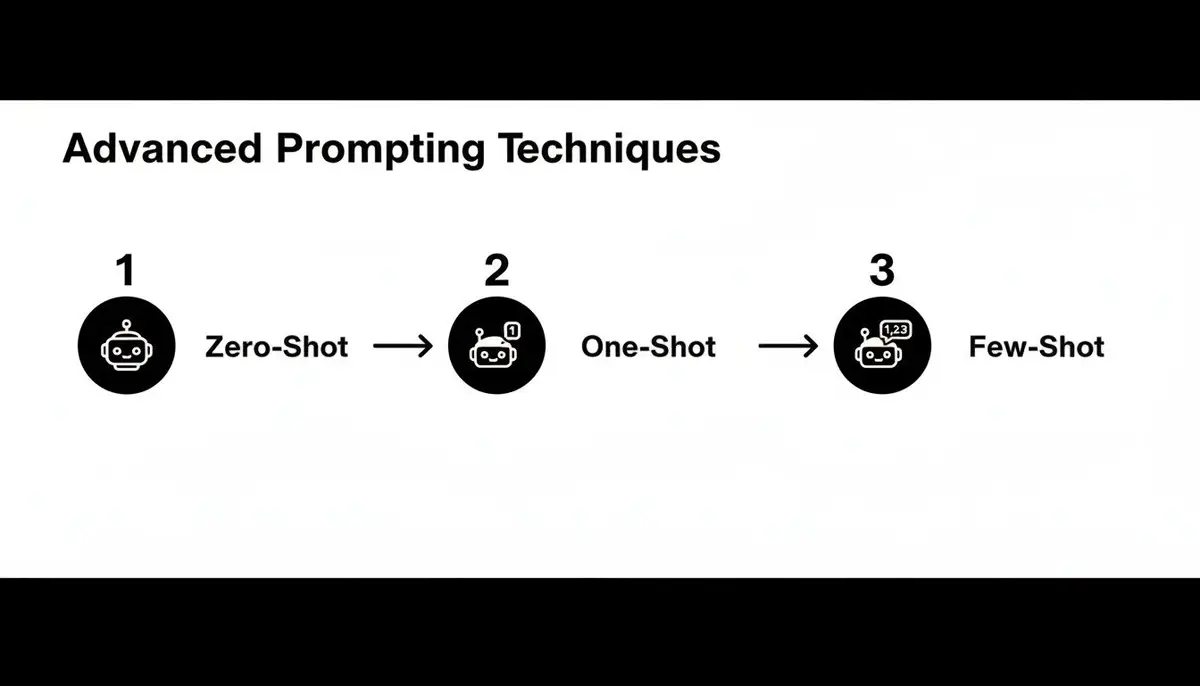
- Zero-shot: no examples. Fine for simple, self-contained tasks: “Write a Python function to validate an email address using regex.”
- One-shot: one example of input and output, to set a format. “Given
{'name': 'Jane Doe', 'role': 'Admin'}, return'Jane Doe (Admin)'. Now convert{'name': 'John Smith', 'role': 'Editor'}.” - Few-shot: several examples, for complex transformations or a pattern the model has to pick up.
To match your team’s style, give 2–3 examples of your team’s style before asking for new code: how you declare functions, name variables and write comments. A project instructions file (CLAUDE.md for Claude Code, AGENTS.md for Codex) does the same job for every session.
Personas and step-by-step reasoning
Give the model a role. Starting with “Act as a senior DevOps engineer specializing in AWS” or “You are a PostgreSQL performance expert” steers the vocabulary and the kind of answer you get.
Ask for the plan first. For a multi-step problem, ask the model to outline its approach before it writes code: “Think step by step and list the changes before writing them.” You can correct a wrong plan before it turns into a wrong diff.
Our guide to prompt engineering best practices covers more patterns.
Building a feature with all four
Here is one way to split the work: a GET /users/{userId}/profile endpoint in a Node.js Express app with TypeScript, designed, written, tested and documented in VS Code. Any one of these agents could do all of it; the split shows what each is good at.
Phase 1: plan with ChatGPT (Codex)
Start with a design. Codex in the VS Code panel can see the repo, so give it the requirements and a role:
“Act as a senior backend engineer. Design a new GET endpoint
/users/{userId}/profilein our Express + TypeScript app. It fetches user data from PostgreSQL, validatesuserId, handles a missing user, and returnsid,name,joinDate. Outline the files, the data schema and the controller logic.”
Expect a file layout (routes, controllers, services), a schema for the User model in your ORM, and a sketch of the controller.
Phase 2: boilerplate with GitHub Copilot
As you create user.routes.ts, user.controller.ts and user.service.ts, GitHub Copilot suggests imports and boilerplate from the file names and the rest of the project. In the controller, type the signature from the plan:
export const getUserProfile = async (req: Request, res: Response) => {
Copilot will usually suggest the body: parse userId, call the service, return the success and error responses. Accept, adjust, move on. Predictable glue code is where inline suggestions save the most typing.
Phase 3: complex logic with Claude Code
Now the service needs more than a lookup: join users with profiles, check a privacy flag, and format joinDate by the request’s Accept-Language header. Logic that spans files suits Claude Code, which reads the related files itself instead of relying on what you paste.
“Modify
getUserProfileinuser.service.ts. Join theUsermodel withProfileonuserId. IfProfile.isPublicis false, throw a 403 Forbidden. FormatjoinDatewithIntl.DateTimeFormat, using the locale from theAccept-Languageheader. Update the controller if needed and run the type check.”
Phase 4: tests and docs with Gemini
Open Gemini Code Assist (on a Standard or Enterprise licence) or Antigravity, point it at the controller and service, and ask for tests:
“Generate unit tests for this Express controller and service using Jest and Supertest. Cover the success case, the user-not-found case and the forbidden case for private profiles.”
Run them, fix what fails, then ask for documentation:
“Generate JSDoc comments for the
getUserProfilecontroller and service functions.”
Review both. Generated tests can pass while asserting very little, so check that each one would fail if the behavior broke.
Debugging and refactoring with AI

AI tools are as useful for fixing and improving code as for writing it.
Decoding errors
Paste the full error and stack trace into the chat panel with the code that caused it and one sentence on what you were trying to do:
“I get this error in my Node.js app when connecting to the database. Stack trace and connection code below. What’s causing it, and how do I fix it?”
You’ll usually get the cause (a missing environment variable, bad credentials) and a corrected snippet. With an agent, go one step further: give it a failing test and let it iterate until the test passes. Our guide to debugging with AI walks through that workflow.
Refactoring
Be specific about the kind of improvement you want:
- Simpler: “Refactor this function to be more readable and reduce its cyclomatic complexity.”
- Faster: “Find the performance bottlenecks in this code and suggest fixes.”
- Modern: “Convert this ES5 JavaScript class to a TypeScript class with proper types.”
A security pass before the pull request
Before you open a pull request, ask for a quick review:
“Act as a security expert and review this code for vulnerabilities. Explain each issue and give a secure alternative.”
AI is good at spotting common patterns such as SQL injection, cross-site scripting and insecure direct object references. You still own the final review. For more on handing whole tasks to an agent, see our guide to AI coding agents.
Measuring what works
AI coding feels faster, but a team needs evidence. Look at outcomes, not activity:
- Merged pull requests: which AI sessions end in a pull request that merges, and how long that takes.
- Which tools and models: who uses which assistant for which work, so you can compare them on your own code.
- Acceptance of suggestions: Copilot’s own usage metrics report how often its inline suggestions are accepted.
Chats on chatgpt.com, claude.ai or gemini.google.com leave no trail a team can see, which is one more reason to work in the editor or terminal. Our guide to Copilot metrics covers what GitHub reports and what it leaves out.
Frequently asked questions
Is it safe to use AI tools with proprietary code?
It depends on the plan. Business plans and APIs, such as ChatGPT Business, Claude Team and Enterprise, the vendors’ APIs and Copilot Business, generally exclude your code from model training by default. On consumer plans, including paid ones, training settings can be on unless you switch them off, so check yours and follow your company’s data policy.
What should I do when an AI generates buggy code?
Read it until you understand it, then run it against your tests. If it fails, tell the model exactly what went wrong (“it throws a null reference when the user object is empty; add a guard clause”) instead of starting over. With an agent, give it the failing test and let it iterate.
Which AI is best for a specific language like Python or Rust?
There is no single best one. All of these models do well on widely used languages such as Python, JavaScript and Java, and results vary more on newer or niche ones like Rust or Zig. Ask two tools the same hard question about your own code and compare. What our own pull requests showed about choosing one is in Best model for coding.
Can AI help me understand an unfamiliar codebase?
Yes. An agent such as Claude Code or Codex can read the repository itself and give you a guided tour. Ask it for a high-level summary of what a module does, its external dependencies, its entry points, or a line-by-line explanation of a confusing function.
Zest records each engineer’s coding-agent sessions (Claude Code, Codex, Cursor, Copilot Chat) and links them to the pull requests they led to.