
A Practical Guide to Doc as Code
What if your documentation could be versioned, reviewed, and published automatically, just like your software? That’s the simple, powerful idea behind Doc as Code. It’s an approach where you apply the same proven tools and workflows that developers use for source code directly to your documentation.
Why Treat Documentation Like Code
We’ve all been there. The company wiki is a ghost town of outdated articles, and finding a reliable answer feels like a treasure hunt. For too long, documentation has been the weak link for engineering teams, leading to distrust and wasted time. The doc as code philosophy tackles this problem head-on by changing how we create and manage information.
Instead of a chaotic free-for-all where anyone can edit a page (and rarely does), this approach brings structure and accountability. It pulls documentation out of its silo and makes it a core part of the development loop.
A Shift in Mindset and Tools
At its core, doc as code is about getting writers and engineers to speak the same language using the same tools. This usually boils down to a few key practices:
- Write in Plain Text: Docs are written in lightweight formats like Markdown. This is a game-changer because it separates the content from the styling, making it easy to edit in any code editor and future-proof.
- Use Version Control: All documentation lives in a Git repository, right alongside the code it describes. This gives you a crystal-clear history of every single change—who made it, when, and why. No more guessing games.
- Review Through Pull Requests: Just like with code, any change to the documentation is submitted as a pull request (or merge request). This ensures a second pair of eyes reviews the content for accuracy and clarity before it’s approved.
- Automate Everything: This is where the magic happens. Continuous Integration (CI/CD) pipelines can automatically check for broken links, enforce style guides, and publish the documentation to a live site the moment a change is merged.
By evolving docs alongside code, you get an early sneak peek of the developer experience just by reading the documentation. Often, usability gaps in the APIs you are trying to ship only reveal themselves once you realize how awkward the documentation is to write.
This disciplined process is the antidote to “documentation drift”—that slow, painful process where docs and code fall out of sync. When an engineer updates a feature, they update the docs in the same commit. By embedding code documentation best practices into this workflow, teams turn their documentation from a liability into an asset everyone can trust.
The Real-World Payoffs of a Doc as Code Strategy
Let’s be honest: documentation is often the first thing to get left behind in the race to ship features. It quickly becomes outdated, inaccurate, and a source of frustration for everyone. Adopting a doc as code approach flips this script entirely. It’s not just about a new set of tools; it’s a fundamental shift that treats documentation as a vital part of the engineering process, just like the code itself.
The biggest and most immediate change is how your team collaborates. When docs live in a Git repository, they follow the exact same pull request (PR) workflow your developers already know and trust. Every single update—from fixing a typo to writing a new guide—gets a proper review for accuracy and clarity before it goes live. This simple change puts an end to the “documentation drift” that plagues so many wikis and shared docs.
A Single, Trustworthy Source of Truth
Using a version control system like Git gives you a complete, transparent history of every change. You can instantly see who changed what, when they did it, and why. This creates a single source of truth that builds incredible trust. Developers stop second-guessing what they read and start relying on the docs because they know the information is vetted and current.
This way of working isn’t a niche trend anymore. The idea first started gaining traction around 2015, and its growth has been explosive. By 2025, it’s estimated that 78% of developers were using Git to manage documentation, a huge leap from just 32% in 2020. The results speak for themselves: teams that treat docs as code have slashed documentation errors by up to 65% and are able to ship 25% more frequently. Plus, a staggering 92% report that it dramatically improves onboarding for new hires. You can dig into more data on how modern tools are changing development in this detailed research on the AI code tools market.
Building Quality and Speed with Automation
Here’s where a doc as code workflow really starts to feel like magic: automation. By plugging your documentation into a Continuous Integration and Continuous Deployment (CI/CD) pipeline, you can automate all the tedious quality checks that no one has time for.
By treating documentation as a first-class citizen in the development lifecycle, you transform it from a source of friction into a catalyst for speed. Automated checks and collaborative reviews mean developers can ship features with confidence, knowing the supporting docs are accurate and ready.
Imagine every time someone opens a PR for a documentation change, a pipeline automatically kicks off to:
- Hunt for broken links: Say goodbye to dead ends and user frustration.
- Enforce your style guide: Keep the voice and tone consistent across all content.
- Validate code samples: Make sure your examples actually work.
- Deploy instantly: As soon as the PR is merged, the changes go live on your site.
This level of automation doesn’t just save a ton of time; it builds a discipline of quality right into your team’s process. To get the most out of this, it’s also smart to implement strong metadata management best practices, which makes your content more searchable and easier to reuse.
How Better Docs Drive Business Results
At the end of the day, all these improvements tie directly back to business outcomes. When new engineers can get up to speed faster, they start adding value sooner. When documentation is clear and reliable, your support team spends less time answering the same questions over and over.
Most importantly, it helps create an engineering culture where everyone feels ownership over the knowledge base. It’s a system where information is just as solid and dependable as the code it describes.
A Standard Doc as Code Workflow and Toolchain
So what does “doc as code” actually look like day-to-day? Let’s walk through the entire lifecycle of a single documentation change. It starts with a developer making an edit on their local machine and ends with a polished, live update on your documentation site. You’ll see it’s a lot like the software development process you already know.
This isn’t just theory; it’s a practical system that makes documentation a natural part of engineering. It’s how you get documentation that’s always in sync, trustworthy, and easy to maintain.
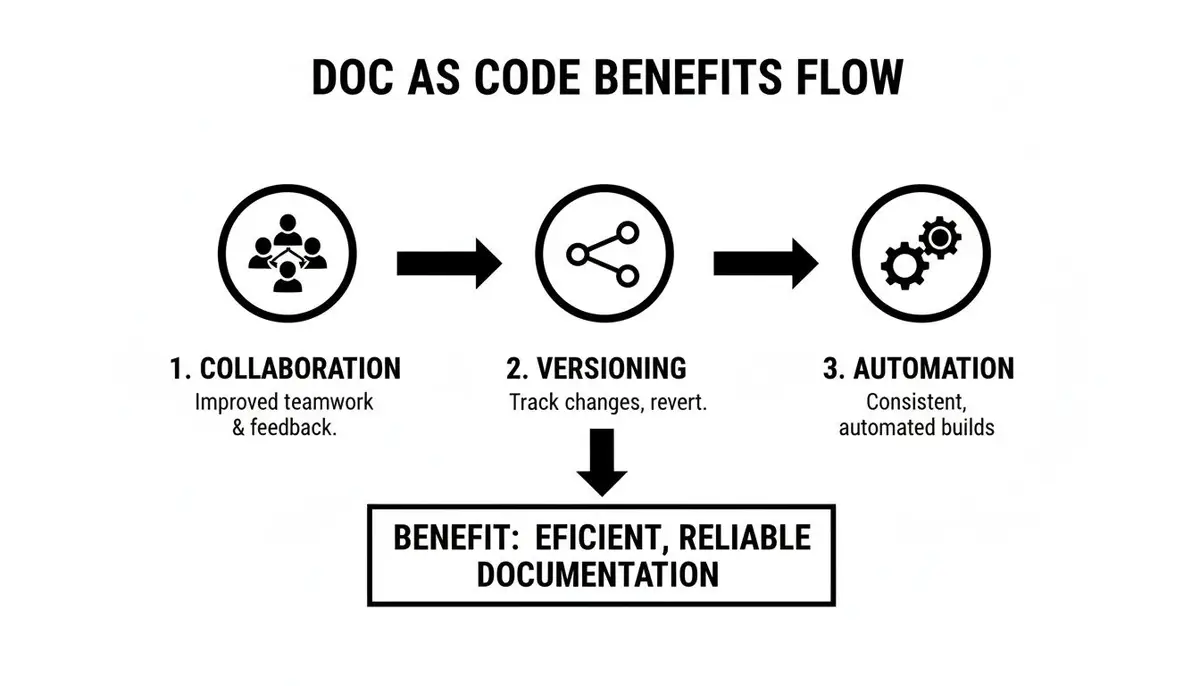
This loop—from collaborative writing to automated deployment—is what makes the whole system tick, ensuring your docs stay accurate and up-to-date.
The Local Edit and Commit
Everything starts where the developer works: their IDE, like VS Code. In a doc as code setup, the documentation files—usually written in a simple format like Markdown—live right alongside the source code in the same repository.
When a developer needs to update a feature, they also update the corresponding doc file in the same workspace. Using Git, they create a new branch for their changes, which keeps the main codebase clean and stable. Once the code and doc edits are done, they’re committed together in a single step. This is the magic moment: it binds the documentation update to the code change, making it nearly impossible for them to drift out of sync.
The Pull Request as a Quality Gate
With the changes committed, the developer pushes their branch to your team’s central repository (think GitHub or GitLab) and opens a pull request (PR). This is where the real collaboration kicks in. The PR is essentially a request to merge the new code and documentation into the main branch.
This immediately kicks off a peer review. Other team members—engineers, tech writers, even product managers—can now jump in and look over the changes. They aren’t just checking the code; they’re also scrutinizing the documentation for a few key things:
- Technical Accuracy: Does the doc correctly explain what the code does?
- Clarity and Readability: Is the explanation clear and easy for the intended audience to follow?
- Completeness: Did we miss any important details or edge cases?
This review process, which is standard practice for code, now acts as a powerful quality check for your documentation. All feedback is left as comments right in the PR, creating a clear and transparent conversation until everyone is happy and the content is ready. You can get even more out of this process by using tools that provide workflow insights to spot bottlenecks and improve how your team collaborates.
From Text Files to a Live Website
Once the PR gets the green light and is merged, the automation takes over. This is where a static site generator (SSG) enters the picture. Tools like Hugo, Jekyll, or Docusaurus are built to take a folder full of Markdown files and instantly turn them into a beautiful, fast, and searchable HTML website.
This entire build-and-publish process is handled automatically by a Continuous Integration/Continuous Deployment (CI/CD) pipeline. As soon as the PR is merged, the pipeline gets to work:
- It pulls the latest code and documentation from the main branch.
- It runs automated checks to catch things like broken links or formatting mistakes.
- It fires up the static site generator to build the new version of the website.
- Finally, it deploys the freshly built site to its hosting location.
The best part? The documentation changes are live in a matter of minutes, all without anyone having to manually upload files or push buttons. It removes the risk of human error and creates a rock-solid publishing process. For many teams, this documentation is published to a central hub, like an internal developer portal, making it easy for everyone in the organization to find.
Choosing Your Doc as Code Toolchain
Picking the right tools is crucial for a smooth doc as code workflow. Your decision should really come down to your team’s technical comfort zone, your existing development environment, and what you want to achieve with your documentation. There are a lot of great options out there, but here’s a quick comparison of some of the most popular toolchains.
Comparison of Popular Doc as Code Toolchains
| Category | Tool Example 1 (e.g., MkDocs) | Tool Example 2 (e.g., Hugo) | Tool Example 3 (e.g., Docusaurus) | Key Features & Best For |
|---|---|---|---|---|
| Language | Python | Go | JavaScript (React) | Best For: Teams that want to stick with a familiar language for easy customization. |
| Setup & Config | Simple YAML config | More options, but still straightforward | React-based, powerful but steeper learning curve | Best For: MkDocs is great for beginners. Hugo is for those who need raw speed. Docusaurus is for teams comfortable with React. |
| Key Features | Large plugin ecosystem, very simple themes | Extremely fast build times, flexible content types | Built-in versioning, search, and live-reloading | Best For: Docusaurus shines for versioned API docs. Hugo is a beast for huge sites. MkDocs is perfect for simplicity. |
| Ideal Use Case | Teams in the Python world or anyone prioritizing simplicity and a fast start. | Content-heavy sites where build performance is the absolute top priority. | Engineering teams that want to build interactive docs with React components or need strong versioning features. |
Ultimately, the “best” toolchain is the one that fits so naturally into your workflow that your team barely notices it’s there. The goal is to make writing and updating documentation feel like a seamless part of developing software, not an extra chore.
How to Implement Doc as Code with a Phased Roadmap
Jumping into a doc as code model doesn’t mean you have to flip a switch and change everything overnight. In fact, the most successful rollouts I’ve seen are gradual and intentional. A phased roadmap lets you build momentum, prove the value, and bring your team along for the ride without causing burnout.
Here’s a practical, four-phase plan to get you started. The secret to getting buy-in is to frame this change not as more work, but as a smart investment in making everyone’s lives easier. Each phase is designed to score a clear win, making it a no-brainer to move on to the next.
Phase 1: Start Small and Prove the Concept
First things first: run a small, low-risk pilot project. The goal here isn’t to boil the ocean; it’s to show the core value of the workflow in a controlled way. You have to resist that temptation to migrate everything at once. Trust me, it’s the key to getting off on the right foot.
Pick one project that’s a known pain point. Maybe it’s a widely used internal library with confusing docs, a complex API, or a service that’s a nightmare to onboard new developers to. Your mission is to create a clear “before and after” picture.
For this first phase, just focus on these simple steps:
- Select a Project: Choose a single, high-impact codebase where better docs would make a real difference.
- Create a Docs Folder: Inside its Git repository, just add a
/docsdirectory. - Migrate Existing Content: Copy and paste the current documentation into this folder, converting it to basic Markdown files. Don’t aim for perfection—just get the content into the repo.
- Make One Improvement: Ask a developer to fix one typo or clarify one confusing sentence in the docs and submit the change via a pull request.
This tiny exercise accomplishes something huge: it makes the entire concept real. Your team immediately sees the core loop in action—editing docs locally, proposing a change, and getting it reviewed just like code. It’s a powerful first step.
Phase 2: Establish the Core Workflow
Okay, you’ve got a successful pilot under your belt. Now it’s time to put a more formal process in place. This phase is all about building out the collaborative and automated parts of the workflow. You’ll be introducing the tools that turn that simple folder of text files into a polished, professional documentation site.
The goal of this phase is to make the “right way” to update documentation the easiest way. By integrating reviews and automated previews, you build quality control directly into the process, not as an afterthought.
First, make pull request reviews a standard expectation. Every documentation change, no matter how small, should go through a PR. This simple rule ensures every update gets a second pair of eyes for technical accuracy and clarity.
Next, you’ll want to pick a static site generator (SSG). There are great options out there like Hugo, MkDocs, or Docusaurus. A good rule of thumb is to choose one that aligns with your team’s existing skills—Go for Hugo, Python for MkDocs, or JavaScript/React for Docusaurus. Set it up to build a clean website from the Markdown files in your pilot project’s repository.
Phase 3: Introduce Basic Automation
Here’s where the magic really starts to happen. This phase is all about setting up a basic Continuous Integration (CI/CD) pipeline to automate the build and deployment. This is how you eliminate manual work and make sure doc changes go live instantly and reliably.
Your CI pipeline should be set up to trigger whenever a pull request is merged into the main branch. To start, the pipeline only needs to do two things:
- Build the Site: It runs your static site generator to convert all the Markdown into a complete HTML website.
- Deploy the Site: It then pushes the built site to a hosting service, making the updated documentation live for everyone.
Even a simple pipeline like this provides a ton of value. It gets rid of that “I’ll get around to publishing it later” delay and creates a direct, automated path from a merged PR to a live, updated doc.
Phase 4: Scale and Optimize the System
Once you’ve proven the automated workflow on a single project, you can start rolling it out to more teams. This final phase is about expanding the practice, setting some standards, and adding more sophisticated quality checks into your pipeline.
Start by encouraging other teams to adopt the same workflow. A great way to do this is by creating a template repository with all the basic configuration already done. This makes it incredibly easy for them to get started.
As you scale, it’s a good idea to create a documentation style guide. This document should lay out your conventions for tone, voice, formatting, and structure. It’s the key to keeping your documentation consistent as more people contribute.
Finally, you can start beefing up your CI/CD pipeline with more advanced quality checks. You can add tools that automatically:
- Check for broken links so users never hit a dead end.
- Lint your Markdown to enforce the rules in your style guide.
- Test your code samples to make sure they’re actually valid and work as expected.
By taking this phased approach, you can systematically build a powerful doc as code practice that your team will actually use. It’s how you turn documentation from a chore into a core part of your engineering culture.
How AI Is Supercharging the Doc as Code Workflow
The doc as code framework is already a huge step forward for development teams. But when you bring Artificial Intelligence into the mix, things get really interesting. AI doesn’t throw out the core ideas of versioning, reviewing, and automating your docs. Instead, it supercharges each step, adding a layer of speed and intelligence that turns a manual chore into a smooth, nearly automatic process.
The most obvious win is in content creation. An engineer can get an instant first draft of docstrings and code comments right inside their editor. No more staring at a blank page. They get a solid starting point that they can then polish and refine. From there, it’s business as usual: commit to Git, open a pull request, get a review, and publish. The workflow is the same, but the initial effort is a fraction of what it used to be.
Automating Inline Documentation Generation
This isn’t just a nice-to-have feature; it’s a booming market. The Code Comment Generation AI sector, which fits perfectly into the doc as code philosophy, is expected to grow from $0.88 billion in 2025 to $1.16 billion in 2026. That’s a 30.7% jump in a single year.
Why the explosive growth? Because it solves a real, painful problem. In most large codebases, comments can lag 70% behind actual code changes, creating a huge knowledge gap. By automating this first draft, AI helps teams keep their inline docs fresh and maintainable. And for teams managing their AI workflows, this can slash review cycle times by up to 45%. You can dig deeper into this trend in this market report on code comment generation.
Capturing and Scaling Knowledge
Beyond just writing, AI is fantastic at spotting what works and helping you scale it. Modern tools can analyze developer sessions and pinpoint the exact moments a certain prompt or technique did a great job explaining a tricky piece of code. This is where the doc as code workflow gets a serious upgrade.
Think of AI as an amplifier, not a replacement. It handles the grunt work, freeing up developers to add the critical context and nuance that only a human expert can provide.
These effective prompts—your team’s “cheatcodes”—can be captured and stored right in your documentation repository. They become reusable, version-controlled assets that standardize how your team documents its code. A moment of individual brilliance becomes part of a shared knowledge base that helps everyone.
Identifying Documentation Gaps
Maybe the most powerful use of AI in this context is its ability to find what’s missing. AI-powered analytics can watch for patterns of developer activity, like where engineers get stuck, hit errors, or search for the same thing over and over. These moments of friction are almost always symptoms of bad or missing documentation.
This gives you a data-driven roadmap for what to document next. No more guessing which guides your team needs. You can target the exact areas causing the most pain and have the biggest impact on productivity. If you’re curious about how AI is reshaping software development itself, check out our guide on how AI can be used for code.
By weaving AI into your doc as code workflow, the entire system becomes smarter, faster, and more tuned-in to what your engineers actually need.
Measuring the Impact of Your Doc as Code Workflow
Switching to a doc as code workflow feels like a huge step forward, but how do you actually prove it’s working? To get real buy-in and justify the effort, you need more than just a good feeling. It’s time to dig into the data.
Measuring success here isn’t about how many pages you’ve written. It’s about showing how your documentation directly helps the engineering team build better software, faster. Adopting this workflow is a big change for any team, and solid numbers are the best way to show everyone that it’s worth it. By tracking the right Key Performance Indicators (KPIs), you can build a strong case that good docs create more productive and confident developers.
Leading Indicators of Adoption and Engagement
Before you can see the long-term benefits, you first need to check if your team is actually using the new system. Early on, focus on metrics that show people are getting on board. These are the signs that you’re heading in the right direction.
One of the first things to look at is the volume and velocity of documentation pull requests (PRs). Are engineers adding or updating docs right alongside their code changes? A steady flow of doc PRs is a fantastic signal that documentation is becoming a natural part of the development process, not just an afterthought.
You should also keep an eye on:
- Time to Merge for Doc PRs: How quickly are doc changes getting reviewed and merged? If they’re moving fast, it means the team sees the value in keeping the knowledge base up-to-date. If they’re languishing, you know where to focus your attention.
- Number of Unique Contributors: Is it just one or two documentation champions doing all the work, or is the whole team pitching in? A growing list of contributors shows that the practice is spreading and becoming a shared responsibility.
Measuring the Impact on Developer Productivity
Ultimately, the real goal of doc as code is to make your developers more effective. This is where you connect your documentation efforts to metrics that leaders and stakeholders really care about. The idea is to measure sources of developer friction and show how they decrease over time.
A great place to start is Time to First Contribution for new hires. How long does it take for a new developer to get their environment set up, understand the codebase, and merge their first PR? Great documentation can shrink this onboarding window dramatically, which is a massive productivity boost. In fact, a 2025 IDC survey found that 83% of developers prefer code-native docs, a practice shown to slash onboarding time from four weeks down to just ten days. You can learn more about how these methods are shaping the industry in this report on the document management systems market.
Another powerful metric is developer stuck time. By cross-referencing these moments with the state of your documentation, you can draw a straight line between high-quality docs and less developer frustration. When you see stuck time drop right after you’ve improved the docs for a specific service, you’ve got concrete proof of your ROI.
Gathering Qualitative Feedback
Numbers tell you what is happening, but you need to talk to your team to understand why. To get the full picture, you have to collect feedback directly from the developers who use the docs every day.
The most impactful metrics are often a blend of hard numbers and human experience. A drop in support tickets is great, but hearing a developer say “I finally trust the docs” is the real sign of success.
Run short, simple surveys with your engineering team. Ask specific questions that get to the heart of their experience:
- On a scale of 1-5, how helpful are the docs for Project X?
- How often do you find an answer in the docs instead of having to ask a teammate?
- What’s one piece of documentation that you wish existed right now?
This kind of feedback is gold. It not only helps you gauge satisfaction but also gives you a clear, prioritized list of what to work on next. When you combine hard data like PR velocity with direct quotes from your team, you can tell a complete and convincing story about the success of your doc as code initiative.
Answering Your Doc as Code Questions
Making the switch to doc as code is a big step, and it’s totally normal for questions and a bit of skepticism to pop up. Let’s tackle some of the most common concerns I hear from engineering teams head-on.
How Can Non-Technical Writers Contribute?
This is probably the biggest—and most valid—question I get. Let’s be honest, the thought of forcing your technical writing team to become Git command-line wizards can feel like a non-starter. But it doesn’t have to be that way.
The trick is to provide different paths for different contributors. Your writers don’t need to touch the command line. They can start by using the web-based editors built right into platforms like GitHub, GitLab, or Bitbucket. These tools let them edit files, see previews, and open pull requests, all within a friendly interface that feels more like a wiki than a developer tool.
If you want an even smoother on-ramp, you can bring in a tool like Netlify CMS. It adds a traditional content management interface on top of your Git repository, giving writers a familiar rich-text editor. The changes they make are still saved as commits, but they never have to see the underlying Git workflow. It’s about meeting people where they are.
Is This Only for Technical Documentation?
Not at all. While the doc as code movement was definitely born out of engineering needs, its core principles are useful for almost any kind of important documentation. Think about it: version control, peer review, and automated checks are a winning combination anytime you need accuracy and clear ownership.
We’ve seen teams apply this model to all sorts of things:
- Internal Knowledge Bases: Building a reliable source of truth for company policies or team playbooks.
- Formal User Manuals: Managing complicated product guides where every detail has to be right.
- Legal and Compliance Docs: Creating a bulletproof, auditable history of every single change.
- Marketing Content: Collaborating on website copy and blog posts with a structured review process.
Basically, if your content needs to be correct, current, and managed by a team, the doc as code approach is worth a serious look.
What Is the Real Difference Between This and a Wiki?
This is a great question because on the surface, they can seem similar. The real difference comes down to three things: structure, review, and integration.
A wiki is often a free-for-all. Anyone with permissions can jump in and make a change directly. That’s great for speed, but it’s a recipe for inconsistent quality, outdated info, and no real accountability. It’s a system built on suggestions.
Doc as Code enforces a structured review process. A wiki offers a suggestion box; a pull request is a formal proposal with a built-in review and approval workflow.
With doc as code, every change is a formal proposal—a pull request. It gets reviewed by the right people, can be tested automatically, and only gets merged once it’s approved. This creates a powerful quality gate and a transparent history of who changed what, when, and why. Most importantly, it keeps your documentation tied directly to the code it describes, which is the single best way to stop it from going stale.