
AI for DevOps: Use Cases, Benefits and Risks
Related guide: DORA metrics and AI coding
AI for DevOps isn’t just about adding another tool to the stack. It’s about a fundamental shift in how we build and ship software—moving from a world of reacting to problems to one where we can predict them. At its core, it’s about weaving artificial intelligence into the entire software lifecycle to automate, optimize, and secure everything we do.
Understanding AI For DevOps And Why It Matters
Think of it this way: if traditional DevOps is like a skilled pilot flying a plane with a standard set of instruments, AI for DevOps is the upgrade to a state-of-the-art autopilot. This isn’t just a system that follows a pre-programmed flight path. It anticipates turbulence before it hits, finds the most efficient route in real-time, and handles countless routine system checks on its own. The pilot is freed up to focus on the bigger picture—handling unexpected events and ensuring the smoothest possible journey.
That’s exactly what AI is becoming for engineering teams: an essential co-pilot. The pressure to ship features faster without breaking things is relentless. AI steps in to help manage that complexity by taking over tedious tasks, surfacing data-driven insights, and flagging issues long before they ever reach a customer.
The Driving Force Behind Adoption
The push for AI in DevOps isn’t just hype; it’s a massive market shift backed by real numbers. The market for AI-driven DevOps tools is expected to jump from $5.9 billion in 2025 to a staggering $19.3 billion by 2033, growing at a compound annual rate of 28.20%. This isn’t just random growth; it’s fueled by the real-world impact AI is having on CI/CD pipelines, monitoring, and analytics. You can dig deeper into these market projections and their impact.
AI completely changes the “what-if” game. We stop asking, “What if this deployment fails?” and start asking, “What potential failures can AI see and help us prevent before we even think about deploying?”
This shift directly tackles some of the most persistent headaches in modern software development:
- Information Overload: Modern applications spit out a firehose of log data. Trying to find the root cause of an issue manually is like finding a needle in a haystack.
- Pipeline Bottlenecks: Manual code reviews, slow testing cycles, and waiting for deployment approvals are constant speed bumps.
- Security Vulnerabilities: Finding genuine threats in a sea of code and dependencies is a massive, never-ending challenge.
By bringing intelligent automation into the mix, AI for DevOps cuts through these problems. It gives teams the ability to build, test, and release software faster, more securely, and with a lot more confidence. It’s the next logical step in our evolution, turning raw data into smart decisions and potential disasters into chances to get ahead of the curve.
To make this crystal clear, let’s look at how things change side-by-side. The old way of doing things relied heavily on manual effort and scripts, while the new approach is all about intelligent automation and foresight.
Traditional DevOps Vs AI-Powered DevOps At A Glance
| DevOps Pillar | Traditional Approach (Human-Driven) | AI-Powered Approach (Predictive & Automated) |
|---|---|---|
| Observability & Monitoring | Teams manually sift through logs and dashboards after an alert fires. Root cause analysis is a reactive investigation. | AI analyzes telemetry data in real-time, detects anomalies, and pinpoints the likely root cause before users are impacted. |
| Incident Response | Engineers are paged, assemble in a war room, and manually diagnose the issue based on runbooks and experience. | AI automatically correlates alerts, suggests remediation steps, and can even trigger automated fixes for known issues. |
| CI/CD Pipeline | Pipelines are configured with static rules. A failed build requires manual investigation to find the flaky test or bad commit. | The pipeline dynamically adjusts. AI predicts the risk of a new change and can automatically roll back a faulty deployment. |
| Testing & Quality | A fixed suite of tests runs on every build. Writing new tests is a manual, time-consuming process. | AI generates relevant tests based on code changes, prioritizes tests to run, and identifies high-risk areas needing more coverage. |
| Infrastructure & Cost | Resources are provisioned based on static configurations or historical peaks. Cost optimization is a periodic manual review. | AI continuously analyzes usage patterns to right-size resources, predict future needs, and automate cost-saving adjustments. |
| Security (DevSecOps) | Security scans are run at specific gates in the pipeline. Vulnerability reports are manually triaged and prioritized. | AI scans code for vulnerabilities as it’s written, identifies novel threats, and automatically prioritizes the most critical fixes. |
This table really highlights the evolution. We’re moving away from a world where we simply automate pre-defined steps to one where the system itself is intelligent, adaptive, and helps us make better decisions at every turn.
How AI Is Changing the DevOps Game
Think of AI not as just another tool in the DevOps toolbox, but as a proactive team member that’s reshaping how we work at every single stage. By weaving intelligent automation into the entire lifecycle—from the first whiteboard session to monitoring in production—AI gives engineering teams a serious advantage. It takes the manual, repetitive slogs and turns them into smart, data-informed workflows, letting teams build and ship software faster and with a lot more confidence.
This isn’t just a future-looking trend; it’s happening right now. A whopping 81% of professionals say their companies are putting more resources into AI. And the payoff is clear: 99% of them are seeing real benefits. We’re talking about tangible results, like the 61% who are shipping better-quality products and the 49% who are getting their features to market faster.
From Initial Plans to Smarter Code
Right from the get-go, in the Plan stage, AI is making a difference. By digging into data from past projects, AI tools can help teams sharpen their requirements and get much more accurate with their delivery estimates. It’s like having a crystal ball that spots potential bottlenecks before anyone even starts coding.
Then, when it’s time to Code, AI assistants like GitHub Copilot really come into their own. They’re not just glorified autocomplete. They act like a junior developer, helping you:
- Spin up entire functions just from a simple description.
- Suggest smart ways to refactor code for better performance.
- Automatically write unit tests to keep quality high from the start.
This frees up developers from the more mundane coding chores, letting them focus their brainpower on the tough architectural challenges.
The diagram below shows this evolution perfectly, contrasting the old way of doing things with a new, AI-driven approach.
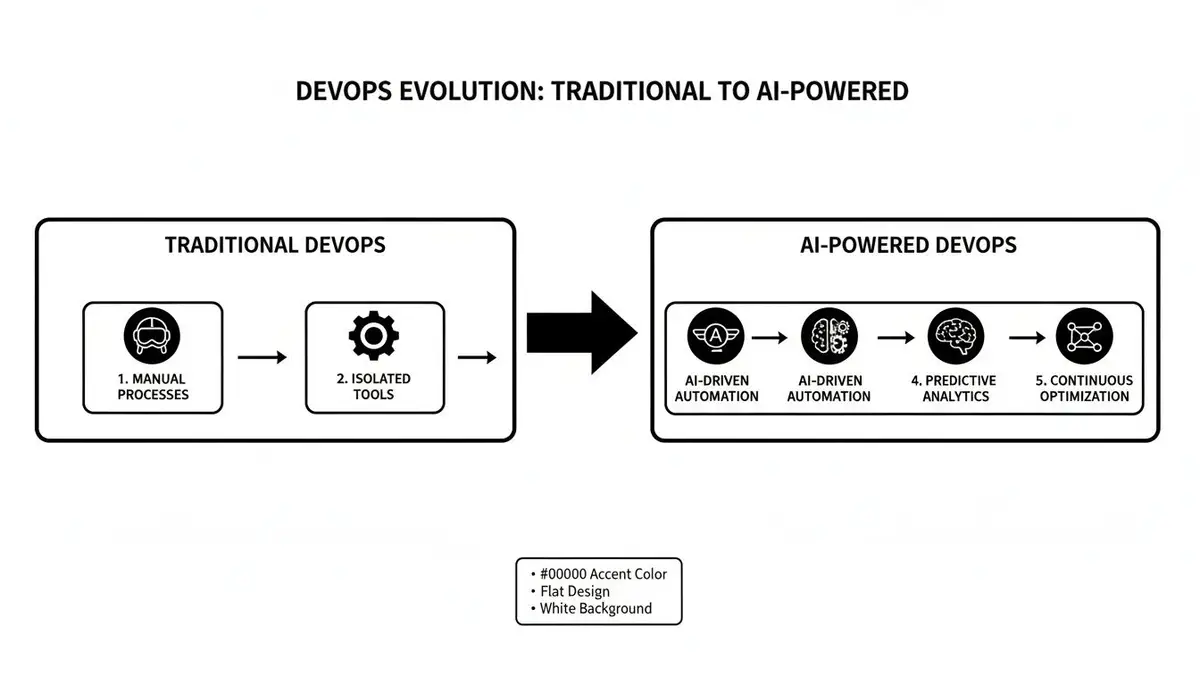
You can see how AI injects intelligence into each phase, shifting the focus from reacting to problems to proactively preventing them in the first place.
Building, Testing, and Releasing with a Brain
When we move into the Build and Test phases, AI gets really clever. It can look at new code changes and predict which tests are most likely to break, so the pipeline runs those first to give you faster feedback. It can even dream up new test cases for weird edge scenarios a human tester might never think of, making the final application that much more robust.
And for the Release stage? AI helps de-risk deployments. By analyzing the code changes and comparing them against past incidents, it can flag a new release as high-risk before it ever hits production. This is where AI takes the core ideas of DevOps automation and puts them on steroids, pushing both speed and safety.
AI transforms monitoring from a rearview mirror into a forward-looking radar. Instead of just showing you what broke, it tells you what is about to break.
Finally, once the code is live, the Monitor phase is where AIOps platforms become essential. They constantly churn through an ocean of logs, metrics, and traces to spot anomalies the moment they happen. When something does go wrong, these systems can slash investigation time, pointing directly to the root cause in seconds instead of hours. No more late-night war rooms trying to figure out what went sideways.
The Tangible Benefits For Your Team And Business
Bringing AI into your DevOps practice isn’t just a tech upgrade for the sake of it. It’s about creating real, measurable value that you can feel on the engineering floor and see in the boardroom. For engineers, it’s a direct attack on daily frustrations and mental burnout. For the business, it’s how you build a competitive edge on speed, stability, and security.
Empowering Your Engineering Teams
The first thing you’ll notice when you adopt AI for DevOps is how it cuts down on “developer toil”—all those repetitive, soul-crushing tasks that drain energy and morale. Imagine a failed build. Instead of a developer manually digging through a mountain of CI/CD logs, an AI assistant can instantly point to the exact commit that broke things. That’s hours of painful detective work just gone.
This same idea of getting faster, smarter feedback applies across the development cycle. AI can:
- Generate Unit Tests: Automatically write test cases for new code, helping you hit your coverage goals without the manual grind.
- Predict High-Risk Changes: Look at a new pull request, compare it to past data, and flag it as risky, signaling the team to give it a closer look.
- Simplify Troubleshooting: When an incident kicks off, AI can connect the dots between alerts from different tools and suggest a likely root cause, shrinking the time spent in a high-stress “war room.”
By automating the tedious and speeding up the complex, AI gives engineers the space to do what they were hired for: solve hard problems and build great products.
Ultimately, this all comes down to reducing cognitive load. No one has to keep the entire system architecture perfectly mapped out in their head anymore. AI becomes a kind of shared memory for the team, providing context and insight right when it’s needed most.
Driving Bottom-Line Business Outcomes
These day-to-day wins for engineers create a ripple effect that leads to big advantages for the business. When your development teams can move faster, the whole company gets a speed boost. Tighter feedback loops and automated testing directly shorten your time-to-market for new features, which means you can respond to customer demands and market changes much more quickly.
System reliability gets a huge lift, too. AI-powered monitoring and incident response have a direct, positive impact on key operational metrics. By tracking improvements in vital DevOps performance metrics like Mean Time to Restore (MTTR) and Mean Time Between Failures (MTBF), you can put hard numbers on the stability you’ve gained. Fewer outages mean happier customers and less risk to your revenue.
It all connects to create a powerful value chain:
- Cost Savings: AI can help optimize your cloud spend by predicting resource needs and preventing over-provisioning. Plus, every hour your team isn’t spending on manual maintenance is an hour they can spend on innovation.
- Stronger Security: AI tools can spot potential vulnerabilities in code as it’s being written, shifting security left and stopping expensive breaches before they ever have a chance to happen.
- Better Resource Allocation: With AI handling the routine diagnostics and fixes, your senior engineers are free to work on strategic projects instead of being pulled into firefighting all day.
When you connect these technical improvements to clear financial and operational wins, AI for DevOps stops being a buzzword and becomes a critical business investment.
Navigating The Risks With Smart AI Governance
Bringing AI for DevOps into your workflow is exciting, but let’s be real—it comes with a new set of challenges. Jumping in headfirst without any guardrails is like letting a self-driving car navigate a city without a map or a human ready to take the wheel. The biggest pitfalls are usually around data privacy, the mysterious “black box” nature of some AI, and blindly trusting automation without a sanity check.
To do this right, you need a solid AI governance framework. This isn’t about bureaucracy or slowing things down; it’s about building a trustworthy foundation so you can move faster, safely. As you start weaving AI into your DevOps practices, setting up clear policies for its use is a must-have, and resources on Artificial Intelligence Governance can point you in the right direction. A good framework ensures AI is a tool that serves your team, not the other way around.
The Human-in-the-Loop Imperative
The absolute cornerstone of any good AI governance plan is the human-in-the-loop model. This is a simple but powerful idea: for any high-stakes decision, the AI can suggest, but a human must approve. Think production deployments, critical security patches, or major infrastructure changes.
For example, an AI might flag a code change as a potential performance bottleneck. But only a developer has the context to decide if that risk is acceptable for the upcoming feature launch. This approach is non-negotiable for complex systems where an AI can’t possibly grasp the full business impact of its suggestions. It’s the essential safety net that keeps automation from going off the rails.
The best AI strategy doesn’t try to replace human judgment; it supercharges it. You’re aiming for a partnership—the machine’s raw data-processing power combined with a human’s deep understanding of context.
Building Trust Through Transparency and Training
Another big hurdle is the ‘black box’ problem. This happens when an AI gives you an answer but can’t tell you how it got there. To get around this, you have to choose tools that value model transparency and explainability. Your team needs to see why an AI recommended a specific code refactor or flagged a security issue. That visibility is what builds trust and lets engineers confidently validate the AI’s logic.
When you’re starting out, pick your battles wisely. Begin with low-risk, high-impact use cases. Don’t try to automate production rollbacks on day one. Instead, start by having AI analyze test failures or suggest improvements for your staging environment. You can explore how to safely introduce tools for AI code review automation to get a feel for it. This lets your team build confidence and skills without the pressure. And remember, ongoing training is crucial so everyone knows what the AI can—and can’t—do.
Your Roadmap To Adopting AI In DevOps
Jumping into AI for DevOps isn’t like flipping a switch. It’s a journey, one that’s best taken in stages. A gradual approach lets your team build confidence, prove the value of these new tools, and scale up what works without throwing your current workflows into chaos.
Think of it like learning to sail. You wouldn’t start by trying to cross the Atlantic. You’d begin in a calm harbor, learning how the sails work and how to steer. Only after you’ve got the basics down would you head for open water. This roadmap works the same way, guiding you from a small, controlled pilot to optimizing your entire organization.
Phase 1: Experiment And Learn
The first step is all about starting small. Your goal isn’t to overhaul the entire company overnight, but to score a single, measurable win. This builds momentum and gives your team hands-on experience in a low-risk environment.
Find one specific, high-impact bottleneck in your current process. The best candidates are tasks that are both repetitive and a major time sink for your engineers.
A few great places to start include:
- Automating Vulnerability Scanning: Set up an AI tool to not just scan, but also prioritize vulnerabilities in your CI pipeline. Even better, see if it can suggest fixes for common security flaws.
- Log Anomaly Detection: Point an AIOps tool at a non-critical service and see if it can spot unusual patterns faster than your existing alerts.
- AI-Assisted Code Reviews: Equip a small team with an AI assistant to suggest refactors or generate unit tests for a specific part of the codebase.
The secret here is to target one problem, put a small team on it, and give them the freedom to play around. This phase is about learning, not perfection.
Phase 2: Measure And Standardize
Once your pilot project from Phase 1 starts looking promising, it’s time to back it up with hard data. This is where you move from a cool experiment to a repeatable, proven strategy. If you can’t measure the improvement, you can’t make a business case for scaling it.
Focus on tracking metrics that directly tie back to the problem you solved. For instance:
- If you automated vulnerability scanning, track the reduction in time spent on manual triage and the number of critical vulnerabilities you caught earlier.
- If you used AI for code reviews, measure the change in code churn or the time saved per pull request.
This is where you separate hype from reality. Solid metrics turn a “cool” AI tool into a “critical” business asset by demonstrating undeniable ROI.
As you figure out what works, start documenting everything. Create a small library of effective prompts, write down best practices for the new tool, and build a short guide for other teams to follow. This standardization is your bridge to the final phase. As teams get better at crafting prompts and workflows, they can find more detailed guidance in our guide to AI software engineering.
Phase 3: Scale And Optimize
With proven results and clear documentation in your back pocket, you’re finally ready to scale. Phase 3 is all about taking your validated workflows and rolling them out to more teams and more complex problems. This is where the true organizational impact of AI for DevOps really starts to emerge.
Start by introducing the standardized practices from Phase 2 to adjacent teams facing similar challenges. Hold a few lunch-and-learns, share the impressive metrics from your pilot, and hand over the documentation to make it easy for them to get started. As more teams get on board, you can start integrating AI tools more deeply into your core infrastructure.
This final stage is really a continuous loop. You’ll need to constantly refine your approach based on broader performance data and feedback from across the organization. What worked perfectly for one team might need a few tweaks for another. The end goal is to build a culture where AI is seen as a natural, integrated co-pilot for every engineer, constantly improving your speed, quality, and reliability.
AI For DevOps Adoption Roadmap
Here’s a quick summary of the three-phase plan for bringing AI into your DevOps practices, from those first small experiments to scaling across the entire organization.
| Phase | Key Objective | Actions to Take | Success Metrics |
|---|---|---|---|
| 1: Experiment | Achieve a measurable win in a low-risk setting. | Identify one bottleneck. Form a small pilot team. Experiment with one AI tool on a non-critical system. | Qualitative feedback from the pilot team. Initial time savings on a specific, targeted task. |
| 2: Standardize | Prove business value with data and create a repeatable playbook. | Track key performance indicators (KPIs). Document effective prompts, workflows, and best practices. | 20% reduction in manual triage time. 15% faster pull request reviews. Positive ROI demonstrated. |
| 3: Scale | Embed AI as a core capability across the engineering organization. | Roll out proven workflows to more teams. Integrate AI into core tooling. Establish a center of excellence. | Measurable improvements in DORA metrics. Widespread adoption across multiple teams and projects. |
By following this structured roadmap, you can avoid the common pitfalls of technology adoption and ensure your investment in AI delivers real, lasting value to your engineering teams and the business as a whole.
Got Questions About AI in DevOps? We’ve Got Answers.
As teams start to dig into what AI can really do for their development pipelines, a lot of the same questions and a few healthy doubts tend to pop up. That’s a good thing. Getting clear on the reality versus the hype is the first step to making smart decisions.
Let’s tackle some of the most common questions head-on so you can move forward with confidence.
Is AI Going to Take My DevOps Job?
Short answer: No. AI is here to make your job better, not to replace you.
Think about all the repetitive, soul-crushing tasks on your plate—sifting through mountains of logs, running routine security checks, or writing the same boilerplate IaC script for the tenth time. That’s where AI shines. It’s built to automate the tedious, data-intensive work.
This frees you up to focus on what humans do best: designing robust systems, planning long-term strategy, and solving those tricky, “it’s never happened before” problems. AI isn’t the pilot; it’s a seriously smart co-pilot that helps you fly faster and safer.
What’s the Difference Between AIOps and AI for DevOps?
It’s easy to get these two mixed up, but the distinction is pretty important.
AIOps (AI for IT Operations) is laser-focused on the live production environment. Its main job is to watch over things, analyze monitoring data, predict when something might break, and help automate the response when it does. Think of it as the AI specialist for the “operate” and “monitor” phases.
AI for DevOps is the bigger picture. It’s about applying AI across the entire software development lifecycle. This includes everything from helping you write code and tests, to optimizing your CI/CD pipeline, and even securing your infrastructure from the get-go. AIOps is a crucial piece of the puzzle, but it’s just one part of the broader AI for DevOps landscape.
How Do We Actually Measure the ROI of AI in Our Pipeline?
You can’t just “feel” the improvement; you have to prove it. Measuring the return on investment (ROI) for AI comes down to tracking the right metrics before and after you introduce it.
To get buy-in and justify the cost, you have to move past gut feelings and show hard numbers. The best place to start is with the core DORA metrics—Deployment Frequency, Lead Time for Changes, and Mean Time to Restore. These are the gold standard for measuring pipeline health and efficiency.
Beyond DORA, you can also track other tangible wins. Look for a reduction in build failures, a lower count of security vulnerabilities making it past development, and a measurable decrease in the hours your team spends on manual grunt work. When you add up the time saved and the risks avoided, the ROI becomes crystal clear.
Putting It All Together: A Pragmatic Roadmap
So, where do you start? The idea of injecting AI into your entire DevOps lifecycle can feel overwhelming. The key is to think incrementally. Don’t try to boil the ocean.
A successful rollout isn’t about flipping a switch; it’s about building momentum.
Start with a Pilot Project
First, pick one area to focus on. Look for a process that’s a known bottleneck or a source of frequent, low-risk failures. A good candidate might be automating the initial triage of production alerts or generating unit tests for a non-critical service.
The goal here is simple: get a small, measurable win. This builds confidence and helps you understand how these tools fit into your team’s actual workflow. Keep a human in the loop—use the AI to generate suggestions, not to push code directly to production on day one.
Measure What Matters
To know if this is actually working, you have to track the right things. The DORA metrics are your North Star here.
Focus on tracking improvements in these key areas:
- Lead Time for Changes: How much faster can you get from a code commit to a successful deployment?
- Change Failure Rate: Are your AI-assisted code reviews and tests actually reducing the number of bugs that make it to production?
- Mean Time to Restore (MTTR): When something does break, does AI-powered incident analysis help you fix it faster?
Proving a tangible impact on these numbers is the best way to get buy-in to expand your efforts.
Key Questions to Ask Before You Scale
Once you’ve got a successful pilot under your belt, it’s tempting to go all-in. Before you do, pause and reflect with your team.
Here are a few critical questions to guide your strategy:
- What are our real bottlenecks? Look at your value stream. Where does work slow down the most? That’s your next target.
- How will we handle the data? AI models need data to learn. Do you have a clear governance plan for what data they can access and how it will be secured?
- Are our people ready? This is a new way of working. What training or support does your team need to feel comfortable and proficient with these new AI assistants?
Answering these questions honestly will help you scale thoughtfully, turning that initial small win into a fundamental improvement in how you build and deliver software.