
Mastering the Cycle Time Formula for Faster Delivery
Related guide: DORA metrics and AI coding

At its most basic, the cycle time formula is beautifully simple: Cycle Time = End Date - Start Date. This calculation measures the total time that passes from the moment work actively begins on a task until it’s finished and delivered.
What Is the Cycle Time Formula?
Think of the cycle time formula as a stopwatch for your development process. The clock starts ticking the second a developer pulls a task into their “In Progress” column and doesn’t stop until that work is live in production. This isn’t just about raw speed; it’s a powerful indicator of your entire workflow’s health and efficiency.
By measuring the actual time it takes to move work across the board, you get a clear, data-driven picture of what your team can deliver. No more guesswork or fuzzy estimates—this is a direct reflection of your process in action. A low, predictable cycle time is the signature of a high-performing team that consistently ships value to users.
Why Cycle Time Matters for Your Team
Tracking cycle time is about so much more than just hitting deadlines. It gives you deep insights that can fundamentally improve how your team operates. The real-world benefits are huge:
- Faster Feedback Loops: When you shrink cycle times, you get features in front of real users faster. This means you can gather crucial feedback and iterate quickly, building what customers actually want.
- Improved Predictability: Once you know your team’s average cycle time, you can forecast future projects with far greater accuracy. This builds trust and sets realistic expectations with stakeholders.
- Bottleneck Identification: Is your cycle time suddenly spiking? That’s often the first red flag for a hidden problem, like a bogged-down code review process or a flaky testing environment.
Cycle time has become a go-to metric for measuring a software team’s efficiency. It’s no wonder, considering just under 40% of developers report that it takes one to two weeks to get code from a concept into a customer’s hands. That timeline has a direct impact on how fast a business can innovate. You can find more detail in these software developer statistics from Allstacks.
This diagram helps visualize the journey a task takes, from the first line of code to its final deployment.
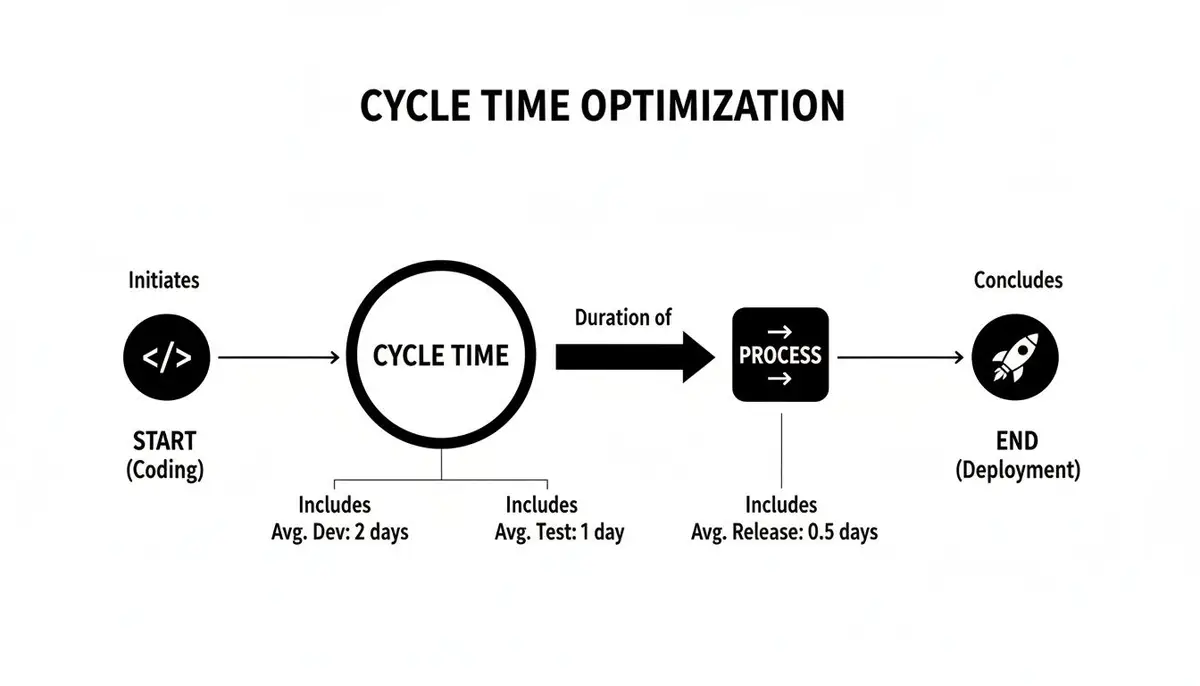
As you can see, cycle time covers the entire active development process, not just the time spent heads-down coding.
Distinguishing Cycle Time from Lead Time
It’s incredibly common to mix up cycle time and lead time, but they measure two very different—though related—parts of the delivery process. Getting them straight is key.
Lead time is all about the customer’s perspective. It starts the moment a request is made (like when a ticket is created in Jira) and ends only when that request is fully delivered. It includes all the idle time the ticket spends waiting in the backlog before anyone even looks at it.
Cycle time, on the other hand, is the developer’s perspective. It begins only when a developer actively starts working on the task and ends when that work is shipped.
Here’s a simple analogy: imagine ordering a coffee.
The total time from when you place your order until the cup is in your hand is the lead time. The time the barista actually spends grinding the beans, pulling the shot, and steaming the milk is the cycle time. The formula helps you zero in on making the “coffee-making” part of your process as efficient as possible.
Cycle Time vs. Lead Time At a Glance
This table breaks down the core differences to help you see how these two critical metrics give you different views of your workflow.
| Metric | Starts When… | Ends When… | What It Measures |
|---|---|---|---|
| Lead Time | A request is made (e.g., ticket created). | The request is fulfilled and delivered. | The entire customer experience, including wait time. |
| Cycle Time | Active work begins on a task. | The task is completed and delivered. | The internal team’s process efficiency. |
Essentially, lead time shows you how long your customers are waiting, while cycle time shows you how fast your team is working. Both are valuable, but they tell very different stories.
How to Calculate Cycle Time with Real Examples

Alright, let’s get our hands dirty and move from theory to practice. Seeing the cycle time formula in action is where you’ll really grasp its value for your team.
But first, a crucial step: you have to agree on your start and end points. This is non-negotiable. Without a consistent definition, your measurements will be all over the place and pretty much useless.
Does work “start” when a ticket is dragged into the “In Progress” column? Or is it when the first commit is pushed? Similarly, is a task “done” when the code is merged, or only after it’s live in production? There’s no single right answer here, but your team has to pick one definition and stick to it.
Example 1: The Straightforward Path
Let’s walk through a simple, best-case scenario. Say your team is building a new “Dark Mode” toggle for your app. You’ve all agreed on these definitions:
- Start Date: The moment the task moves from “To Do” to “In Progress.”
- End Date: The moment the feature is deployed and available to all users.
Here’s how the timeline plays out:
- A developer grabs the ticket and starts coding on Monday, July 8th.
- The feature is fully coded, tested, and deployed by Friday, July 12th.
The calculation is as simple as it looks:
Cycle Time = End Date (July 12th) - Start Date (July 8th) = 4 days
Simple enough. This tells you it took four full business days to get that feature from the developer’s keyboard into the hands of your users.
Example 2: A More Realistic Scenario with Rework
Of course, software development is rarely a straight line. The real world is messy, filled with feedback loops, unexpected snags, and rework. This is where cycle time really shines, because it captures the entire messy reality, not just the “active coding” part.
Let’s look at a bug fix that hits a common speed bump: code review.
- Monday, August 5th: A developer starts working on a critical bug.
- Tuesday, August 6th: The fix is pushed, and a pull request (PR) is opened for review.
- Wednesday, August 7th: A reviewer leaves feedback requesting changes. The PR is now blocked, waiting on the original developer.
- Thursday, August 8th: The developer addresses the feedback and updates the PR.
- Friday, August 9th: The updated code gets the green light and is deployed to production.
Notice that even with the back-and-forth, our start and end points don’t change. The cycle time clock doesn’t pause just because a task is waiting for review.
Cycle Time = End Date (August 9th) - Start Date (August 5th) = 4 days
The total cycle time is still four days. This is a powerful insight! It shows how a seemingly simple bug fix can easily soak up the better part of a week once you account for the entire process, including wait times.
When you track this over time, you start to see patterns. Maybe you’ll notice that the code review stage consistently adds a day or two to your cycle time. This is the kind of data that helps you pinpoint real bottlenecks. To get a stable baseline, you’ll want to calculate the average cycle time across dozens of tasks.
And if you’re looking to get more sophisticated with your tracking, you might want to learn how to build a cycle time calculator tailored to your team’s workflow.
Uncovering the Hidden Bottlenecks That Bloat Your Cycle Time
Knowing your cycle time is a great first step, but figuring out why it’s so high is where the real work begins. We’ve all been there: a task estimated at two days somehow stretches into two weeks. What happened? The answer almost always lies in the hidden friction—all the non-coding stuff that quietly sabotages your team’s speed and blows up your cycle time metrics.
Here’s a reality check that surprises a lot of people: developers spend way less time coding than you’d think. A March 2023 survey revealed that developers spend just 43% of their time actually writing code. The other 57% gets eaten up by meetings, administrative tasks, and a whole lot of waiting. It’s this “waiting” that’s the real killer. Data from the 2022 State of Engineering Time survey gets even more specific: 38% of developers say they’re stuck waiting on other people, and 42% are left waiting on machines. You can dig into more of these software development challenges at machonedigital.com.
This is exactly why telling developers to “code faster” misses the point entirely. Your biggest wins will come from attacking the dead time between the coding.
The Code Review Queue
One of the most common culprits? The code review process. A developer finishes their work, opens a pull request (PR), and… crickets. It just sits there, sometimes for hours, often for days, waiting for a teammate to take a look. Every single moment that PR is idle, your cycle time clock is ticking away.
This isn’t just about the initial delay, either. It’s about killing momentum. When a developer finally gets feedback, they have to slam the brakes on their current task, mentally reload the context of that original ticket, make the changes, and push it up again. That context switching is a huge mental drain and a recipe for more delays.
Clunky Testing and Deployment
Manual processes are an absolute anchor on your cycle time. If every single change requires a person to manually kick off a test suite or deploy code to a staging server, you’re building massive delays right into your workflow. It gets even worse when only one specific person has the keys to perform these tasks.
A slow, manual deployment process can easily turn a one-day feature into a three-day ordeal. Hitting “code complete” feels like a false summit when the path to production is blocked by a series of manual gates and dependencies.
This is where automated testing and CI/CD (Continuous Integration/Continuous Delivery) pipelines are game-changers. They take the human element out of the equation, ensuring that code can move from a developer’s machine to production with as little friction as possible. But before you can start fixing this, you have to get a clear picture by first calculating cycle time for your team.
Waiting on Environments and Resources
Another classic bottleneck is simply waiting for the tools and access needed to do the job. This logjam can show up in a few different ways:
- Staging Environment Gridlock: The shared staging environment is a one-car garage, and everyone is lined up waiting for their turn.
- API and Database Dependencies: Your work is completely blocked because you’re waiting for another team to finish their piece of the puzzle.
- Missing or Unclear Documentation: Developers burn valuable hours just trying to find the information they need to get started.
From a cycle time perspective, these waiting periods are pure waste. No progress is being made on the task, but the clock doesn’t stop. The result is bloated, unpredictable delivery timelines. The first step to fixing these tangles is learning to spot them in the first place.
Actionable Ways to Shrink Your Cycle Time

Spotting the bottlenecks is only half the job. The other half is actually doing something about them. The aim isn’t some massive, one-time overhaul but a series of small, smart tweaks that add up to a much shorter cycle time. It’s all about creating a smoother, more predictable flow of work.
This means we need to stop focusing on individual heroics and start looking at the process itself. Instead of telling developers to “code faster,” the real question should be, “What’s getting in the way of the code moving forward?” That simple shift in perspective is what leads to real, sustainable improvements.
Break Big Tasks into Smaller Pieces
Honestly, one of the most effective things you can do is just make the work smaller. Big, monolithic features are a nightmare to estimate and are notorious for attracting delays and scope creep. They essentially create a traffic jam in your workflow, blocking other important work from getting through.
When you break those big projects down into small, self-contained tasks, you get a few immediate wins:
- They move faster. Smaller tasks just fly through each stage of the process.
- You get feedback sooner. Getting smaller chunks of work reviewed and tested means you find problems when they’re still easy to fix.
- You lower the risk. If a small task gets stuck, it’s a minor hiccup. If a massive feature hits a wall, it can derail a whole sprint.
Think of your workflow like a highway. A few oversized trucks can gridlock everything. But a steady stream of cars keeps traffic flowing beautifully. You should aim for tasks that your team can take from an idea to deployed in just a couple of days.
Automate Your Testing and Deployment
Manual steps are the natural enemy of a short cycle time. Every single time a developer is sitting around waiting for a manual test or for someone to push the deployment button, the clock is ticking. These manual handoffs add unpredictability and human error right when you need things to be smooth.
This is where automation becomes your best friend. Adopting solid CI/CD pipeline best practices is one of the most powerful moves you can make to slash your cycle time. It just takes all the friction out of the last mile.
By automating your builds, tests, and deployments, you create an express lane straight to production. This doesn’t just cut down on dead time; it frees up your team to do what they do best: build great software, not babysit releases.
Rethink Your Code Review Process
The code review stage is often a black hole where time disappears. If a pull request (PR) sits idle for days, you’ve found a major bottleneck. The fix isn’t to skip reviews, but to create a culture where feedback is fast and constructive.
Here are a few ideas to get started:
- Set a team agreement: Decide on a target turnaround time for reviews, like promising a first look within 24 hours. This creates a shared sense of responsibility.
- Keep PRs small: This connects back to breaking down work. A small, focused PR is infinitely easier for a teammate to review quickly.
- Automate the easy stuff: Use tools like linters and code formatters to catch the simple mistakes before a human ever has to.
When you start treating code review as an active, collaborative part of the process instead of a passive queue, you can easily shave days off your average cycle time.
Measuring Cycle Time in the Age of AI

The explosion of AI coding assistants is shaking up how software gets built, and it means we need to look at the traditional cycle time formula through a fresh lens. While tools like GitHub Copilot can make the initial coding phase feel lightning-fast, that speed doesn’t automatically translate to faster delivery.
This new way of working brings its own unique delays. Time spent wrestling with prompts, double-checking AI-generated logic, or debugging strange outputs can easily cancel out any gains. This is why modern observability tools are no longer a nice-to-have; they’re essential for seeing what’s really happening with your team’s velocity.
Adapting Your Measurement Strategy
To get a true read on cycle time in an AI-heavy workflow, you have to look past the simple start and end dates on a ticket. The real story is in the back-and-forth between the developer and the AI. The crucial question becomes: are your developers spending more time coaxing the AI than it would have taken to just write the code themselves?
This calls for a much more granular approach to your metrics. You need to start capturing data that shows the details of this new process.
Some key questions to ask are:
- How much time are we spending generating code versus verifying it?
- Which kinds of tasks are getting the biggest boost from AI?
- Where are the new slowdowns and friction points in our AI-assisted workflow?
Without this deeper insight, you’re just playing a shell game with your bottlenecks. You might shrink the “coding” part of the cycle only to unknowingly bloat the “review and rework” phase. It’s a common growing pain for teams adopting AI in software engineering.
Gaining Visibility into AI Workflows
This is where tools built for the AI era, like Zest, can give you the visibility you need. Zest links each engineer’s AI coding sessions to the pull requests they led to, and its GitHub App reports PR cycle time.
By tracking what’s happening with prompt engineering and code validation, you can pinpoint exactly where AI is a powerful accelerator and where it might be adding drag. This data gives you the power to fine-tune how your team works with AI tools.
The goal isn’t just to make one part of the process faster. It’s to make sure you’re actually using AI to shorten the entire delivery cycle from start to finish. And you can’t improve what you don’t measure.
Why Managing Cycle Time Is Key to Project Success
Getting a handle on your team’s cycle time isn’t just some academic exercise for engineers. Think of it as a vital sign for your entire project’s health. When you see a low and predictable cycle time, it’s not just a nice number to report—it’s proof that your team can consistently ship value. And that’s the bedrock of any successful project.
On the flip side, a long or unpredictable cycle time is an early warning system. It’s a flashing red light signaling deeper problems. You might be dealing with hidden bottlenecks, friction in your process, or crippling team dependencies that are putting your deadlines, budget, and even your reputation on the line.
The stakes are incredibly high. Industry data paints a pretty sobering picture of just how easily projects can go off the rails. According to 2023 figures, a shocking 31.1% of software projects are canceled before they even see the light of day. Even worse, 52.7% blow past their budgets, often by a massive 189%.
With only 16.2% of projects actually finishing on time and on budget, it’s crystal clear that predictability is a rare and valuable commodity. You can see more of these challenging software project statistics for yourself.
From Metric to Mindset
When you start actively managing cycle time, your team’s focus naturally shifts from just being busy to actually being effective. The conversation moves away from vague, optimistic estimates and toward cold, hard data about delivery performance.
Nailing down and reducing your cycle time brings a few critical wins for the business:
- You De-Risk Initiatives: Shipping smaller chunks of work faster means you catch bugs early, get feedback from real users sooner, and can pivot before you’ve invested too much in the wrong direction.
- You Build Stakeholder Trust: When your delivery timelines are predictable, you can make promises you can actually keep. This turns nervous stakeholders into confident partners.
- You Ship Value Faster: This is the big one. You get valuable features into your customers’ hands more quickly, which is the whole point of building software in the first place.
Mastering cycle time is fundamental to building a high-performing engineering organization. It’s about creating a system where you can consistently turn great ideas into tangible value, proving your team’s reliability and impact with every successful deployment.
At the end of the day, a healthy cycle time isn’t the goal itself. It’s the key that unlocks a more agile, resilient, and successful development process—one that consistently delivers on its promises.
Common Questions About Cycle Time
Even with the formula in hand, a few practical questions always pop up when teams start tracking cycle time. Let’s tackle the most common ones so you can start using this metric with confidence.
What Is a Good Cycle Time?
This is, without a doubt, the most popular question. But the honest answer is: there’s no magic number.
A “good” cycle time is completely relative to your team and the kind of work you do. A team squashing minor UI bugs might have a cycle time of a single day. Another team building a complex new backend service could have a perfectly healthy cycle time of two weeks.
The real goal isn’t to hit some arbitrary industry benchmark. It’s to establish your own baseline and then work on making it stable and predictable. The win comes from consistently shrinking your average, not chasing someone else’s.
How Is Cycle Time Different From Lead Time Again?
It’s an easy mix-up, for sure. Here’s a simple way to remember the difference.
Lead time is what the customer experiences. Think of it as the total waiting time, from the moment they make a request until the moment it’s delivered to them.
Cycle time, on the other hand, is the team’s active development time. It only starts when a developer actually begins working on the task and ends when that work is shipped. Cycle time is a subset of lead time—it’s one piece of that larger puzzle.
How Do I Actually Start Tracking Cycle Time?
You don’t need a sophisticated tool to get started. In fact, you can begin right now with the project board you’re already using, whether it’s Jira, Trello, or something else.
- Define Your Start and End Points: Get the team together and agree on what “start” and “end” mean for you. A common choice is “Start” = ticket moved to ‘In Progress’ and “End” = ticket moved to ‘Done.’
- Record the Dates: For the next ten tasks your team completes, just jot down the start and end dates for each one. A simple spreadsheet works perfectly for this.
- Do the Math: Use the cycle time formula (End Date - Start Date) for each task.
That’s it. This quick exercise gives you your first baseline and often immediately shines a light on where delays are hiding in your process.
Ready to move beyond spreadsheets and get deep visibility into your AI-assisted workflows? Zest records your team’s AI coding sessions, links them to the pull requests they led to, and reports PR cycle time from GitHub. Learn more at meetzest.com.