
Developer Experience Metrics: What to Track and Why
Related guide: Developer productivity metrics for AI-assisted teams

Measuring developer experience metrics isn’t about counting outputs like lines of code. It’s about understanding the friction your engineers hit every single day. The question shifts from “how much did they do?” to “how easy was it for them to get it done?”. This focus on flow, tools, and processes is the real secret to unlocking sustainable engineering performance.
Why Developer Experience Metrics Matter
If you’re still looking at ‘lines of code’ to measure your team’s performance, you’re missing the point. It’s like judging a chef by how many pots and pans they dirtied. True engineering success isn’t just about what gets built; it’s about creating an environment that lets people do their best work. That’s the heart of developer experience (DX).
Developer experience is the sum of every interaction an engineer has with their tools, codebase, and internal processes. It’s the daily reality of their job—the small frustrations, the constant interruptions, and those rare, precious moments of deep, focused work. When DX is poor, even your most talented engineers will hit a wall.
The Business Case for a Better DX
Imagine your engineering team is a Formula 1 racing crew. You can have the best driver in the world, but they won’t win if the cockpit is confusing, the controls are clunky, and the pit stops are a mess. A great DX is about fine-tuning that entire system. And when you do, it directly fuels critical business goals:
- Innovation Speed: When your team isn’t constantly fighting their tools, they can focus their energy on building new features and solving real customer problems.
- Product Quality: A smooth workflow with tight feedback loops means developers catch bugs earlier, test more effectively, and can iterate with confidence.
- Talent Retention: Top-tier developers want to work where they feel effective, not burnt out. A frustrating environment is one of the fastest ways to lose great people.
“Developer experience encompasses how developers engage with, interpret, and find meaning in their work. It’s the difference between a developer who is energized and productive versus one who is frustrated and just going through the motions.”
From Vanity Metrics to Holistic Insight
The industry is finally moving away from outdated vanity metrics. Instead, we’re seeing a shift toward holistic frameworks that actually capture the reality of modern software development, especially as AI-assisted workflows become the norm.
For example, Atlassian’s recent State of the Developer Experience report found huge productivity gains from AI, but it also uncovered a major disconnect: 63% of developers feel their leaders just don’t get the challenges they face. You can dig into these organizational blind spots in the full report on Diginomica.
This gap is exactly why DX matters more than ever. The right metrics give you the data to bridge that understanding, turning developer feedback from complaints into concrete, actionable improvements. A critical part of this is clear and accessible information; for instance, following software documentation best practices can dramatically reduce friction for your entire team.
Ultimately, developer experience metrics aren’t about surveillance. They’re about building a resilient, high-performing engineering culture from the ground up.
Understanding DORA and SPACE Frameworks
When it comes to measuring how your engineering team is doing, two names always come up: DORA and SPACE. It’s easy to think of them as competing with each other, but that’s not the right way to look at it. They’re more like two different dashboards in a race car. One tells you your speed and lap time, while the other gives you a full diagnostic on the engine’s health. You need both to win the race.
This map shows how a great developer experience sits at the heart of it all. It’s the engine that drives everything else—better products, happier engineers, and real innovation.
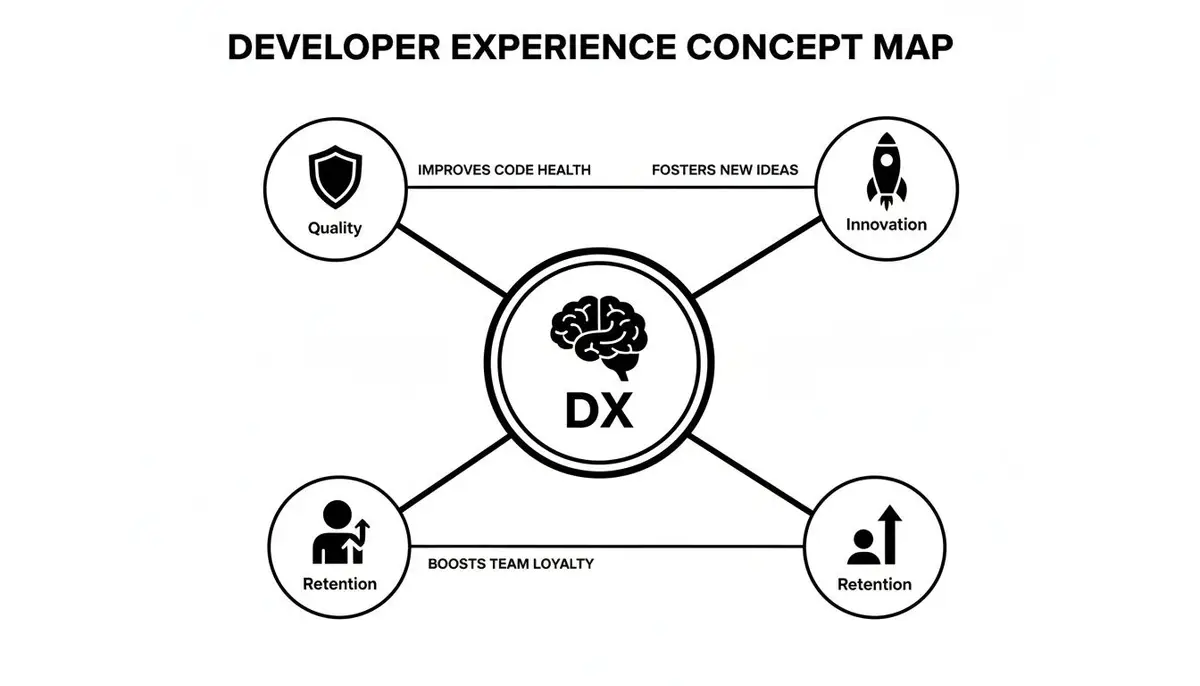
As you can see, DX isn’t just a “nice-to-have.” It’s the core driver for tangible business outcomes, from shipping better features to keeping your best people from walking out the door.
DORA: The Speedometer and Lap Timer
The DORA (DevOps Research and Assessment) metrics are all about speed and stability. Think of them as your team’s speedometer. They came out of years of rigorous research and give you the hard numbers on your software delivery pipeline’s performance. They answer two simple but critical questions: how fast are we shipping, and how reliable is our code when it gets there?
DORA boils it all down to four key metrics:
- Deployment Frequency: How often do you successfully push code to production? The best teams do this multiple times a day, on demand.
- Lead Time for Changes: How long does it take for a committed piece of code to actually go live? This is a direct measure of your pipeline’s efficiency from start to finish.
- Change Failure Rate: What percentage of your deployments blow up in production? This is your gut check on quality and stability.
- Mean Time to Restore (MTTR): When things inevitably break, how quickly can you fix them and get the service back online? This is all about resilience.
Every year, the DORA State of DevOps report confirms that these four metrics separate the high-performers from everyone else. The elite teams are deploying constantly with lead times of less than an hour. For a deeper dive, our guide on what DORA metrics are breaks down how to apply them.
SPACE: The Internal Diagnostics System
If DORA is about speed, the SPACE framework is about the health of the driver and the engine. It was created by researchers at Microsoft, GitHub, and the University of Victoria to give a more complete, human-focused picture of developer productivity.
SPACE recognizes that things like burnout, clunky tools, and communication bottlenecks are invisible to DORA’s stopwatch. Yet, these are the very things that will eventually bring a high-speed team to a grinding halt.
The SPACE framework reminds us that you can’t have sustainable performance without a healthy, engaged team. Pushing for velocity is pointless if your developers are heading straight for a cliff.
SPACE covers five crucial dimensions:
- Satisfaction & Well-being: Are your developers happy, fulfilled, and not burning out? This is usually captured with surveys.
- Performance: What’s the real outcome of their work? This looks beyond activity to things like code quality and customer impact.
- Activity: What are the countable outputs, like the number of commits, pull requests, or code reviews?
- Communication & Collaboration: How well are people working together? This tracks how information flows between teams.
- Efficiency & Flow: Can developers get their work done without being constantly interrupted or blocked? It’s all about removing friction.
A team might have amazing DORA scores, shipping code all day long. But if their satisfaction is in the basement, that speed won’t last. SPACE gives you the context behind the numbers, making sure you’re building a team that’s not just fast, but also resilient and motivated for the long haul.
DORA vs. SPACE Frameworks at a Glance
So, how do these two frameworks really stack up against each other? The key is to see them as complementary lenses. DORA measures the output of your system, while SPACE measures the health of the people and processes within that system.
Here’s a quick breakdown of their core differences:
| Aspect | DORA Metrics | SPACE Framework |
|---|---|---|
| Primary Focus | System-level software delivery performance and stability. | Individual and team developer productivity and well-being. |
| Key Question | “How fast and reliably are we shipping value?” | “Are our developers effective, efficient, and satisfied?” |
| Measurement | Quantitative data from CI/CD and monitoring tools. | A mix of quantitative (system data) and qualitative (surveys) data. |
| Core Components | Deployment Frequency, Lead Time, Change Failure Rate, MTTR. | Satisfaction, Performance, Activity, Collaboration, Efficiency. |
| Primary Goal | Optimize delivery throughput and operational stability. | Create a sustainable, healthy, and high-impact engineering culture. |
Ultimately, using them together gives you a 360-degree view. DORA spots a slowdown in your delivery pipeline, and SPACE can help you diagnose why it’s happening—perhaps due to tool friction or a drop in team morale. Combining them allows you to not only go fast but to keep going fast.
Key Developer Experience Metrics to Track
Alright, we’ve talked about the high-level ideas. Now, let’s get our hands dirty and talk about what to actually measure. Measuring developer experience isn’t about slapping a generic dashboard on your team and calling it a day. Think of it more like building a practical menu of developer experience metrics that shines a light on the specific friction your team is feeling right now.

To make this truly actionable, I find it helps to group metrics into three core categories. This approach helps you focus your energy where it’s needed most, whether that’s in the speed of your workflow, the quality of your code, or the health of your team’s collaboration.
Productivity and Flow Metrics
This first bucket is all about the efficiency of your development process. The real goal here is to hunt down and eliminate the bottlenecks that shatter deep work and slow down the delivery of value. This is absolutely not about tracking how “busy” developers are. It’s about seeing how smoothly an idea can travel from a thought to a finished feature.
- Cycle Time: This is the big one. It measures the total time from a developer’s first commit on a task all the way to that code shipping to production. A long cycle time is a massive red flag for systemic issues. It almost never means your developers are slow; it’s far more likely to point to a sluggish review process, a clunky deployment pipeline, or not enough test automation.
- Focus Time vs. Interruptions: This is a bit more nuanced. It’s about contrasting the amount of uninterrupted coding time with time lost to meetings, Slack pings, or just general context switching. A high rate of interruptions is a direct assault on a developer’s flow state, leading to less output and more frustration. Tracking this helps you put a number on the hidden cost of a reactive work culture. For a closer look at this connection, you can explore various developer productivity metrics that go deeper on this topic.
Quality and Reliability Metrics
Let’s be honest: speed without stability is just a fast way to create a disaster. These metrics are your guardrails, ensuring that as you push for more velocity, you don’t sacrifice the quality and reliability your users depend on. They provide a critical feedback loop on the health of your codebase and the real-world effectiveness of your engineering practices.
A low Change Failure Rate isn’t just a technical achievement; it’s a direct reflection of a high-trust, high-quality engineering environment. It means your processes—from code review to automated testing—are working together to catch issues before they impact users.
Measuring quality well is a discipline in its own right. If you want to go deeper, it’s worth exploring some of the key metrics to track in quality engineering environments, many of which have a direct impact on the developer experience.
- Change Failure Rate (CFR): As one of the core DORA metrics, CFR measures the percentage of deployments that go wrong and require a fix (like a hotfix or a full rollback). A high CFR is a clear signal that something is broken in your testing, review, or deployment process. It’s a direct measure of the risk you’re taking every time you ship code.
- Mean Time to Recovery (MTTR): Because failures will eventually happen, the real question is how quickly you can bounce back. MTTR measures the average time from when an incident kicks off to when it’s fully resolved. A low MTTR shows that your team is resilient and can diagnose and fix problems efficiently, which is huge for building confidence and lowering stress during an outage.
Collaboration and Health Metrics
Software development is a team sport, period. These metrics focus on the human side of engineering—how well your team communicates, collaborates, and grows together. A healthy, collaborative environment is the foundation for building great software and, just as importantly, for keeping your best people around.
- Pull Request (PR) Lifecycle: This metric breaks down the entire journey of a pull request into its key stages: time to first review, time spent in discussion and rework, and finally, time to merge. A long wait for that first review is one of the most common—and frustrating—blockers for developers. Analyzing this lifecycle exposes the bottlenecks in how your team works together.
- Onboarding Time: How long does it take for a new developer to get their machine set up, make sense of the codebase, and ship their first meaningful change to production? A long onboarding process is usually a symptom of poor documentation, a nightmare local setup, or just a lack of clear guidance. Streamlining this is a massive win for the new hire’s experience and for the team’s overall capacity.
By picking and choosing metrics from across these three categories, you can build a complete picture of your developer experience. You’ll be able to turn those vague feelings of frustration into concrete data you can actually do something about.
Measuring the New AI-Assisted Workflow
For years, we’ve relied on developer experience metrics like Cycle Time or PR review speed to understand how our teams work. These metrics were built for a world before AI coding assistants became a developer’s right hand. They’re great at measuring the visible, mechanical parts of the process—commits, reviews, and deployments.
But how do you measure the invisible magic? How do you quantify the value of a perfectly timed suggestion from GitHub Copilot that saves a developer 30 minutes of digging through Stack Overflow? Or the time saved when an AI explanation makes a complex, legacy function click into place in seconds?
This new, AI-assisted reality requires a new way of thinking about developer experience metrics. Sticking with old measurements is like trying to gauge the efficiency of an electric car by measuring its fuel consumption—you’re using the wrong tool for the job. To really understand what’s happening on a modern engineering team, we have to look at how developers are actually working with their AI tools.

Core AI-Centric Metrics to Start Tracking
To get a clear picture of an AI-assisted workflow, you have to move beyond standard DORA or SPACE metrics. We need measures that capture the unique dance between human and AI. These metrics help make the once-invisible impact of AI something you can actually see and improve.
Here are three foundational metrics to start with:
-
AI Adoption Rate: This is the most basic, yet most important, starting point. It’s a simple percentage: how many of your developers are actively using AI coding assistants every day or week? A low adoption rate is more than a missed opportunity; it’s a red flag. It might point to a lack of training, a trust issue with the tools, or just too much friction in the workflow.
-
AI-Generated Code Acceptance Rate: This metric digs a bit deeper than just usage. It tracks how much of the code suggested by AI is actually accepted and committed by developers. A high acceptance rate is a great sign—it means the AI is providing relevant, high-quality suggestions that genuinely speed things up. On the flip side, a low rate could signal problems with prompt engineering, context limitations, or AI suggestions that clash with your team’s coding standards.
-
Time Saved per Task or Feature: This is where the rubber meets the road, connecting AI use to tangible business value. By comparing the time it takes to complete similar tasks with and without AI help, you can start putting real numbers to the efficiency gains. This data is invaluable for justifying tool investments and showing how AI impacts project timelines.
From Black Box to Transparent Workflow
Without the right tools, the impact of AI remains a black box. You might see overall productivity go up, but you won’t know why. Was it the new AI assistant, or a tweak to the code review process? This guesswork prevents you from making targeted improvements.
Capturing AI-centric developer experience metrics isn’t about surveillance. It’s about creating a feedback loop for a brand-new skill: collaborating effectively with an AI partner. It turns hunches into a clear, data-driven strategy.
Specialized platforms can automatically pull this data right from the developer’s environment. They can pinpoint exactly where a developer is struggling with weak prompts or getting stuck in a frustrating loop of generating and rejecting code. Suddenly, the AI goes from a mysterious helper to a transparent, optimizable part of your workflow. For more on this, our guide on improving productivity for developers offers some related strategies.
Traditional Metrics vs. AI-Assisted Metrics
To really get a feel for this shift, it helps to see the old and new metrics side-by-side. The table below shows how the focus moves from tracking process outcomes to understanding the effectiveness of the human-AI interaction itself.
| Measurement Area | Traditional Metric Example | AI-Assisted Metric Example |
|---|---|---|
| Code Creation | Lines of Code Written | AI-Generated Code Acceptance Rate |
| Team Activity | Commit Frequency | AI Adoption Rate (% of active users) |
| Problem Solving | Time Spent on Bug Fixes | Avg. Time Saved per AI-Assisted Task |
| Onboarding | Time to First PR | Reduction in “Stuck Time” with AI help |
By embracing these AI-centric developer experience metrics, you’re no longer just using AI tools—you’re strategically mastering them. This data-driven approach is key to figuring out what’s working, sharing best practices, and building a truly high-performance, AI-native engineering culture.
How to Actually Start Measuring Developer Experience
Knowing you should measure developer experience is the easy part. Actually getting started can feel overwhelming. The secret? Don’t try to boil the ocean.
A “big bang” approach, where you suddenly try to track dozens of metrics, is doomed to fail. Instead, think of it as a gradual rollout. You want to build trust and momentum by starting small, proving the value, and then expanding. This isn’t about flipping a switch; it’s about building a sustainable culture of improvement.
This phased approach prevents teams from feeling buried in data and ensures the program is seen as a helpful tool, not a surveillance system. The entire point is to use developer experience metrics to start conversations, not to end them with judgments.
Phase 1: Start by Listening
Before you look at a single line of code or a single system log, talk to your people. Your most valuable data in the beginning isn’t buried in your CI/CD pipeline; it’s waiting in the conversations you have with your team. This qualitative feedback is your compass—it will point you directly to the biggest sources of friction.
Kick things off with simple, informal interviews or a short, open-ended survey. Ask questions that get to the heart of their daily struggles:
- “What’s the most frustrating part of your day-to-day work?”
- “If you had a magic wand to fix one thing in our development process, what would it be?”
- “When was the last time you felt truly ‘in the zone,’ and what helped you get there?”
This initial listening tour does two crucial things. First, it uncovers the real, lived frustrations your team is dealing with. Second, it proves this initiative is genuinely about helping them, which immediately starts building goodwill and trust.
Phase 2: Pick Your First Few Metrics
Now that you have these qualitative insights, you can pick a small, focused set of metrics that directly address the problems your team just told you about. Resist the powerful temptation to track everything. A cluttered dashboard just creates noise, not clarity.
Choose one or two key metrics that connect directly to their biggest pain points. For example:
- Pain Point: “Code reviews take forever.”
- Metric: Start tracking Pull Request Time to First Review.
- Pain Point: “Deployments are slow and scary.”
- Metric: Focus on Cycle Time and Change Failure Rate.
- Pain Point: “It takes new hires months to get up to speed.”
- Metric: Measure Time to First Meaningful Commit for new developers.
By starting small, you keep the process manageable and ensure the data you’re collecting is immediately relevant to what the team actually cares about. This tight feedback loop is the key to keeping everyone engaged.
Phase 3: Automate and Visualize
Manually gathering data is a surefire way to kill a DX program before it even gets off the ground. It’s tedious, error-prone, and adds to the very same administrative drag you’re trying to eliminate. Automating data collection is the next critical step.
Use tools that plug directly into your existing workflow—your version control system, your CI/CD pipeline—to pull data automatically. Once that data is flowing, put it into a simple, transparent dashboard. This dashboard should be open for everyone on the team to see, reinforcing the idea that these numbers are a shared resource for getting better.
The goal of a DX dashboard isn’t to create a leaderboard. It’s to build a shared map that helps the entire team navigate around bottlenecks and find smoother paths to delivering value.
This transparency is non-negotiable. When developers can see the data for themselves and understand how it’s collected, it demystifies the whole process and builds confidence that the metrics are being used fairly and constructively.
Phase 4: Iterate and Improve
The final phase is where the magic happens: turning data into action. Regularly review the metrics with your team—retrospectives are a perfect time for this. Use the numbers to spark discussions, not to assign blame.
For example, Amazon achieved a groundbreaking 15.9% year-over-year reduction in their Cost to Serve Software (CTS-SW) by directly tying DX improvements to business value. They proved that making developers’ lives easier has a real economic impact. You can discover more about how Amazon quantified this breakthrough.
Frame your conversations around collaborative problem-solving: “Hey team, it looks like our PR review time is creeping up. What’s getting in the way? What can we try next sprint to bring it down?” This approach empowers the team to own their processes and continuously fine-tune them, creating a powerful cycle of measurement, learning, and improvement.
Turning Metrics Into Meaningful Action
Let’s get one thing straight: measuring the developer experience isn’t about watching over anyone’s shoulder. It’s about empowerment. The whole point is to hunt down and eliminate the friction that slows your team down, causes needless frustration, and gets in the way of building fantastic software.
Think of it as turning raw data into productive conversations, and then turning those conversations into real, tangible improvements.
By tracking the right developer experience metrics, you give everyone a shared language to talk about and solve systemic problems. This simple act changes the entire conversation. Suddenly, you’re not talking about individual performance, but about the health of the whole engineering system. That’s how you build a culture of trust and solve problems together.
Balancing System and Human Insights
The best measurement programs don’t just look at one side of the coin. They strike a crucial balance, combining hard system-level data from frameworks like DORA with the human-centric, qualitative feedback from models like SPACE. One tells you what is happening in your delivery pipeline; the other helps you understand why it’s happening and how your developers are feeling about it.
This holistic view is more critical than ever with the rise of AI-assisted workflows. New metrics like AI Adoption Rate and Code Acceptance Rate give you a window into how these powerful tools are actually being used. This ensures they’re truly speeding things up, not just creating new kinds of friction or technical debt under the surface.
The ultimate purpose of tracking developer experience metrics is to make the invisible work visible. It surfaces the silent struggles with clunky tools, slow pipelines, and constant interruptions, giving you a clear roadmap for improvement.
From Measurement to Momentum
Putting a thoughtful measurement program in place is the first step. The real magic happens when you use that data to kick off a continuous cycle of learning and improvement. When you focus on the developer’s journey—from their very first commit all the way to final deployment—you do more than just ship better software faster.
You build an engineering culture that’s more resilient, innovative, and frankly, a more satisfying place to work. When developers feel heard and are given the power to fix their own workflows, they become more engaged, more creative, and more invested in the team’s success. That’s the real payoff of putting developer experience front and center.
Frequently Asked Questions
Diving into developer experience metrics can feel a little overwhelming, and it’s natural to have questions. Let’s tackle some of the most common ones that come up for engineering leaders.
How Do I Start Measuring DX With a Small Team?
If you’re working with a smaller team, don’t try to boil the ocean. The best approach is to start simple and focus on gathering qualitative feedback first. You don’t need a fancy dashboard right away.
Just send out a quick survey. Ask your developers what they think about their tools and what the biggest headaches are in their day-to-day work. That direct, human insight is pure gold.
Once you’re ready for some hard numbers, pick just one or two high-impact developer experience metrics. Things like Cycle Time or Pull Request Review Time are great starting points. They give you a solid, high-level look at your team’s health without drowning you in data. The goal isn’t to measure everything at once—it’s to build the habit of measuring and start a conversation about getting better.
Are These Metrics Just Another Way to Judge Developers?
This is a big one, and it’s a completely fair question. The answer has to be a clear and absolute no.
The moment you use developer experience metrics to rank engineers or critique individual performance, they become toxic and useless. Their real job is to help you spot problems at the system level, not point fingers at people.
Think about it: if Cycle Time is consistently high, that’s almost never one person’s fault. It’s a giant red flag telling you there’s a bottleneck somewhere in the process—maybe the review stage is slow, the testing suite is flaky, or deployments are a nightmare.
Always, always frame these metrics as tools for the team to improve together. They’re conversation starters, not report cards.
What Is the Single Best DX Metric to Track First?
No single metric is a silver bullet for every team, but if I had to pick one, it would be Cycle Time. It measures the entire journey from the first line of code committed all the way to production.
Because it’s so comprehensive, it’s fantastic at showing you exactly where the friction is in your workflow.
If your team leans heavily on AI completions, your assistant’s own metrics report the AI-Generated Code Acceptance Rate (GitHub’s Copilot usage metrics, for example); Zest doesn’t. It shows usage, not whether the code shipped.
Zest records each engineer’s coding-agent sessions (Claude Code, Codex, Cursor, Copilot) and links them to the pull requests they led to.