
How to improve developer productivity: practical tips
Related guide: Developer productivity metrics for AI-assisted teams
If you want to improve developer productivity, you have to stop looking at the wrong things. Forget counting lines of code or how many tickets someone closes. That’s old-school thinking. True productivity is all about focusing on the signals that actually matter: flow, feedback loops, and cognitive load.
The goal is to channel your team’s energy toward high-impact work and get rid of the friction that slows everyone down.
What Developer Productivity Actually Means
Traditional metrics like commit counts are often misleading. They can create a lot of noise and false positives, completely ignoring the real drags on productivity—things like slow builds, environment drift, or the constant mental tax of context switching.
This is where the SPACE framework comes in. It’s a much smarter way to think about productivity, shifting the focus to five key dimensions:
- Satisfaction: How happy and engaged are your developers?
- Performance: Are you shipping high-quality work efficiently?
- Activity: Is the work meaningful, or is it just busywork?
- Communication: How clear and effective are handoffs and feedback?
- Efficiency: How much time is wasted waiting or sitting idle?
This framework encourages a more holistic view, one where a developer’s satisfaction is just as important as the team’s output. It forces you to look beyond the surface-level numbers.
Flow and Feedback Loops
Nothing kills momentum like long waits and slow feedback. The best teams I’ve worked with keep their energy high with frequent code integration and incredibly short feedback cycles.
For instance, one team at a company called BetaTech started using auto-deploy previews to catch UI bugs much earlier. Instead of waiting for a full staging deploy, they could see changes instantly.
- They automated preview generation for every single pull request.
- They established a rule to get feedback to the developer within one business day.
- They actively monitored preview errors at the edge to catch issues fast.
Here’s another real-world example: At Acme Corp, a simple change to cache dependencies cut their build time from a painful six minutes to just 45 seconds. Think about that. Over a month, engineers got back 20% more deep work capacity just by eliminating a repetitive setup task.
The benefits of looking at productivity this way are huge:
- You can diagnose bottlenecks with much greater clarity.
- You create a balanced focus on both developer happiness and team output.
- You build faster feedback loops that drive continuous improvement.
One team I know took this to heart and batched all their pull requests into dedicated review hours. The result? Their average review latency plummeted from 24 hours to under six hours.
Identifying Workflow Bottlenecks
What really breaks a developer’s focus? It’s often the small, recurring frustrations—the slow local rebuilds, the flaky tests that fail for no reason. These “wasted minutes” quickly add up to hours of lost deep work.
To find your own bottlenecks, start measuring a few key areas:
- Build and test times per commit
- Number of context switches per feature
- Interruptions logged during coding sessions
“Real productivity comes from reducing waiting time, not just pushing more code.”
A Simple Productivity Checklist
Not sure where to start? This simple checklist can help you benchmark where your team stands and figure out where to focus your efforts.
- Measure your end-to-end feedback loop. How many minutes does it take from commit to feedback?
- Evaluate cognitive load per task. A quick survey can tell you which tasks are the most draining.
- Identify your top three recurring interruptions. Is it meetings? Slack pings? Flaky tests?
- Calculate the percentage of time spent in deep focus. Are developers getting enough uninterrupted time?
- Review communication latency on code reviews. How long does it take to get a PR reviewed?
Using these insights helps your team shift its focus from just shipping more stuff (output) to shipping the right stuff that makes a difference (impact).
For a deeper dive, check out our guide on measuring developer productivity.
Assessing Your Engineering Culture
When you embed this approach into your daily work, you’re not just tweaking a process; you’re building a sustainable engineering culture. It’s a culture that empowers developers to ship faster without sacrificing quality.
Make a habit of revisiting your checklist and SPACE assessments regularly. As your codebase grows and your team changes, new friction points will always emerge. Continuous evaluation is the only way to make sure your momentum stays strong. And in engineering, momentum is everything.
Get Your Coding Environment Dialed In
Think of your development environment as your digital workshop. Every bit of friction—every slow process, every tiny inconsistency—is a direct tax on your focus and momentum. Getting this space optimized is one of the fastest ways to see real gains in developer productivity. The whole point is to spend less time configuring and troubleshooting and more time actually building.
We’ve all been there, trying to solve the classic “it works on my machine” problem. That headache is almost always a sign of inconsistent environments, where tiny differences in dependencies or configurations between developer laptops and production servers lead to the most unpredictable bugs.
Standardize Everything with Containers
This is where containerization tools like Docker become non-negotiable. By defining your entire development stack in a Dockerfile or docker-compose.yml, you guarantee that every developer and every CI/CD pipeline is running the exact same setup.
The payoff is immediate. New hires can be up and running in minutes with a single command, instead of burning days fighting with manual setup docs.
Fine-Tune Your Integrated Development Environment
Your IDE should be more than just a fancy text editor; it should be a powerful assistant. Taking a little time to configure it properly can save you hundreds of hours down the road. The right plugins and settings can turn your editor into a partner that catches errors, suggests improvements, and automates the boring stuff.
Here are a few things that have a massive impact:
- Intelligent Linting and Formatting: Use tools like ESLint for JavaScript or Black for Python to automatically enforce code style and spot syntax errors on the fly. This eliminates whole categories of bugs and keeps the codebase uniform.
- Code Snippets and Shortcuts: You’re probably typing the same blocks of code over and over. Create custom shortcuts for them. In VS Code, for example, you can define a snippet that spits out a full React component template with just a few keystrokes.
- Database Tooling: Integrate a database client directly into your IDE. Being able to write queries, inspect schemas, and manage data without ever leaving your editor is a huge productivity win. No more context switching.
Automating these small tasks frees up your brainpower for the real, complex problems you’re trying to solve.
Share Configurations with Dotfiles
Dotfiles are the configuration files—like .bashrc or .gitconfig—that customize your shell and other tools. Getting these standardized across a team means everyone is on the same page with aliases, shell functions, and environment variables.
A shared, version-controlled dotfiles repository is a force multiplier. It doesn’t just speed up onboarding; it creates a consistent command-line experience for every engineer, which cuts down on confusion and one-off fixes.
For instance, your team can maintain a shared repository of dotfiles with aliases for common Git commands, Kubernetes contexts, or project-specific build scripts. When a new developer joins, they just clone the repo, run a quick setup script, and instantly have the team’s collective workflow and shortcuts at their fingertips. It’s a simple change that has a powerful, compounding effect on the entire team’s productivity.
Weave AI Coding Assistants into Your Workflow
Just about every developer has an AI coding assistant in their toolkit these days, but simply installing one doesn’t magically make you more productive. The real skill is learning how to use it. You get the biggest wins when you stop thinking of it as a black box and start treating it like a very fast, very literal-minded pair programmer.
It’s brilliant at some things and needs a lot of hand-holding for others.
Think of it this way: AI is fantastic for spitting out boilerplate code, writing unit tests for a function you’ve already defined, or translating a snippet of Python to JavaScript. These are jobs with clear inputs and predictable outputs, and letting the AI handle them can save you a ton of time.
But when it’s time to map out complex business logic or design a whole new system? That’s where your expertise is non-negotiable. The AI has zero context about your project’s history, its hidden technical debt, or where it’s headed. You have to be the architect, handing off the smaller, more mechanical tasks to your AI assistant.
Knowing When to Trust It and When to Take the Wheel
A classic rookie mistake is blindly trusting whatever the AI spits out. This is a fast track to introducing subtle bugs or clunky code that takes you longer to fix than it would have taken to write it from scratch. It’s a big reason why some senior devs initially feel like AI tools actually slow them down.
In fact, an early 2025 study on open-source developers found they were actually 19% slower when using AI assistants. The researchers pointed out that the constant need to double-check the AI’s work and the interruptions to their deep-work flow were likely the culprits. You can dig into the full randomized controlled trial results if you’re curious. This doesn’t mean AI is a bust; it just means you have to be smart about it.
The real goal isn’t to have AI do your job. It’s to have AI handle the tedious parts so you can focus on the genuinely hard problems. Your role shifts to directing, reviewing, and integrating.
How to Write Prompts That Actually Work
Getting good code out of an AI assistant is all about the quality of the prompts you feed it. Vague requests get you generic, often useless code. Prompts packed with specific context get you accurate, helpful suggestions. If you’re looking for the right tool for the job, we’ve got a guide on the best AI coding assistants that might help.
Here are a few tactics that work in the real world:
-
Be Specific: Don’t just ask, “Write a function to sort users.” That’s a recipe for disaster. Instead, try something like, “Using our
Userclass with propertiesid,name, andlastActive, write a TypeScript function that sorts an array ofUserobjects by thelastActivedate, newest first.” -
Set the Guardrails: Tell the AI about any constraints. Are there performance needs? A strict style guide? A specific library you have to use? Add phrases like, “This function needs to be pure with no side effects,” or “Use the
date-fnslibrary for all date handling.” -
Don’t Be Afraid to Correct It: If the first output is a miss, don’t just delete it and start over. Treat it like a conversation. Push back with a follow-up prompt like, “That’s close, but you forgot to add error handling for invalid date formats. Let’s add that in.”
Automate Your Repetitive Workflows
Let’s be honest, manual, repetitive tasks are the silent killers of a developer’s day. They don’t just eat up time; they drain the mental energy you desperately need for actual problem-solving. Every time you have to manually run a deployment script, double-check code formatting, or verify a server configuration, you’re chipping away at the focus you could have spent building something meaningful. Smart automation is how you get that focus back.
The first step is simply to notice these loops. Think about the things you do every day or week that feel like you’re on autopilot. Code reviews, setting up new environments, and running through deployment checks are usually the biggest offenders. These are perfect candidates for automation, not just to move faster, but to eliminate the tiny, frustrating human errors that always seem to crop up.
This flow chart nails the core idea: automation isn’t about setting something and forgetting it. It’s an interactive cycle where your expertise guides a tool to produce a high-quality result.
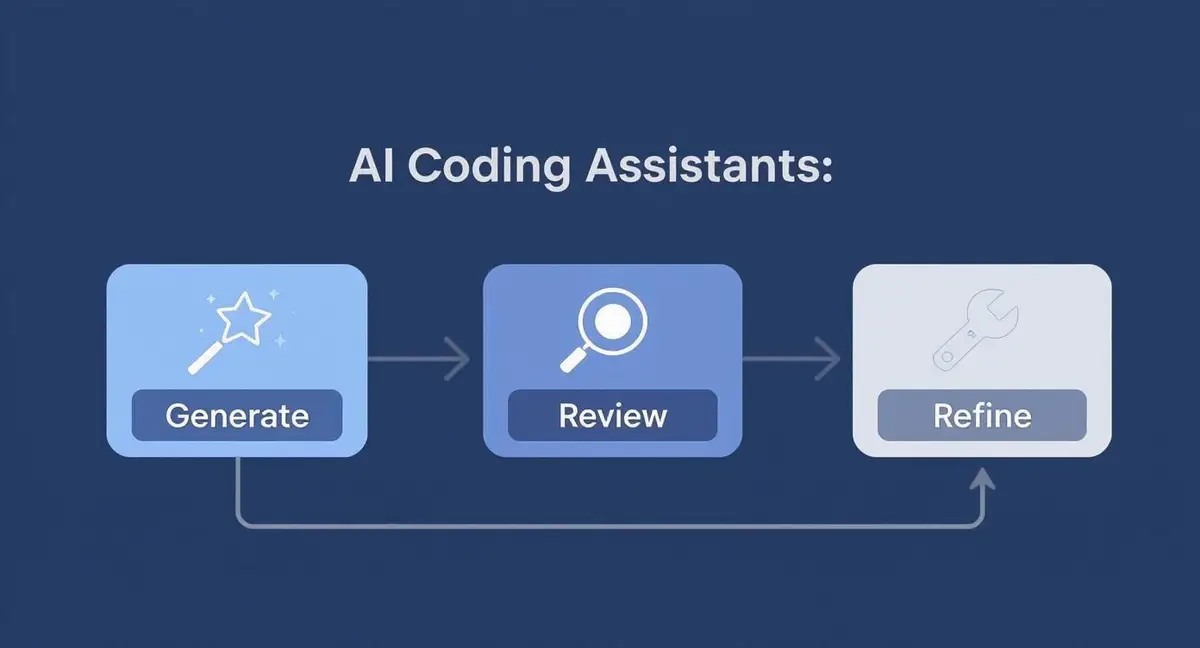
You generate, you review, you refine. This partnership between you and the tool is where the real magic happens.
Create Reusable Checklists and Scripts
One of the most powerful forms of automation isn’t some ridiculously complex CI/CD pipeline—it’s a simple, reusable checklist. Checklists are fantastic because they standardize your processes. They ensure you never miss a critical step, which is a lifesaver for high-stakes work like a production deployment. They effectively turn that “tribal knowledge” locked in one person’s head into a documented, repeatable workflow anyone can follow.
For instance, a pull request checklist can automatically remind developers to update the docs, add unit tests, and confirm their changes actually match the original ticket. These little nudges stop common mistakes long before they ever get merged. You can take this even further by using automated code review tools that enforce these rules programmatically.
The real goal of automation is to make the right way the easy way. When you embed your best practices into scripts and checklists, you’re creating guardrails that guide everyone toward quality and consistency without slowing them down.
Foster High-Impact Team Collaboration
Even the most productive developer will eventually hit a wall without great team dynamics. Real engineering velocity isn’t about individual heroics; it’s a team sport. Progress truly accelerates when you build processes that make working together feel seamless.
When collaboration clicks, it acts as a massive force multiplier. But when it’s clunky, it just creates frustrating delays and bottlenecks for everyone involved.
The first step is to rethink your core team rituals, especially code reviews. Are they treated as adversarial gates, or are they seen as genuine opportunities for shared learning? A great pull request shouldn’t just be about catching bugs—it should teach both the author and the reviewer something new.
Protect Deep Work with Asynchronous Communication
Nothing kills a developer’s flow state faster than constant pings and shoulder taps. The best teams I’ve seen are ruthless about protecting their focus time by defaulting to asynchronous communication.
This means shifting the culture away from instant Slack messages that demand an immediate response. Instead, favor detailed comments in pull requests or project management tools like Jira or Asana.
This small change gives developers the freedom to engage with feedback on their own schedule, preserving those critical, uninterrupted blocks of time needed for complex problem-solving. It’s a culture built on mutual respect for each other’s focus.
With the global developer community projected to hit 47.2 million by 2025, a remote-first, async-friendly model is no longer optional. It’s essential for tapping into this massive talent pool. You can dig into these fascinating global developer population trends to see just how big this shift is.
Empower Developers with Clear Documentation and Roles
Ambiguity is the silent killer of productivity. Every time a developer has to stop what they’re doing to ask for permission or track down an answer, you lose valuable momentum.
Two things are absolutely critical to preventing this drain:
- Excellent Documentation: Think of your documentation as the team’s shared brain. It should be the first place someone goes to get answers on architecture, processes, and common questions. If it’s not written down, it doesn’t exist.
- Clearly Defined Roles: When everyone knows who owns what, decisions happen faster. This autonomy gives developers the confidence to move forward and solve problems without getting stuck in a cycle of approvals.
In the end, it’s all about creating a high-trust environment where collaboration is an accelerator, not a tax. When your processes are clear and your communication is intentional, teams can move faster together, turning individual efforts into major collective wins.
Got Questions? We’ve Got Answers
Improving developer productivity can feel like a moving target. Let’s tackle some of the most common questions that pop up for engineering leaders trying to get it right.
How Do I Measure Productivity Without Being a Micromanager?
The trick is to stop measuring people and start measuring the system. Forget about individual outputs like lines of code or number of commits. Those metrics create a culture of surveillance and don’t actually tell you if you’re building the right thing, faster.
Instead, look at the health of your entire development process. Focus on team-level outcomes that show you where the friction is.
- Cycle Time: How long does it take for a task to get from the first commit to production? This is a fantastic gauge of your team’s end-to-end efficiency.
- Deployment Frequency: Are you shipping code multiple times a day or once a month? High frequency usually means smaller, safer changes and quicker feedback loops.
- Change Failure Rate: When you deploy, how often do things break? This metric keeps your need for speed in check with a healthy dose of quality control.
These metrics help you see the whole picture. They encourage everyone to work together to fix system-wide bottlenecks, rather than creating an environment where individuals feel like they’re being watched.
Are AI Coding Assistants Actually Helping?
It’s complicated. AI tools are everywhere now, but their real-world impact is still shaking out. The Stack Overflow Developer Survey of 2025 found that a whopping 84% of developers are either using or planning to use AI tools.
But here’s the interesting part: while 69% say these tools boost their productivity, the overall positive sentiment has dropped. It went from over 70% in previous years down to just 60% in 2025. This tells us developers are getting more realistic about what AI can and can’t do.
So, what’s the verdict? AI is a phenomenal assistant, not a replacement for a skilled developer. It shines when used for specific, targeted tasks like writing unit tests or generating boilerplate code. It’s not a magic wand for complex architectural decisions.
What’s the Quickest Way to Get Started?
If you want a fast win, go after the wait times. Developers spend an astonishing amount of time just waiting around—for builds to finish, tests to run, or environments to spin up.
The single biggest drag on developer productivity is often idle time—waiting for builds, tests, or reviews. Fixing these small delays delivers an immediate and noticeable impact on team morale and momentum.
Just ask your team two simple questions:
- “What’s the one process that makes you groan every time you have to do it?”
- “If you could get rid of one recurring wait from your day, what would it be?”
I guarantee you’ll hear about a painfully slow build, a flaky test suite, or a clunky code review process. Pick one of those, fix it, and you’ll immediately give hours back to your entire team every single week. It’s the lowest-hanging fruit with the biggest payoff.
Zest records each engineer’s coding-agent sessions (Claude Code, Codex, Cursor, Copilot) and links them to the pull requests they led to.