
A Guide to Unit Testing in Java

Unit testing in Java isn’t just about checking boxes; it’s the practice of writing small, focused tests to make sure individual pieces of your code—whether it’s a single method or a whole class—do exactly what you expect them to do, all on their own. Think of it as a foundational discipline for building software that doesn’t break. It helps you catch bugs early, makes integration way less painful, and lets you refactor code without holding your breath.
Why Unit Testing in Java Actually Matters
Let’s be real—sometimes, writing unit tests feels like a chore. It’s just another thing to do when you’re already facing a deadline. But what if it was the one habit that could prevent most production bugs and actually make your codebase pleasant to work in? The best Java developers I know don’t see unit testing as an afterthought; it’s a non-negotiable part of how they write code.
Here’s a classic scenario: you ship a new feature for your e-commerce app. A month goes by, and suddenly, customer support is flooded with complaints about loyalty points not calculating correctly. After hours of frantic debugging, you trace the problem to a tiny logic error in a utility class you thought was completely unrelated. A simple unit test would have caught that bug in seconds, saving you a massive headache and protecting your customers’ trust.
A Safety Net for Change and Growth
A solid suite of unit tests is your safety net. It gives you the freedom to refactor and improve your code without constantly worrying that you’ll break something else. When every critical piece of logic is covered, you can confidently swap out an old algorithm or clean up a messy method. If you introduce an unintended side effect, your tests will fail immediately, pointing you right to the problem.
This is absolutely crucial for the long-term health of a project. Without that safety net, developers get scared to make improvements, and the code starts to stagnate. That fear of change is a huge contributor to technical debt. By investing time in tests, you’re actively working to keep your codebase clean and maintainable, which is a core strategy to https://meetzest.com/blog/how-to-reduce-technical-debt.
More Than Just Finding Bugs
Catching errors is the most obvious benefit, but unit tests do so much more.
- Living Documentation: A well-written test is the best documentation you can have for a method. It shows exactly how the code is supposed to be used and what its expected behavior is—invaluable for anyone new to the team.
- Improved Design: You can’t easily test a giant, tangled method. The act of writing tests pushes you to create smaller, more focused classes and methods, which naturally leads to a cleaner, more modular architecture.
- Rapid Feedback: In any Agile or DevOps workflow, getting fast feedback is everything. Automated unit tests, especially with powerhouse frameworks like JUnit and Mockito, run in seconds. They give you immediate validation that your recent changes haven’t broken anything.
The industry gets it. The global unit testing software market was valued at $1.6 billion in 2022 and is on track to hit $5.0 billion by 2030. This isn’t just a trend; it’s a testament to how essential unit testing has become for building high-quality software.
Getting Your Java Testing Environment Ready
https://www.youtube.com/embed/vZm0lHciFsQ
Let’s be honest, setting up a new testing environment can sometimes feel like a chore. All the configuration hurdles can sap your momentum before you’ve even written a single line of test code. My goal here is to cut through that friction and get you from zero to a runnable test in just a few minutes.
The whole process really just boils down to adding the right tools and putting your files in the right place. This visual guide lays it out perfectly.
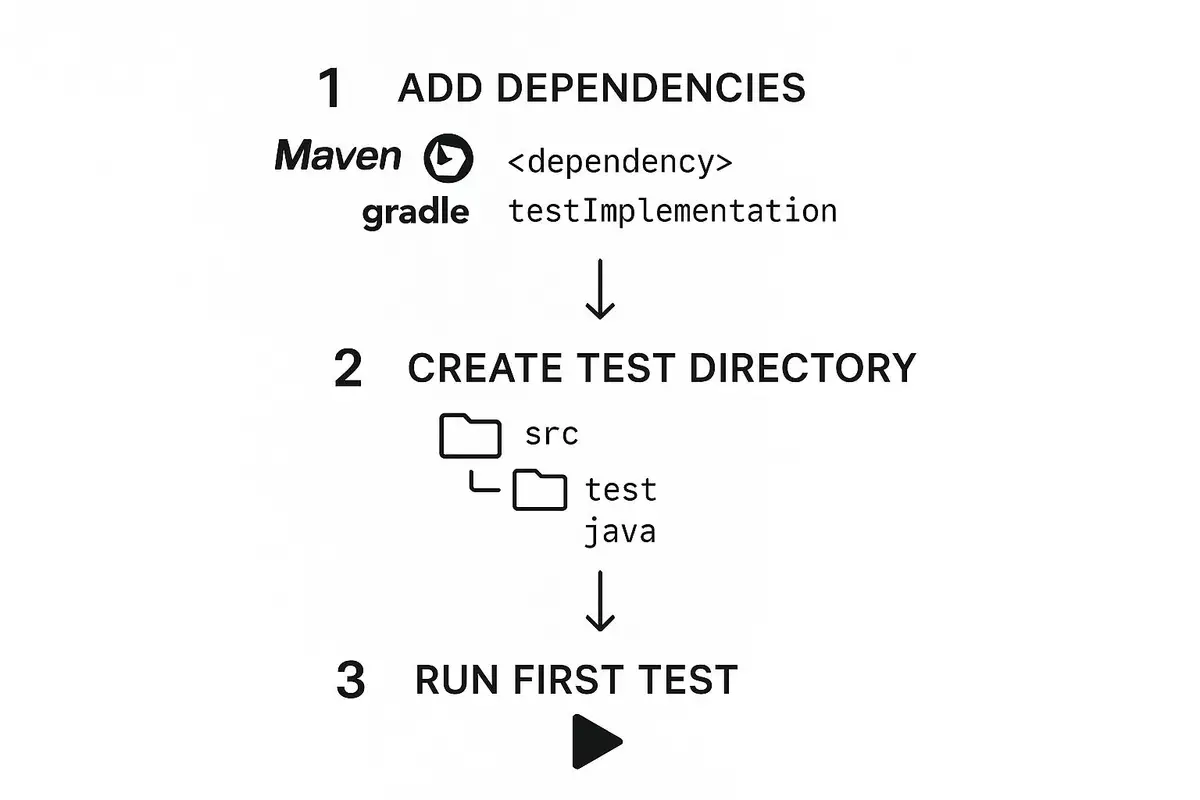
As you can see, the core setup involves just a handful of simple actions. It proves that getting started with unit testing in Java isn’t the complex beast it’s sometimes made out to be.
Adding Core Testing Dependencies
First things first, you need to tell your project what tools you’re going to use. This all happens in your build file, whether that’s a pom.xml for Maven or a build.gradle for Gradle.
For modern Java testing, two libraries are pretty much essential: JUnit 5 and Mockito. JUnit is the workhorse that runs your tests and lets you make assertions, while Mockito is the magic wand for creating mock objects to isolate the code you’re testing.
These tools are industry standards for a reason. With 139,879 companies using Java in the U.S. alone, the ecosystem is incredibly mature. Frameworks like these have been battle-tested across countless projects, making them powerful and reliable. For more on Java’s massive footprint, TMS Outsource has some great insights.
For Maven Projects (pom.xml):
Just drop these dependencies into your pom.xml. The junit-jupiter-api gives you the @Test annotations, junit-jupiter-engine is the runtime that executes them, and mockito-core brings in the mocking capabilities.
Quick Tip: That
<scope>test</scope>tag is non-negotiable. It tells Maven these libraries are only for testing, so they won’t get packaged into your final application. It keeps your production builds clean and lean.
For Gradle Projects (build.gradle):
If you’re on team Gradle, the syntax is a bit cleaner. Add these lines to the dependencies block of your build.gradle file. Here, testImplementation does the same job as Maven’s test scope.
dependencies { // JUnit 5 testImplementation ‘org.junit.jupiter:junit-jupiter-api:5.10.2’ testRuntimeOnly ‘org.junit.jupiter:junit-jupiter-engine:5.10.2’ // Mockito testImplementation ‘org.mockito:mockito-core:5.11.0’ }
Structuring Your Test Code
With the dependencies sorted, where do you actually put the test files? Thankfully, there’s a universal convention that all build tools and IDEs understand.
- Your main application code goes here:
src/main/java - Your test code belongs here:
src/test/java
Stick to this structure, and your life will be much easier. The build system will automatically find and run your tests, and it keeps your production code completely separate from your test code. This separation is also the bedrock of automated build pipelines. If you want to dive deeper into that, our guide on what is continuous integration is a great place to start.
Running Your First Test from an IDE
Here’s where you get that immediate payoff. Modern IDEs like IntelliJ IDEA and Eclipse have fantastic, out-of-the-box support for JUnit.
Once you’ve added the dependencies and created a test class inside src/test/java, you can run it instantly.
Just right-click the test file (or even a single test method) and hit “Run”. The IDE will handle the rest, firing up a dedicated panel to show you the results. Seeing that green bar light up is one of the most satisfying parts of the development loop—it’s instant feedback that your code does what you expect it to do.
Writing Your First Tests with JUnit 5

Alright, with the setup out of the way, it’s time to actually write some code. This is where the theory of unit testing in Java becomes a practical skill. We’ll get our hands dirty and move beyond just configuration, diving straight into the core mechanics of JUnit 5. I’ll use examples that look and feel like the code you probably work with every day.
We’ll start with a simple CalculatorService. This will be our guinea pig for exploring how to structure tests for maximum clarity and effectiveness. Forget abstract concepts for a minute; this is all about seeing results.
Structuring Tests with the AAA Pattern
A clean test is an understandable test. I’ve found the best way to achieve that clarity is by following the Arrange-Act-Assert (AAA) pattern. Think of it less as a rigid rule and more as a simple, powerful convention that makes your tests readable at a glance.
Here’s how it breaks down:
- Arrange: Get everything ready. This is where you instantiate objects, prepare your input data, and set up any conditions needed for the test to run.
- Act: Do the thing. This is usually just a single line of code where you call the method you’re actually testing.
- Assert: Check the result. Did the “Act” step produce the outcome you expected? This is where you verify it.
Let’s say we have a basic CalculatorService we need to test.
public class CalculatorService { public int add(int a, int b) { return a + b; } }
Now, let’s write our first test class for it. Remember, this goes in your src/test/java directory.
import org.junit.jupiter.api.Test; import static org.junit.jupiter.api.Assertions.assertEquals;
class CalculatorServiceTest {
@Test
void testAddition() {
    // Arrange
    CalculatorService calculator = new CalculatorService();
    int a = 5;
    int b = 3;

    // Act
    int result = calculator.add(a, b);

    // Assert
    assertEquals(8, result, "5 + 3 should equal 8");
}
}
See how clear that structure is? We arrange the inputs, act by calling the add method, and then assert that the result is what it should be. This simple pattern is the foundation for pretty much every unit test you’ll write.
Using JUnit 5 Annotations Effectively
JUnit 5 relies on annotations to figure out what’s a test and how it should behave. While there are a bunch of them, a handful of core annotations will cover 90% of your needs. Getting comfortable with these is key to mastering unit testing in Java.
The @Test annotation is the most fundamental—it’s what tells JUnit “this method is a test case.” But others help manage the test lifecycle. For example, @BeforeEach is perfect for setting up a fresh state before every single test runs, which is crucial for preventing tests from interfering with each other.
A key principle of good unit testing is isolation. Each test should be able to run independently without being affected by the state left behind by others.
@BeforeEachis your primary tool for enforcing this.
Let’s refactor our CalculatorServiceTest to use it.
import org.junit.jupiter.api.BeforeEach; import org.junit.jupiter.api.DisplayName; import org.junit.jupiter.api.Test; import static org.junit.jupiter.api.Assertions.assertEquals;
class CalculatorServiceTest {
private CalculatorService calculator;

@BeforeEach
void setUp() {
    calculator = new CalculatorService();
}

@Test
@DisplayName("Should return 8 when adding 5 and 3")
void testPositiveAddition() {
    // Act
    int result = calculator.add(5, 3);

    // Assert
    assertEquals(8, result);
}
}
Notice two small but important changes. We moved the CalculatorService instantiation into a setUp method annotated with @BeforeEach. This guarantees we get a new, clean calculator object for every test. We also added @DisplayName to give the test a human-readable name in IDEs and reports, which makes debugging failures so much easier.
Here’s a quick look at the most common annotations you’ll be using.
Essential JUnit 5 Annotations and Their Purpose
This table is a handy reference for the annotations that control the test lifecycle. You’ll use these constantly to set up, run, and tear down your test environments.
| Annotation | Purpose | Example Use Case |
|---|---|---|
@Test |
Marks a method as a test case. The most fundamental annotation. | void testAddition() |
@BeforeEach |
Runs a method before each test method in the class. | Initializing a fresh object for every test to ensure isolation. |
@AfterEach |
Runs a method after each test method in the class. | Cleaning up resources like closing a file or database connection. |
@BeforeAll |
Runs a method once before all tests in the class. Must be a static method. | Setting up a shared, expensive resource like a database connection pool. |
@AfterAll |
Runs a method once after all tests in the class. Must be a static method. | Tearing down the shared resource created in @BeforeAll. |
@DisplayName |
Provides a custom, human-readable name for a test class or method. | @DisplayName("Test division by zero scenario") |
@Disabled |
Disables a test method or class. | Temporarily skipping a test that is broken or not yet implemented. |
Knowing when to use @BeforeEach versus @BeforeAll is a classic distinction. Use the former for test isolation and the latter for performance when setup is slow and doesn’t affect test outcomes.
Mastering JUnit Assertions for Robust Checks
The heart of any test is the assertion. It’s where you make a claim about your code’s behavior. JUnit 5 provides a rich library of assertion methods in the org.junit.jupiter.api.Assertions class.
assertEquals(expected, actual): Your bread and butter. Checks if two values are equal.assertTrue(condition)/assertFalse(condition): Perfect for verifying boolean conditions.assertNotNull(object)/assertNull(object): A straightforward check for nullity.assertThrows(Exception.class, () -> { ... }): Confirms that a block of code throws a specific exception. This is critical for testing your error-handling logic.
Let’s add a divide method to our service that should throw an exception when the denominator is zero.
public class CalculatorService { // … add method from before
public double divide(int a, int b) {
    if (b == 0) {
        throw new IllegalArgumentException("Cannot divide by zero");
    }
    return (double) a / b;
}
}
Now, we need a test to confirm this error condition works as designed.
import static org.junit.jupiter.api.Assertions.assertThrows; // … other imports
class CalculatorServiceTest { // … previous tests
@Test
@DisplayName("Should throw IllegalArgumentException when dividing by zero")
void testDivisionByZero() {
    // Arrange, Act, and Assert all in one
    Exception exception = assertThrows(IllegalArgumentException.class, () -> {
        calculator.divide(10, 0);
    });

    // Optionally, you can also assert the exception message
    assertEquals("Cannot divide by zero", exception.getMessage());
}
}
This test is great because it doesn’t just check that some exception was thrown; it specifically verifies that an IllegalArgumentException was the one. This makes your test much more precise. By getting comfortable with these core assertions, you can build a truly comprehensive and reliable test suite that validates your code’s behavior in both success and failure scenarios.
Isolating Your Code with Mockito
So far, we’ve only tested a CalculatorService that was completely self-contained. That’s a great starting point, but it’s not how most real-world code works. In reality, classes constantly collaborate with other classes to get things done.
Let’s imagine a UserService that needs a UserRepository to fetch user data. How do you test the logic inside UserService without actually spinning up a database? A true unit test needs to be fast and completely isolated. Hitting a database is slow, can be flaky, and instantly turns your unit test into a much more complex integration test.
This is exactly where mocking comes in. The whole idea is to replace real dependencies—like that UserRepository—with fake, controllable stand-ins. These stand-ins are called mocks. In the Java world, Mockito is the go-to framework for this, and it’s an essential tool for effective unit testing in java.
How to Set Up a Test with Mocks
Let’s walk through a practical example. We’ll have a UserRepository interface and a UserService that uses it to find a user by their ID.
// The dependency we’re going to mock out
public interface UserRepository {
Optional
// The class we actually want to test public class UserService { private final UserRepository userRepository;
public UserService(UserRepository userRepository) {
    this.userRepository = userRepository;
}

public String getUserGreeting(String id) {
    Optional<User> user = userRepository.findById(id);
    return user.map(u -> "Hello, " + u.getName())
               .orElse("User not found");
}
}
To properly test UserService, we need a stand-in for UserRepository. Mockito makes this incredibly easy with two key annotations: @Mock and @InjectMocks.
@Mock: Slap this on a field, and Mockito creates a mock implementation of that class or interface. We’ll use this for ourUserRepository.@InjectMocks: This tells Mockito to create a real instance of the class you want to test (ourUserService) and then automatically inject any fields marked with@Mockinto it.
Here’s what the test class setup looks like.
import org.junit.jupiter.api.Test; import org.junit.jupiter.api.extension.ExtendWith; import org.mockito.InjectMocks; import org.mockito.Mock; import org.mockito.junit.jupiter.MockitoExtension;
import static org.mockito.Mockito.when; import static org.junit.jupiter.api.Assertions.assertEquals;
@ExtendWith(MockitoExtension.class) class UserServiceTest {
@Mock
private UserRepository mockUserRepository;

@InjectMocks
private UserService userService;

// Our tests will go right here
}
Don’t forget the @ExtendWith(MockitoExtension.class) at the top. This is the magic that tells JUnit 5 to fire up Mockito and process those annotations before any tests are run.
Defining Mock Behavior with when and thenReturn
Okay, we have our mocks, but right now they don’t do anything. We need to tell them how to behave when their methods are called. This process is called stubbing. For our test, we need to define what the mockUserRepository should do when findById is called.
Mockito’s when(...).thenReturn(...) syntax is your best friend for setting up these rules. Let’s write a test for the “happy path,” where the user is found successfully.
@Test void getUserGreeting_ShouldReturnGreeting_WhenUserExists() { // Arrange: Tell the mock what to do User fakeUser = new User(“123”, “Alice”); when(mockUserRepository.findById(“123”)).thenReturn(Optional.of(fakeUser));
// Act: Call the method we're testing
String greeting = userService.getUserGreeting("123");

// Assert: Check if we got the right result
assertEquals("Hello, Alice", greeting);
}
See what we did there? We have total control. We’re not touching a database. We are laser-focused on testing the logic inside
getUserGreeting. That’s the whole point of an isolated unit test.
What about the other case, where a user isn’t found? Simple. We just create another stub for that scenario.
@Test void getUserGreeting_ShouldReturnNotFound_WhenUserDoesNotExist() { // Arrange when(mockUserRepository.findById(“404”)).thenReturn(Optional.empty());
// Act
String greeting = userService.getUserGreeting("404");

// Assert
assertEquals("User not found", greeting);
}
This ability to precisely control how dependencies behave is what makes mocking so powerful. It’s also worth noting that the platform you run on matters. The Java ecosystem’s rapid evolution has a real impact on testing. In 2023, only 9% of Java applications were on Java 17 in production. By 2024, that number skyrocketed to 35%—a nearly 300% jump. Newer JDKs bring performance and security improvements that can make your test suites run faster and more reliably. For a deeper dive, check out the latest state of the Java ecosystem report.
Verifying Method Calls with verify
Sometimes you don’t care what a method returns—especially if it’s a void method. What you really care about is confirming that the method was actually called. This is known as behavior verification.
Let’s add a deleteUser method to our UserService.
public class UserService { // … existing code
public void deleteUser(String id) {
    userRepository.deleteById(id); // Assume this method exists on the repo
}
}
How can we test this? There’s no return value to assert. Instead, we use Mockito.verify(...) to check that the deleteById method on our mock was called with the correct ID.
import static org.mockito.Mockito.verify;
// … inside UserServiceTest
@Test void deleteUser_ShouldCallRepositoryDelete() { // Arrange String userIdToDelete = “user-to-delete”;
// Act
userService.deleteUser(userIdToDelete);

// Assert: Was the right method called on our mock?
verify(mockUserRepository).deleteById(userIdToDelete);
}
This test confirms that UserService is correctly delegating the deletion work to its repository. Verification is absolutely critical for testing methods that cause side effects (like deleting data) instead of just returning values.
By combining stubbing (when/then) and verification (verify), you get a complete toolkit for testing any part of your system in isolation. This is the cornerstone of professional unit testing in Java.
Java Unit Testing Best Practices

Getting a test to pass is just the beginning. The real challenge—and where the value lies—is building a suite of tests that are clean, lightning-fast, and a breeze to maintain. If you’re not careful, a messy test suite can quickly become a bigger headache than having no tests at all.
What follows isn’t just theory. These are hard-won best practices from years of writing (and debugging) tests. Think of them as simple rules you can apply today to make your tests valuable assets instead of technical debt.
Write Descriptive Test Names
Your test name should tell a story. It needs to clearly describe the exact behavior you’re testing. A name like testUserCreation() is lazy and unhelpful. What about user creation are you testing? Is it a success path? An error case?
Instead, try something like shouldThrowExceptionWhenUsernameIsNull. Now that’s a name with a purpose.
This simple habit transforms your test suite into living documentation. When a test fails, you instantly know what behavior broke, which can shave precious minutes—or even hours—off your debugging time.
Good vs. Bad Naming:
- Bad:
@Test void testLogin() - Good:
@Test void shouldReturnAuthTokenWhenCredentialsAreValid()
Test One Logical Concept per Method
Every test method should have one job and one job only. It should verify a single, specific outcome. The temptation to cram multiple checks into one test is strong, but it leads to confusion and makes failures a nightmare to diagnose.
If you need to check three different things about a method, that’s fine—just write three separate tests. This keeps each one focused, simple, and completely independent.
// BAD: Testing multiple ideas in one go @Test void testUserRegistration() { // Arrange UserService service = new UserService();
// Act & Assert for valid user
User validUser = service.register("test", "pass");
assertNotNull(validUser.getId());

// Act & Assert for null username... in the same test? Uh oh.
assertThrows(IllegalArgumentException.class, () -> {
    service.register(null, "pass");
});
}
// GOOD: Each test has a single, clear purpose @Test void shouldAssignIdWhenRegistrationIsSuccessful() { UserService service = new UserService(); User validUser = service.register(“test”, “pass”); assertNotNull(validUser.getId()); }
@Test void shouldThrowExceptionWhenUsernameIsNull() { UserService service = new UserService(); assertThrows(IllegalArgumentException.class, () -> { service.register(null, “pass”); }); }
When you separate tests like this, a failure points you directly to the broken piece of logic. No more untangling a complex web of assertions to find the root cause.
A great unit test fails for only one reason. If your test can fail for multiple reasons, it’s a sign that it should be split into smaller, more focused tests. This principle is fundamental to creating a maintainable test suite.
Avoid Logic in Your Tests
Your test code should be dead simple. Steer clear of loops, if/else statements, or any kind of complex setup. The minute you add logic to a test, you introduce the possibility of having a bug in the test itself. Trust me, that’s a rabbit hole you don’t want to go down.
If you find your test setup is getting complicated, take it as a hint. It’s often a sign that the code you’re testing is too complex and could use a good refactoring. The goal is for your tests to be transparent and immediately understandable.
Test Behavior, Not Implementation
This is a classic mistake. It’s easy to fall into the trap of writing tests that are tied to the internal workings of a class, like checking if a specific private method was called. Don’t do it.
Instead, focus on the public contract of your class. What are the observable results of calling a method?
- Does it return the correct value?
- Does it throw the right exception when it should?
- Does it change the object’s state in a predictable way?
For instance, don’t test that an internal sort() method was called. Test that the list you get back is actually sorted.
This approach makes your tests far more resilient. You should be able to completely refactor the inside of a method without breaking a single test, as long as the external behavior doesn’t change. This principle is a cornerstone of building robust software and aligns with the goals of conducting secure code reviews, where the focus is always on observable and secure behavior.
Common Questions About Unit Testing in Java
As you get your hands dirty with unit testing, you’re bound to run into a few common questions. These are the classic “what-if” scenarios and points of confusion that trip up even seasoned developers. Let’s walk through them.
What’s the Real Difference Between Unit and Integration Tests?
This is probably the most common question I hear. It really boils down to scope and isolation.
A unit test is all about one specific thing—a single method or class, completely isolated from its surroundings. Think of it as putting a single component under a microscope. To achieve this isolation, you’ll mock out everything else, like database connections, network calls, or other services. This makes your tests incredibly fast and reliable.
An integration test, as the name suggests, checks how different parts of your system work together. A classic example is testing a service layer method that actually calls a live database. You’re no longer just testing your code; you’re testing the integration between your code and the database. These tests are vital for confidence but are much slower and more brittle.
Should I Be Testing Private Methods?
My short answer is almost always no. Your tests should focus on the public-facing contract of your class—its public methods. Private methods are just implementation details.
If you find yourself desperate to test a private method, take a step back. It’s often a sign—a “code smell”—that the method is doing too much. That complexity might be telling you it belongs in its own class. Pull it out, make its core logic public in the new class, and then you can test it cleanly without any funny business.
Sticking to the public API in your tests gives you a massive advantage: you can refactor the internal guts of a class anytime you want. As long as the public behavior doesn’t change, your tests will keep passing, which is exactly what you want.
How Much Test Coverage Is Actually Enough?
Ah, the million-dollar question. While chasing 100% coverage might seem like a noble goal, it’s often a waste of time and can lead to brittle, low-value tests. It definitely doesn’t mean your code is perfect.
A much healthier target for most projects is somewhere in the 70-80% range. But honestly, the percentage isn’t the real prize. The focus should be on what you’re covering, not just how much.
Instead of obsessing over the number, make sure you’ve covered:
- The critical business logic at the heart of your application.
- Any complex code with lots of branches or tricky algorithms.
- Both the “happy path” and the most likely error conditions.
At the end of the day, a handful of thoughtful tests covering crucial functionality is worth far more than hitting a vanity coverage metric by testing simple getters and setters. Quality over quantity, always.
At Zest, we believe that good practices are built one session at a time. Zest records your AI coding sessions in Claude Code, Codex, Cursor and VS Code and turns each day’s work into an automatic standup. Ship faster and build better habits with Zest.