
Agile Sprint Planning: A Practical Guide for Developers

Agile sprint planning is the moment a team huddles up and commits to building a small, valuable piece of the product. It’s not just another meeting to hand out tasks; it’s the critical conversation that gets everyone aligned on a single, clear objective for the next couple of weeks. This is where you turn a high-level product backlog into a concrete, actionable plan.
What Actually Happens in Sprint Planning

Think of sprint planning as drawing a clear circle around a small set of problems and saying, “We’re going to solve these specific things next.” The whole point is to move from a sea of possibilities (the Product Backlog) to a focused, achievable goal for the sprint. This single ceremony is what prevents last-minute chaos, clarifies what’s expected, and gives your development team the autonomy they need to do great work.
The entire process is a collaborative negotiation. You have the Product Owner, who knows what the business and users need, and the Development Team, who knows what’s actually possible to build in the given time. It’s where the “what” meets the “how.”
The Core Components of Planning
A good planning session doesn’t just happen. It relies on a few key ingredients being ready before the meeting even starts. You need a solid Product Backlog, an honest look at the team’s capacity, and a clear Sprint Goal. Without these, the meeting quickly devolves into a long, frustrating guessing game.
- A Refined Product Backlog: This can’t be a messy wish list. The items at the top need to be small, well-understood user stories with clear acceptance criteria. Ideally, the team has already seen and discussed these items in a backlog refinement session.
- Realistic Team Capacity: This is about knowing your team’s actual available horsepower for the sprint. It means accounting for holidays, appointments, and other company commitments. If a developer has two days of vacation planned, your capacity reflects that reality. No magical thinking allowed.
- A Compelling Sprint Goal: The Product Owner should come prepared with a proposed objective for the sprint. This goal gives the work purpose and provides flexibility. When unexpected issues pop up, the goal helps the team make smart trade-off decisions. It answers the crucial question, “Why are we even building this?”
Key Takeaway: Sprint planning isn’t about filling every last hour with tasks. It’s about crafting a forecast of work that, when put together, achieves a valuable Sprint Goal. The goal is the mission; the tasks are just the path to get there.
From Input to Output
The tangible result of a successful sprint planning session is the Sprint Backlog. This isn’t just a copy-and-paste of items from the Product Backlog; it’s a brand-new artifact owned entirely by the development team.
It contains the selected Product Backlog items and, more importantly, the team’s detailed plan for delivering them. This usually involves breaking down user stories into smaller technical tasks—things like “Set up database schema,” “Create API endpoint,” or “Build UI component.”
To quickly see how these pieces fit together, here’s a simple breakdown of the sprint planning process.
Sprint Planning at a Glance
| Component | What It Is | Who Owns It |
|---|---|---|
| Product Backlog | A prioritized list of all desired features and fixes for the product. | Product Owner |
| Team Capacity | The amount of focused work the team can realistically complete in the sprint. | Development Team |
| Sprint Goal | A one-sentence objective for the sprint, providing purpose and direction. | Product Owner (Proposed) / Scrum Team (Finalized) |
| Sprint Backlog | The set of Product Backlog items chosen for the sprint, plus the team’s plan to deliver them. | Development Team |
This table shows the flow from high-level ideas in the Product Backlog to a concrete, team-owned plan in the Sprint Backlog.
Sprint planning is a cornerstone of Agile development, and its importance is proven by its widespread adoption. In fact, sprint or iteration planning is used by 58% of teams, making it one of the most common Agile practices out there. Most teams find a two-week sprint offers the best balance between planning and fast delivery. If you’re curious, you can discover more agile development statistics and see how teams put these practices into action. This consistent use shows just how valuable it is for helping teams ship working software predictably and effectively.
Setting Your Team Up for a Smooth Planning Session

A productive agile development sprint planning meeting is won or lost long before anyone walks into the room. The secret isn’t some complex formula; it’s a simple, consistent practice called backlog refinement.
Think of refinement as the dedicated time for the team to poke, prod, and truly understand the work coming down the pipeline. It’s where the real collaboration happens.
Skip this prep work, and your sprint planning will almost certainly devolve into a long, confusing slog filled with scope creep and unanswered questions. But get it right, and planning becomes a quick, focused session where the team can confidently commit to the sprint ahead.
Writing User Stories Developers Can Actually Build
If you’re a Product Owner, your main job with a user story is to clearly state a need—not to write a perfect technical spec. The best stories are concise and focused on the “what” and “why,” leaving the “how” to the experts on the development team. A solid story has a clear structure and is backed up by acceptance criteria that leave no room for guesswork.
For instance, I’ve seen this kind of story land in a backlog more times than I can count:
Bad Story: “As a user, I want to filter products.”
This is a developer’s nightmare. It’s so vague it raises a dozen questions. Filter by what? Price? Category? Brand? All of the above? How do the filters interact? It’s impossible to estimate.
Let’s clean that up:
Good Story: “As a user, I want to filter the product list by category and price range so I can find relevant items faster.”
That’s a much better starting point. It provides context and communicates the user’s goal. But the real magic happens in the acceptance criteria.
Building Clear Acceptance Criteria
Acceptance criteria (AC) are the guardrails for a user story. They’re the specific, testable conditions that must be met for everyone to agree the work is “done.” ACs are your best friend for killing ambiguity.
For our improved story, the ACs might look like this:
- Given I’m on the product list page,
- When I select one or more categories from the filter panel,
- Then the product list should only display items from those categories.
- And when I adjust the price slider,
- Then the product list should only show items within that price range.
- And when I clear all filters,
- Then the product list should return to its original, unfiltered state.
With these details, what was once a vague request has become a concrete, buildable feature. Now your team can actually estimate it.
Critical Questions Developers Should Ask During Refinement
Backlog refinement isn’t a spectator sport. It’s the development team’s best chance to challenge assumptions and uncover hidden complexities before a single line of code is written. Honestly, asking sharp questions is a skill that separates the great teams from the ones constantly putting out fires.
Don’t just sit there and nod. Your questions during refinement are the best defense against scope creep and unrealistic expectations. Uncovering a hidden dependency now saves days of headaches later.
Here are the questions every developer on your team should be asking:
- Dependencies: Does this rely on an API from another team? Do we need new infrastructure stood up or access to a specific service? Finding these blockers early prevents a story from getting stuck in limbo mid-sprint.
- Edge Cases: What happens if the user enters garbage data? What if the network drops out mid-request? Thinking through these “what-if” scenarios is what makes a feature robust.
- Technical Approach: Is there an existing code pattern we should follow here? Will this require a new library or a major refactor of an old component? Getting aligned on the technical strategy prevents rework.
- Testing Strategy: How are we going to test this thing? Does it need unit tests, integration tests, or end-to-end automation? A clear testing plan is crucial, especially for complex features. This is where understanding practices like what is continuous integration becomes really valuable, as it directly supports your ability to automate these tests.
This kind of proactive questioning ensures that by the time a story lands in sprint planning, the entire team has a shared understanding and can estimate with confidence.
How to Run a Sprint Planning Meeting That Works
A great agile development sprint planning meeting is where a list of possibilities gets hammered into a real, actionable plan. This isn’t just about doling out tasks; it’s a dynamic conversation that gets the entire team locked in on a single, shared objective. Let’s walk through how to run a session that feels focused, collaborative, and genuinely productive.
At its core, the entire meeting is about answering three simple but powerful questions:
- Why are we doing this? (The Sprint Goal)
- What can we get done? (The Backlog Items)
- How will we do the work? (The Detailed Plan)
It’s no surprise that by 2025, Agile remains the go-to for software development. Scrum is still king, with 87% of teams using it as their framework of choice. In Scrum, sprint planning is the linchpin that aligns everyone. It’s what stops people from running in different directions and ensures the whole team is pulling the same rope. If you’re curious about the bigger picture, you can explore detailed insights on the most popular agile methodologies.
Define a Powerful Sprint Goal
Every planning session should kick off with the Product Owner proposing a Sprint Goal. This isn’t just a laundry list of user stories; it’s a single, crisp sentence that gives the work meaning. A solid goal brings clarity and empowers the team to make smart trade-offs if they hit a snag during the sprint.
Bad Sprint Goal: “Finish stories ABC-123, ABC-124, and ABC-125.”
This is just a checklist. It has no soul, no context, and no wiggle room. If story ABC-124 hits a wall, the entire “goal” is suddenly at risk.
Good Sprint Goal: “Implement a secure and functional checkout process so users can purchase their first item.”
Now that tells a story. It’s focused on the outcome. It tells the team exactly why their work matters for the next couple of weeks. It also gives them the freedom to adjust their approach—maybe a minor UI element gets simplified—as long as they deliver on that core promise of a secure checkout. The developers then work with the Product Owner to finalize this goal, making sure it’s both ambitious and achievable.
Select and Deconstruct Backlog Items
Once everyone is rallied around the Sprint Goal, the team starts pulling high-priority items from the Product Backlog that directly help achieve it. This is a negotiation, not a top-down order. The development team always has the final say on how much work they can realistically commit to based on their capacity.
After a user story is chosen, the real work begins: breaking it down into small, concrete technical tasks. This is where the “how” really takes shape.
For instance, a user story like “As a user, I can reset my password” could be broken down into tasks like these:
- Create a ‘Forgot Password’ button on the login screen.
- Build the UI form to capture the user’s email.
- Develop an API endpoint to generate a secure, single-use reset token.
- Implement the email service to send the reset link.
- Create the password reset page with new password fields.
- Write the logic to validate the token and update the user’s password.
- Add unit tests for the token generation and password update services.
This process turns a vague requirement into a tangible checklist. More importantly, it surfaces dependencies and technical hurdles that weren’t obvious from just looking at the story title.
This infographic shows the natural flow of a well-run sprint planning meeting, from the big-picture goal down to the nitty-gritty tasks.
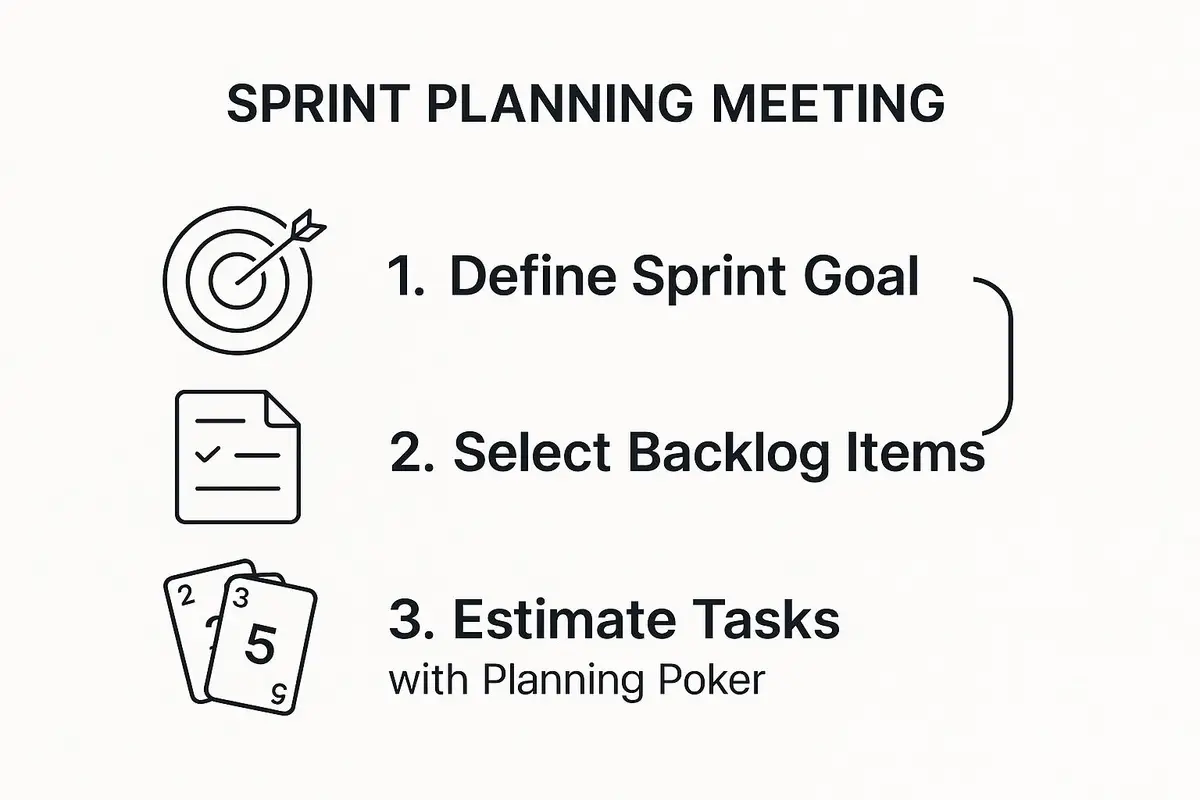
As you can see, each step narrows the focus, turning a broad objective into a detailed and actionable sprint plan that everyone understands.
Estimate with Purpose Using Planning Poker
Let’s be clear: estimation isn’t about predicting the future down to the exact hour. It’s about creating a shared understanding of the work ahead. Planning Poker is my favorite technique for this because it gets everyone talking and quickly reveals where people have different assumptions.
The process is simple:
- The Product Owner or a developer explains a user story.
- The team fires off clarifying questions.
- Each developer privately picks a card with their estimate (usually from a sequence like 1, 2, 3, 5, 8, 13…).
- Everyone flips their card over at the same time.
A big difference in estimates—like one person showing a ‘3’ and another an ‘8’—is a gift. It’s a flashing red light that signals a mismatch in understanding. This is your cue to dig in and figure out what’s really going on.
The developers with the highest and lowest estimates should explain their thinking. This conversation almost always uncovers something important: a hidden requirement, a patch of technical debt, or a much simpler way to solve the problem that no one else had considered. The aim isn’t to bully everyone into agreement, but to use the discussion to build a collective understanding before anyone commits to the work. When the plan is set and the sprint kicks off, the team moves forward with confidence, grounded in a realistic plan they all helped create.
Tools and Techniques Real Developers Use
All the theory in the world won’t help if your team is tripping over clumsy tools. The right software is what turns a chaotic backlog into a clean, predictable sprint. It’s not just for tracking tickets; it’s the shared canvas where the entire team sees the plan, clarifies the details, and keeps each other honest.
Truly effective agile development sprint planning hinges on a setup that gives developers instant clarity, not more administrative busywork.
Picking Your Digital Board
The big players like Jira, Azure DevOps, and Trello all aim to solve the same problem: making the work visible. But they come at it from different angles.
For many, Jira is the powerhouse. Its real strength isn’t just the endless customization but practical developer-focused features like JQL (Jira Query Language). Being able to create hyper-specific board filters is a lifesaver. You can even set up automations so that moving a ticket to “In Review” automatically assigns it to the dev lead and kicks off a build in your CI/CD pipeline.
If your team is deep in the Microsoft ecosystem, Azure DevOps (ADO) is a no-brainer. The magic is in its tight integration. You can trace a line of code from a specific commit all the way back to the original user story without ever leaving the platform—it connects backlogs, Git repos, pipelines, and testing suites seamlessly.
Then there’s Trello. Its genius is its simplicity. The card-based, visual-first layout is perfect for smaller teams or projects where the complexity of Jira or ADO just feels like overkill. You can get a board up and running in minutes.
The tooling landscape is always shifting. As of 2025, modern sprint planning boards are more vital than ever, offering analytics and slick interfaces that help teams move faster. If you’re weighing your options, you can find an in-depth comparison of today’s top sprint planning boards to see how the current generation stacks up.
When you’re comparing tools, it’s easy to get lost in feature lists. What really matters is how those features directly impact a developer’s day-to-day workflow during planning and execution.
Comparing Sprint Planning Tools for Dev Teams
| Tool | Best For | Key Feature for Developers | Integration Strength |
|---|---|---|---|
| Jira | Highly complex projects needing deep customization and reporting. | JQL (Jira Query Language) for custom filters and powerful automation rules. | Excellent, with a massive marketplace of third-party apps. |
| Azure DevOps | Teams heavily invested in the Microsoft stack (Azure, .NET). | Seamless traceability from user story to code commit to deployment pipeline. | Unbeatable within the Microsoft ecosystem, but more limited outside of it. |
| Trello | Small teams, startups, or projects prioritizing speed and simplicity. | The incredibly intuitive drag-and-drop card interface. Visual and fast. | Good, with “Power-Ups” for adding functionality like GitHub or Slack. |
Ultimately, the best tool is the one your team will actually use consistently. The goal is to reduce friction, not add another layer of process.
Practical Tricks for Developer Clarity
Beyond the tool itself, it’s the small, consistent habits that really make a difference. One of the best I’ve ever seen is embedding a “Definition of Done” checklist directly into every user story template. It’s a simple change, but it stops things from getting forgotten in the rush to ship code.
A checklist isn’t micromanagement; it’s a safety net. It frees up your brainpower from remembering routine tasks so you can focus on solving the hard problems.
Here’s a practical checklist you can adapt right away and drop into your user story tickets, whether you’re using Jira, ADO, or even a Trello card description.
Developer Task Checklist Template:
- [ ] Code Complete: All core logic is written and meets the acceptance criteria.
- [ ] Unit Tests Passed: New code is covered by meaningful unit tests (>80% coverage is a good target).
- [ ] Peer Reviewed: At least one other developer has reviewed and approved the pull request.
- [ ] Docs Updated: Public APIs, complex logic, or environment changes are documented.
- [ ] Verified by QA: The feature has been tested and signed off by QA on a staging server.
This gives every developer a clear, scannable path to “done” for every single task. Notice the specific callout for unit tests? That simple line reinforces quality as a non-negotiable part of the job. For teams wanting to get better at this, diving into a guide on unit testing in Java can offer solid examples and best practices.
Another powerful technique is using swimlanes or labels to visually slice up the work on your board. For instance, you could create swimlanes for “Bugs” vs. “Features” or apply labels like “TechDebt” or “Backend.” This immediate visual feedback helps everyone see the sprint’s composition at a glance, ensuring you’re balancing new development with crucial maintenance. These are the kinds of small, practical tweaks that turn a digital tool from a simple task list into a real command center for your dev team.
Common Sprint Planning Mistakes to Avoid
Even the most seasoned agile teams can hit a wall during sprint planning. A plan that looks perfect on paper can quickly fall apart because of a few common, but totally avoidable, pitfalls. Let’s walk through some of the classic tripwires I’ve seen over the years and, more importantly, how to sidestep them.
Recognizing these problems as they happen is half the battle. Knowing how to steer the team back on course is the other half.
The Unrefined Backlog Ambush
What it looks like: The Product Owner shows up to the meeting with a list of vague, high-level ideas instead of clearly defined user stories. Suddenly, the development team is forced to play catch-up, spending the whole session just trying to understand the basic “what” and “why” behind each item. It’s a flurry of questions that should have been sorted out days ago.
How to fix it: The Scrum Master has to step in and gently hit the pause button. Planning with a raw backlog is like trying to build a house without a blueprint—it’s just a recipe for frustration and failure.
The best move here is to timebox the discussion for any fuzzy item. If you can’t get clarity on a story in 10-15 minutes, it’s a clear sign it isn’t ready. The Scrum Master can simply say, “This one needs a bit more refinement before we can commit to it.” Then, it goes back to the Product Backlog. This isn’t about pointing fingers; it’s about protecting the sprint and reinforcing good habits.
The Vague and Uninspiring Sprint Goal
What it looks like: The meeting starts, and the Sprint Goal is presented as something like, “Finish tickets JIRA-123, JIRA-124, and JIRA-125.” This tells the team nothing about the purpose of their work. It offers no context, no motivation, and no room for creative problem-solving. It turns skilled professionals into ticket-takers.
How to fix it: The development team should feel empowered to push back. A simple question like, “Why are these specific items important right now?” can shift the entire conversation toward business value.
A strong Sprint Goal is the team’s North Star. It guides decisions when things get tough. A weak goal is just a to-do list that offers no direction when you inevitably hit an unexpected obstacle.
Work with the Product Owner to reframe the goal around the outcome. Instead of a list of tickets, a much better goal would be: “Allow users to securely log in with their Google account to reduce signup friction.” Now that’s a clear, valuable mission the team can rally behind.
Overcommitment from External Pressure
What it looks like: A stakeholder or manager sits in on the meeting, leaning on the team to squeeze in “just one more thing.” The team, not wanting to say no, reluctantly agrees, even when their gut (and capacity data) is screaming otherwise. This happens all the time, especially when a team’s historical velocity isn’t well-established.
How to fix it: The Scrum Master’s job is to act as a shield. They protect the team’s process and ensure the plan stays realistic. The best way to handle this is to make the trade-off crystal clear.
The Scrum Master can say, “We can definitely add that new story. Based on our capacity, we’d need to swap out this other item to make it happen. Which one is the higher priority?” This simple move reframes the conversation from “can you do more?” to “what is most important?” It puts the decision-making power back where it belongs—with the Product Owner—based on real-world constraints.
This kind of pressure is also a primary cause of technical debt. When rushed, teams often cut corners, which is why it’s so critical to know how to reduce technical debt before it spirals. Sacrificing quality for a little more quantity is a trade that almost never pays off.
Scope Creep During the Meeting
What it looks like: While discussing a user story, someone has a “brilliant idea” for a cool, related feature. Before you know it, the conversation has gone completely off the rails, with new requirements being tacked on right there in the meeting. The original, well-estimated story has suddenly morphed into a much larger, more complicated beast.
How to fix it: The Scrum Master needs to be the designated “idea catcher.” You want to acknowledge the great idea without letting it derail the entire meeting.
A simple phrase works wonders: “That’s a fantastic idea. Let’s add it to the Product Backlog so we can prioritize it properly after this meeting.” It validates the person’s contribution while keeping everyone focused on the task at hand. The goal of sprint planning is to plan the sprint, not to brainstorm the next quarterly roadmap.
Your Sprint Planning Questions Answered
Even with the best process laid out, you’re always going to run into specific, on-the-ground questions during agile development sprint planning. These are the practical little details that can easily trip up a team. Let’s tackle some of the most common ones I hear.
How Long Should a Sprint Planning Meeting Actually Take?
The official Scrum Guide gives you a ceiling: a maximum of eight hours for a one-month sprint. So for a standard two-week sprint, you’re looking at a four-hour maximum timebox.
But let’s be real. If you’ve done your homework with backlog refinement and the team comes in prepared, you can often knock it out in half that time. If your planning sessions are consistently bumping up against that four-hour limit, take it as a sign. It’s a strong signal that you aren’t spending enough time refining the backlog before you walk into the room.
What Do We Do with Unfinished Work from the Last Sprint?
Whatever you do, don’t just automatically roll it over. The first step is for the Product Owner and the development team to take a hard look at that leftover work. Ask yourselves: is this still the most important thing for us to be working on right now?
If the answer is yes, the item goes back into the Product Backlog to be weighed against all the other priorities. And this next part is critical: you must re-estimate the remaining work. Let’s say a 13-point story has about 5 points of work left. You don’t pull the 13-pointer into the new sprint; you pull in a 5-point item. This is the only way to keep your velocity metric honest and your future planning accurate.
Can We Change the Sprint Backlog After Planning?
Absolutely, with one big caveat: only the development team can change it. Think of the Sprint Backlog as a living plan, not a contract etched in stone. Once you dive into the work, you’re going to learn things you couldn’t have known before.
You might realize a certain task is totally unnecessary, or that you need to add a new one to get a story all the way to “done.” That’s perfectly fine, as long as these changes don’t put the Sprint Goal at risk. What you can’t do is let new feature requests from stakeholders sneak in. Those have to go to the Product Owner for prioritization in the main Product Backlog, never directly into an active sprint.
Key Takeaway: The Sprint Backlog belongs to the developers. They can and should adjust it to better hit the Sprint Goal. The Sprint Goal itself, however, is sacred. It shouldn’t change.
What if We Cannot Agree on a Story Estimate?
When you see a huge gap in estimates—one developer says 3 points while another says 13—that’s not a problem. It’s a gift. It’s a massive red flag that your team members have completely different pictures of the work in their heads, and uncovering that disconnect is one of the most valuable things you can do.
Don’t try to just meet in the middle. Instead, have the people with the lowest and highest estimates walk everyone through their reasoning. This conversation almost always shines a light on hidden complexity, a risky dependency someone forgot about, or a much simpler technical path that another person saw. The goal isn’t to force an agreement, but to use the discussion to build a shared understanding before you commit.
Zest records each engineer’s coding-agent sessions (Claude Code, Codex, Cursor, Copilot) and links them to the pull requests they led to.