
A Complete Example of Unit Testing from Start to Finish

Shipping code without a safety net can be a real nail-biter. That’s where unit testing comes in—it is your safety net. This is the practice of checking the smallest, most isolated pieces of your code, like a single function or method. The goal? To squash bugs long before they ever get near your users and turn into a real headache.
Why Unit Testing Is Your Best Friend in Development

I like to think of it like building a car. You wouldn’t assemble the entire engine and then test to see if the spark plugs work. You’d test each part—the pistons, the fuel injectors, the spark plugs—on its own. It’s a lot easier and cheaper to swap out a faulty spark plug on a workbench than to tear down a fully assembled engine.
That’s the exact philosophy behind unit testing. You’re not trying to test the entire application at once. You’re just proving that one tiny, isolated piece—a “unit”—behaves precisely as you expect it to.
The Power of Working in Isolation
Focusing on these individual units gives you some serious advantages that go way beyond just finding bugs. It fundamentally changes how you work.
-
Painless Debugging: When a unit test fails, you know the exact location of the problem. No more spending hours tracing a bug through layers of complex code. The failure is already pinpointed to that small, self-contained unit.
-
A Nudge Toward Better Design: I’ve found that writing testable code naturally pushes you to write better code. It forces you to create smaller, more focused functions that do one thing really well. This leads to a cleaner, more modular codebase that’s easier for everyone to understand and maintain.
-
Refactor with Confidence: We’ve all been there—scared to touch a piece of old code for fear of breaking something completely unrelated. A solid suite of unit tests acts as your personal guardrail. It gives you the freedom to improve and refactor your code, knowing that if you accidentally break something, a test will immediately tell you.
The financial case for this is pretty compelling, too. Catching bugs early in the process can reduce overall development costs by as much as 90% compared to fixing them after they’re live. Think about that. Some data suggests a 10x cost increase for bugs that escape into production—a huge risk when you consider that 70% of projects in the massive $500 billion software market go over budget because of defects.
For a more detailed look at the core concepts, check out our guide on what unit tests are and why they’re so crucial in modern software development.
Building a Real-World Example of Unit Testing
Theory is great, but the best way to really get unit testing is to roll up your sleeves and write some. Let’s step away from the abstract and build a practical example of unit testing from the ground up. We’ll be using Python and the popular Pytest framework, but don’t worry—the core concepts here apply no matter what language you’re working with.

Instead of the tired Calculator class you see everywhere, we’ll tackle something more realistic: a DiscountValidator. This class will be responsible for a simple business rule: deciding if a customer gets a discount based on their purchase history and how long they’ve been with us.
The “Red-Green-Refactor” Approach
We’re going to dive right in with a Test-Driven Development (TDD) workflow. The idea is simple but powerful: we write a failing test first, then write just enough code to make it pass. This cycle is famously known as Red-Green-Refactor.
- Red: First, write a test for a feature that doesn’t exist yet. It will fail, which is exactly what we want.
- Green: Next, write the most straightforward code possible to make that test pass. No gold-plating, just get it working.
- Refactor: Finally, clean up your code. Improve its structure and readability, all while ensuring the test stays green.
This approach forces you to write code only in response to a clear, testable requirement. Let’s kick things off with our first test: a loyal customer who should receive a discount.
We’ll start by creating our test file, test_validator.py. Pytest is smart enough to automatically find and run files that start with test_.
# test_validator.py
import pytest
from datetime import date, timedelta
from discount_validator import DiscountValidator

# A test case for an eligible customer
def test_eligible_customer_gets_discount():
    # Arrange: Set up our test data
    today = date.today()
    customer = {
        "account_created": today - timedelta(days=400),
        "total_purchases": 15
    }

    # Act: Run the code we are testing
    is_eligible = DiscountValidator.is_eligible(customer)

    # Assert: Check if the result is what we expect
    assert is_eligible is True
This test is a perfect example of the Arrange-Act-Assert pattern. We first set up our customer dictionary (Arrange), then call the is_eligible method that we’re about to write (Act), and finally, we check that the result is True (Assert).
If we were to run Pytest right now, it would crash with an ImportError since discount_validator.py doesn’t even exist. We’re officially in the “Red” state. Success!
Making the Test Pass
Time to go from Red to Green. Let’s create the discount_validator.py file and write the bare minimum code needed to make our test pass.
# discount_validator.py
from datetime import date, timedelta

class DiscountValidator:
    """Checks if a customer is eligible for a discount."""

    MIN_PURCHASES = 10
    MIN_ACCOUNT_AGE_DAYS = 365

    @staticmethod
    def is_eligible(customer: dict) -> bool:
        """
        A customer is eligible if their account is over a year old
        AND they have made at least 10 purchases.
        """
        account_age = date.today() - customer["account_created"]

        is_old_enough = account_age.days >= DiscountValidator.MIN_ACCOUNT_AGE_DAYS
        has_enough_purchases = customer["total_purchases"] >= DiscountValidator.MIN_PURCHASES

        return is_old_enough and has_enough_purchases
With this code in place, running Pytest again will give us a passing test. Just like that, we’ve moved from Red to Green.
Testing the Edge Cases
Our first test covered the “happy path”—the ideal scenario. But what about the tricky situations? A truly robust test suite covers the edge cases to prevent nasty surprises down the road. For example, what happens if a customer is brand new but has made a ton of purchases? They shouldn’t be eligible.
Let’s add a new test to handle that specific case.
Key Takeaway: The most valuable unit tests are often the ones that check for edge cases and failure conditions. These tests protect your application from breaking when it encounters unexpected or invalid data.
Here’s the second test we’ll add to test_validator.py:
# In test_validator.py

def test_new_customer_is_not_eligible():
    # Arrange: A brand new customer with many purchases
    today = date.today()
    customer = {
        "account_created": today,
        "total_purchases": 50
    }

    # Act
    is_eligible = DiscountValidator.is_eligible(customer)

    # Assert
    assert is_eligible is False
Running Pytest again shows both tests passing. We’ve successfully used this example of unit testing to build a small but reliable piece of logic. Better yet, we now have a safety net that confirms it works as expected for both positive and negative scenarios. This process ensures our code is correct today and stays that way as we add more features in the future.
Writing Tests That Don’t Break
Building a test suite is a big investment. So, what’s worse than having no tests at all? Having a suite full of brittle tests—the kind that break with every tiny code change, even when the core functionality is perfectly fine. This creates a high-maintenance nightmare that just slows everyone down. The real goal is to write tests that are robust, trustworthy, and built to last.

A great test suite should feel like a stable foundation, not a house of cards. When your tests are solid, they give you the confidence to refactor and ship code faster. But when they’re fragile, they become a source of friction and are often ignored, which completely defeats their purpose.
Isolate Your Tests with Mocks
One of the biggest culprits behind brittle and slow tests is depending on external systems. A true unit test should never make a real network call, write to a file system, or connect to a live database. These outside factors introduce unreliability and slow your entire test suite to a crawl.
This is where mocks save the day. A mock is basically a “fake” object that you control, which pretends to be a real object or service. By using mocks, you can completely isolate the piece of code you’re testing from its dependencies. This ensures your test is deterministic—it will always produce the same result—and lightning-fast.
Let’s look at a simple example of unit testing where we need to mock an external API call. Imagine a function that fetches user data from an API and then checks if that user is an admin.
# service.py
import requests

def is_user_admin(user_id: int) -> bool:
    """Fetches user data and checks their role."""
    response = requests.get(f"https://api.example.com/users/{user_id}")
    response.raise_for_status() # Raise an exception for bad status codes
    user_data = response.json()
    return user_data.get("role") == "admin"
Testing this function directly would make a real HTTP request. That’s slow and unreliable. Instead, we can use Python’s unittest.mock to fake the requests.get call.
# test_service.py
from unittest.mock import patch
from service import is_user_admin

# Use the 'patch' decorator to replace 'requests.get'
@patch('service.requests.get')
def test_is_user_admin_returns_true_for_admin_role(mock_get):
    # Arrange: Configure the mock to return a fake response
    mock_get.return_value.json.return_value = {"role": "admin"}
    mock_get.return_value.raise_for_status.return_value = None # Ensure it doesn't raise an error

    # Act
    result = is_user_admin(123)

    # Assert
    assert result is True
    mock_get.assert_called_with("https://api.example.com/users/123")
Pro Tip: Your test names should be descriptive sentences.
test_is_user_admin_returns_true_for_admin_roletells you exactly what’s being tested without you having to read the code. This is a game-changer when a test fails months later.
This test runs instantly and will never fail because of a network issue. We completely control the environment, which lets us focus solely on our is_user_admin logic. For more strategies on building a reliable suite, you might be interested in our guide on unit testing best practices. As you focus on creating robust tests, exploring advancements like automated bug detection and code generation with Generative AI can further solidify your testing approach and help write tests that are less prone to breaking.
Measuring What Matters with Code Coverage
So, you’re writing tests. That’s a fantastic start. But here’s the million-dollar question: are you testing the right things? A full suite of passing tests can give you a false sense of security if those tests aren’t actually exercising the critical parts of your code.
This is where code coverage becomes your best friend. It’s a metric that shows you exactly which lines of your source code get run when your test suite executes.
Think of it like a heatmap of your application’s logic. It illuminates the well-tested pathways and, more importantly, exposes the dark, untouched corners where bugs love to hide. The goal isn’t to blindly chase a high number, but to use coverage as a diagnostic tool to spot meaningful gaps in your testing strategy.
Running a Coverage Report
Let’s go back to our DiscountValidator example from before. We can measure its test coverage using a fantastic little tool for Python called coverage.py. First, you’ll need to install it with a simple pip install coverage.
Once it’s installed, you’ll run your tests a bit differently. Instead of just calling pytest, you’ll run your test suite through the coverage tool like this:
coverage run -m pytest
This command does everything pytest normally does, but with a crucial difference: it watches your discount_validator.py file to see which lines are executed. After the tests finish, you can generate a report.
coverage report -m
The -m flag is super useful because it points out the specific line numbers that your tests missed. For our simple validator, the output should look pretty good:
Name                    Stmts   Miss  Cover   Missing
-----------------------------------------------------
discount_validator.py       8      0   100%
test_validator.py          15      0   100%
-----------------------------------------------------
TOTAL                      23      0   100%
A perfect 100%! While that’s great for our small example, don’t get hung up on hitting this number in a large, real-world project. It’s often impractical and not always the best use of your time.
Interpreting the Gaps
The true power of a coverage report shines when you don’t hit 100%.
Let’s imagine for a second that we’d forgotten to write the test_new_customer_is_not_eligible test case. The coverage report would immediately flag the lines handling that specific if condition as “missed.” It’s basically shouting, “Hey, you have no example of unit testing for what happens when a customer is new!” This gives you a direct, actionable insight.
Important Takeaway: Don’t chase 100% coverage for the sake of it. A much better goal is 100% coverage of your critical business logic. High coverage on simple helper functions is far less valuable than ensuring every branch of a complex pricing algorithm is tested.
This pragmatic approach is common in major software projects. For instance, developers on the open-source Storm Water Management Model (SWMM) used 2,953 unit tests to achieve 39.7% statement coverage. However, those tests covered 82.4% of the functionalities documented in its user manual. This demonstrates a smart focus on user-facing behavior over raw line counts. You can read more about how they combined test types to improve these metrics and prevent costly real-world errors.
Ultimately, code coverage is a guide, not a grade. It prompts you to ask better questions, like “Why isn’t this line covered?” and “What’s the risk if this logic remains untested?” It’s the tool that helps you move from just writing tests to strategically building a truly robust application.
Integrating Unit Tests into Your Daily Workflow
Writing unit tests is one thing, but making them an integral part of your day-to-day development is where you’ll see the real payoff. Running tests manually on your machine is a good start, but the magic happens when you automate the process, creating a safety net that catches bugs without you even thinking about it.
The goal is to move beyond your local setup and plug your tests into a Continuous Integration/Continuous Deployment (CI/CD) pipeline. When you automate your test suite this way, you build a powerful quality gate that protects your main codebase from regressions.
Automating Quality with CI/CD
The basic idea here is simple but incredibly effective: set up a system to automatically run your entire test suite every single time a developer submits a change, usually as a pull request (PR). If any test fails, the system blocks the merge. It’s a straightforward rule that stops broken code from ever making its way into your main branch.
This was a massive shift from how things used to be done. The real turning point came in the 2010s, when unit testing became a standard part of CI/CD. This single change is estimated to have slashed production bugs by 40-60%. I’ve personally seen teams that wired up their tests in tools like GitHub Actions or Jenkins boost their release frequency by up to 10x. The financial impact is just as impressive—catching a bug early can slash future repair costs by as much as 90%.
Getting started is easier than you might think. With a tool like GitHub Actions, a simple configuration file in your repository can handle everything:
- Check out the latest code from a PR.
- Install all the project dependencies.
- Run the full test suite (e.g.,
pytest). - Report back with a clear “pass” or “fail.”
For those who want to get more sophisticated, you can dig into things like GitLab CI rules for smarter pipelines to fine-tune exactly when and how your tests run. If you’re still deciding on a tool, our guide on CI/CD platforms can point you in the right direction.
Supercharging Workflows with AI
Automation doesn’t just stop at running tests. The next step is using AI-powered tools to give you much deeper insights into your code’s health. Forward-thinking teams are now using AI to get more than just a simple pass or fail signal from their pipelines.
Imagine an AI assistant that not only helps you write test boilerplate but also joins your team’s daily check-ins. Zest handles the check-in part: it writes each engineer’s daily standup from that day’s AI sessions and pull requests and posts it to Slack.
My Takeaway: The best teams I’ve worked with make quality a data-driven habit, not an afterthought. They use automation and AI to build a system where shipping well-tested code is simply the easiest path forward.
This flow is all about creating a continuous feedback loop between your code, your tests, and the reports they generate.
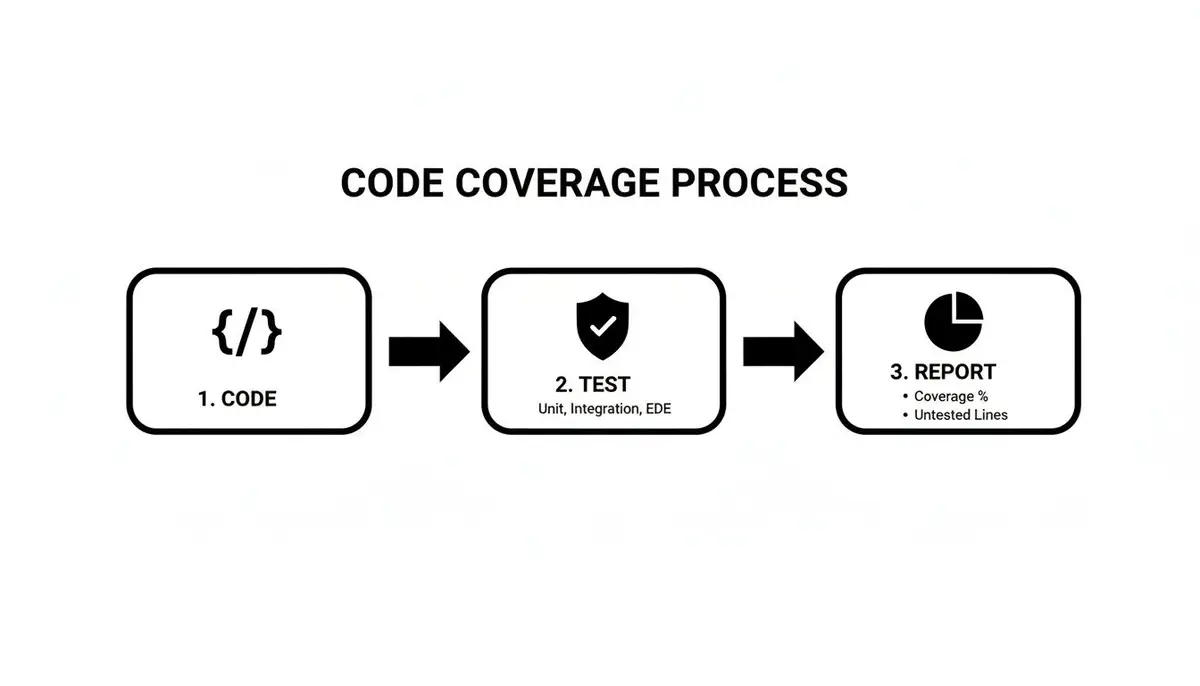
This loop ensures every piece of code is checked against your tests before it gets merged, and the reports give you the feedback needed to improve. That’s how you build a culture of quality that actually scales.
Common Questions About Unit Testing
As you dive into writing unit tests, you’ll inevitably run into some common questions and roadblocks. It happens to everyone. Let’s walk through some of the most frequent ones I hear from developers, so you can get clear answers and keep your momentum going.
How Many Unit Tests Are Enough?
Honestly, there’s no magic number.
The real goal isn’t hitting a specific quota; it’s about building confidence. You want to trust that your code works and that you can ship it without fear. A great rule of thumb is to shoot for high coverage—think 80% or more—on the parts of your code that matter most. This means focusing on your core business logic and any functions with tricky conditional paths.
For simple, straightforward code, you’ll probably need fewer tests. A practical approach I’ve always found effective is to write tests for every new feature and every bug fix. Over time, this habit naturally builds a robust safety net.
The point isn’t to hit a number; it’s to build a level of trust in your code that lets you ship fearlessly.
What’s The Real Difference Between Unit and Integration Tests?
I love this analogy: a unit test checks if a single LEGO brick is perfectly shaped. An integration test checks if two different LEGO bricks snap together correctly.
- Unit Tests: These are your lightning-fast, precise tests. They check one tiny piece of your code in complete isolation. To do this, they use “fakes” or “mocks” to pretend to be other parts of the system, like a database or an external API. A classic example of unit testing is just making sure a function returns the right value for a given input.
- Integration Tests: These are a bit slower because they check how multiple real components work together. For instance, an integration test would check if your app can actually write a record to a database and then read it back successfully.
Both are valuable, but they serve very different purposes.
Can AI Just Write All My Tests for Me?
Not quite, but it can get you surprisingly far.
AI coding assistants like GitHub Copilot are fantastic for spitting out boilerplate test code and handling standard cases. They can draft the basic structure of a test in seconds, freeing you up to focus on what really matters.
But remember, you’re the domain expert. An AI doesn’t understand the subtle business logic or the quirky edge cases that you, as the developer, know intimately. Think of AI as a powerful assistant—let it handle the repetitive grunt work, but always step in to review, refine, and add the critical thinking that only a human can provide.
My Tests Are Slow. What Should I Do?
Slow tests are a huge red flag. Almost every time I see a slow test suite, it’s because integration tests are masquerading as unit tests.
The number one culprit? Making calls to external systems. Any test that hits a real database, touches the file system, or makes a network call will be slow. Period. These dependencies introduce latency and unpredictability you just don’t want in a unit test.
The solution is to get aggressive with mocks. By faking these external dependencies, you isolate your code and remove the delays. Your test will run in milliseconds, measuring only the performance of the code you wrote. This keeps your test suite fast, which means you and your team will actually want to run it often.
Ready to make your development workflow smarter and more transparent? Zest helps your team measure and improve your AI-assisted coding in Claude Code, Codex, Cursor and VS Code. Turn daily activity into automatic summaries and actionable insights. Get started for free at Zest.